The code attempts to wait on an existing download if one is already
in progress rather than starting a concurrent download of the same
session. If this code path runs, we incorrectly defer a call to a
nil function, triggering a panic.

This bug was introduced in #7360.
* Support user traits in impersonated role certificates

* Add param to tctl bots add for specifying logins

* Update comment on desiredAccessInfoForRoleRequest to be mroe accurate

* Update docs for --logins support with Machine ID

* Rearrange bot tests and name them more in-line with standards

* Add test coverage for Server.createBot

* Test role impersonation preserves user traits

* pass traits directly into desiredAccessInfoForRoleRequests

* Drop underscores from test names

* Remove unnecessary initialization of traits

* Address PR comments

* Update docs/pages/machine-id/getting-started.mdx

Co-authored-by: Paul Gottschling <paul.gottschling@goteleport.com>

* Update docs/pages/machine-id/getting-started.mdx

Co-authored-by: Paul Gottschling <paul.gottschling@goteleport.com>

* Update docs/pages/machine-id/getting-started.mdx

Co-authored-by: Paul Gottschling <paul.gottschling@goteleport.com>

Co-authored-by: Paul Gottschling <paul.gottschling@goteleport.com>
Fix TLS usage across multiple protocols like SPDY used in `kube exec` or WebSockets for moderated sessions that require HTTP/1.1 as the initial protocol while other requests like get/edit/delete rely on HTTP/2 protocol.
The same `*tls.Config` was reused for mixed protocol, causing several issues including a data race while manipulating `*tls.Config.NextProtos` without any lock.
This commit clones the `*tls.Config` per request to prevent mixups between connection protocols.
Fixes#15076
Improve the error message for libfido2 error 60 (UV blocked) and automatically
retry error 63 (UV invalid).
libfido2 error 63 happens with some frequency with Yubikey Bio. The biometric
sensor is a bit finicky, so if the finger is a bit off it tends to happen.
Fixes#13900.
* Simulate libfido2 errors 60 and 63
* Add better handling for common libfido2 errors
Websockets are a message-based protocol, but our combination of
an io.Writer wrapper and io.Copy means some TDP messages may
get broken up and emitted as separate message events in the browser.

Our UI assumes that each 'message' event is a single TDP message,
so we make sure that each TDP message we send corresponds to a
single WriteMessage call.
For Teleport Discover, the user will be able to test connecting to a
resource right after adding it.
The flow should look like this:
- User selects the resource type - in this case Server/Nodes
- WebUI generates a new Token
- WebUI shows the `sudo bash .../<token>/install.sh` to the user
- When the user runs this command, and assuming everything works out,
the WebUI should be able to receive the Server/Node that was
generated from that specific Token.
To achieve this, here's a more detailed flow, which this PR implements
- User selects the resource type - in this case Server/Nodes
- WebUI generates a new Token
This generates a Provision Token which contains a RefResourceID
WebUI receives back that ID
- WebUI shows the `sudo bash .../<token>/install.sh` to the user
This generates a script which includes setting the labels as part of
the `teleport configure` command:
`$ teleport configure ... --labels teleport.internal/resource-id=<refResourceID> ...`
- User runs the provided command on the target host
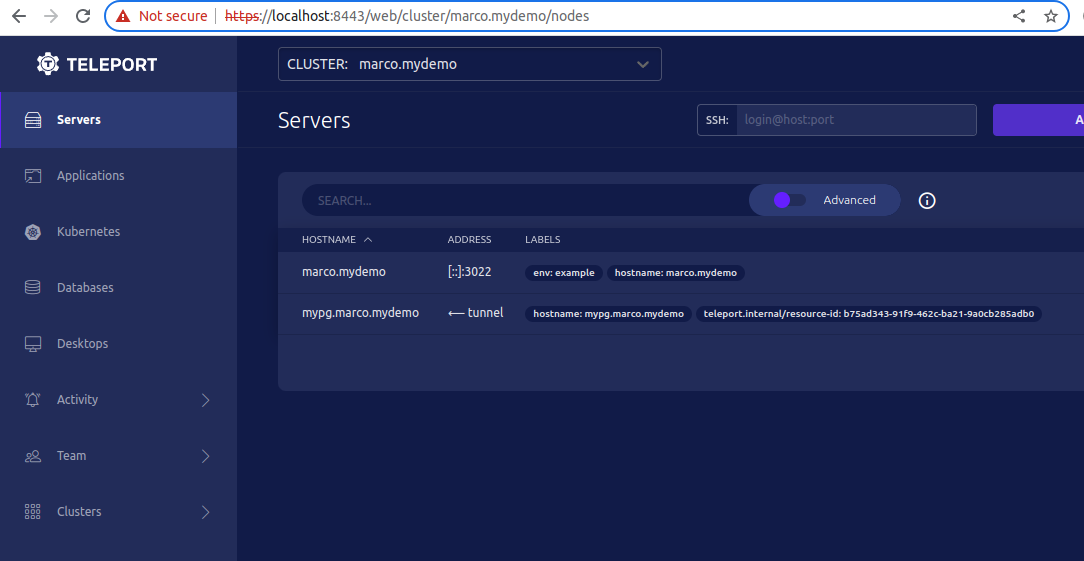
- WebUI should be able to query the Servers/Nodes which contain that
specific `<resource-id>` and allow the user to connect to it.
Demo:
* Previously additional peer proxies were only attempted if the stream
failed to be created. Now any failure for example a missing reverse
tunnel will also attempt additional peer proxies.

* Shuffle the order in which proxy connections are used.
Prior to this change, we assumed that the best way to resolve
auto-discovered desktops would be to make a DNS query of the
configured LDAP server, since the Linux box running Teleport
would likely not be domain joined and may have separate DNS
configuration.
It turns out to be pretty common to deploy dedicated LDAP servers
behind a VIP or other frontend, in which case we fail to resolve
the desktop's IP even though the system resolver would have worked
just fine.
Instead, make a standard DNS query using the system's default
settings first, and fall back to the LDAP server only if that
query fails.
Fixes#15154
Adds a wrapper around `ssh.Session` which injects tracing context
in a similar manner to the `ssh.Client` wrapper. All usages of
`ssh.Session` have now been replaced and have the appropriate
`context.Context` passed along

Part of #12241
## What

First part of the Kubernetes [Discovery RFD](https://github.com/gravitational/teleport/pull/13376/) to introduce a Kubernetes server per cluster.

This PR introduces a separate Kubernetes server that uses the already introduced `KubernetesClusterV3`.

## Compatibility

In previous versions, Kubernetes Clusters were part of regular `ServerV2` resource and this refactoring deprecates the `ServerV2` usage but keeps them for compatibility with previous version.

Everything is backward compatible, so v10 kubernetes agents and trusted clusters can connect fine.

## Next steps

Once this is merged, a new PR will introduce dynamic registration for Kubernetes Clusters discovered through EKS Discovery.
The `--allow-passwordless` flag was ignored when set, which makes tsh do
non-passwordless registrations. This causes all sorts of confusing behavior.

I'm taking the chance to also add some additional logging to webauthncli.

* Correctly use the value of --allow-passwordless
* Add additional logging to wancli
* Tag forwarded spans with custom attributes

Adds a `teleport.forwarded.for` attribute to a resource or
all spans that are forwarded to the auth server. This allows
consumers of the spans to identify where the spans are coming
from and take possible action. In some scenarios it may
be desirable to drop forwarded spans along the collection
process, by tagging them we can provide a way for those
consumers to identify them. It also allows for potentially
identifying a malicious user that may be trying to spam the
telemetry backend with spans.

Part of #12241
* Add additional debug logging for instantiation of ssh server conn

* Rough out introducing mux to ssh listener

* Catch errors from multiplexer serve

* Adapt multiplexer to support ProxyHelloSignature

* Adjust logging for ssh conn creation

* Adjust tests to use semantically correct assert/require helpers

* Address PR comments

* Check Client addr is properly propagated in mux test
In the context of Teleport Discover we are trying to ease the usage of Teleport for the user's first interaction.
When adding a new database resource the user must, among other things, generate the mTLS files
Examples:
https://goteleport.com/docs/database-access/guides/postgres-self-hosted/#step-25-create-a-certificatekey-pairhttps://goteleport.com/docs/database-access/guides/mysql-self-hosted/#step-24-create-a-certificatekey-pair
This PR aims to reduce this friction: the user should be able to setup the resource without prior setup of local tools (`tsh login`)
We're doing this by providing an endpoint that will return those exact files
Demo
```shell
marco@lenix ~/p/downloadmtls> curl --silent --insecure 'https://127.0.0.1.nip.io:3080/v1/webapi/sites/lenix/sign' --dat
a '{"hostname":"discover.example.com", "ttl":"9999h", "format": "db"}' --header 'Authorization: Bearer 308bf3dd3019ddc4
2cff44a48e028480' --header 'Content-Type: application/json' -OJ
marco@lenix ~/p/downloadmtls> tar -xvf teleport_mTLS_discover.example.com.tar.gz
server.key
server.crt
server.cas
marco@lenix ~/p/downloadmtls> head -1 server.*
==> server.cas <==
-----BEGIN CERTIFICATE-----
==> server.crt <==
-----BEGIN CERTIFICATE-----
==> server.key <==
-----BEGIN RSA PRIVATE KEY-----
```
Fixes https://github.com/gravitational/teleport/issues/14049
In Teleport Discover, we want to improve the UX of adding a resource.
We'll suggest users to test accessing a resource, and give them immediate feedback using the UI.

Note: we'll add this feature to Server Access, later one we'll add other resources.

After adding a server resource, the user will be presented with a command to test the connection:
`tsh ssh --test-id=123 user@host`

Running that command will provide the user feedback right in the UI of whether or not it worked.
If not, a short message will be displayed describing why it didn't work and how the user can solve the problem.

---

To achieve this we'll need a couple of changes:
1. new resource that stores the result of trying to connect to a given resource, so that the UI can ask for it
2. change `tsh ssh` to receive the `--test-id` flag and write the result to a record of this new resource

This PR addresses 1 - new resource.

A new resource is created:
```
Connection Diagnostics
- success (bool)
- message (string)
```

Two new rpc methods:
- create connection diagnostics
- read connection diagnostics

One new HTTP Endpoint:
- read connection diagnostics

Related to
https://github.com/gravitational/teleport/issues/13957
* GetCertAuthority cache bypass fixes

* Bypass the cache for GetUser in WithUserLock

It's is used in places that want the latest version (like registration)

* Actually check the backend in GenerateHostCerts

* Fix windows desktop event parsing and caching

* GetWebSession and GetWebToken shouldn't be cached

Very little would hit those directly, and *auth.ServerWithRoles bypasses
the cache anyway.
When we download, we write the file contents with the
`http.ResponseWriter` which is also used to write our
replies, so it was also writing our success replies.

fixes https://github.com/gravitational/teleport/issues/14557
This MR introduces Kubernetes Secret storage for Teleport Kubernetes Agent state.

When running Teleport Agent inside a Kubernetes cluster where TELEPORT_REPLICA_NAME and KUBE_NAMESPACE exist, the agent will store identities and states in a Kubernetes Secret instead of local storage.

Otherwise, if the above environment variables are not present or not in Kubernetes, the agent persists state in SQLite.

Notes:

Fresh installs will enable the Kubernetes Secret Storage by default.
If PV storage is configured, the agent will store its identity in a Secret and use the PV for non-identity objects.
If the operator is upgrading from an existing release that didn't support Secret storage, the Helm chart will convert the objects to enable Kube Secret Storage. If the current object is a Deployment, the Helm chart installs a new Statefulset side by side and will trigger a Helm hook that is responsible for deleting the Deployment once Statefulset pods are healthy. Otherwise, if upgrading from a Statefulset the agent will read the credentials stored in PV and move them into Kube Secret.

Implementation of #12958
Related to #5585
* start work on self signed tsh fixes

* fix go sum

* Adjust error formatting

* Complete less explicit error checks last

* Adjust PR feedback

* Further PR review

* Support darwin and linux certificate errors
 Zac Bergquist
