mirror of
https://github.com/cita-777/metapi.git
synced 2026-11-01 20:55:09 +08:00

390 lines
18 KiB
Markdown
390 lines
18 KiB
Markdown
<div align="center">
|
||
|
||
<img src="docs/logos/logo-full.png" alt="Metapi" width="280">
|
||
|
||
**中转站的中转站 — 将分散的 AI 中转站聚合为一个统一网关**
|
||
|
||
<p>
|
||
把你在各处注册的 New API / One API / OneHub / DoneHub / Veloera / AnyRouter / Sub2API 等站点,
|
||
<br>
|
||
汇聚成 <strong>一个 API Key、一个入口</strong>,自动发现模型、智能路由、成本最优。
|
||
</p>
|
||
|
||
<p align="center">
|
||
<a href="https://github.com/cita-777/metapi/releases">
|
||
<img alt="GitHub Release" src="https://img.shields.io/github/v/release/cita-777/metapi?label=Release&logo=github&style=flat">
|
||
</a><!--
|
||
--><a href="https://github.com/cita-777/metapi/stargazers">
|
||
<img alt="GitHub Stars" src="https://img.shields.io/github/stars/cita-777/metapi?style=flat&logo=github&label=Stars">
|
||
</a><!--
|
||
--><a href="https://hub.docker.com/r/1467078763/metapi">
|
||
<img alt="Docker Pulls" src="https://img.shields.io/docker/pulls/1467078763/metapi?style=flat&logo=docker&label=Docker%20Pulls">
|
||
</a><!--
|
||
--><a href="https://hub.docker.com/r/1467078763/metapi">
|
||
<img alt="Docker Image" src="https://img.shields.io/badge/docker-1467078763%2Fmetapi-blue?logo=docker&style=flat">
|
||
</a><!--
|
||
--><a href="LICENSE">
|
||
<img alt="License" src="https://img.shields.io/badge/license-MIT-brightgreen?style=flat">
|
||
</a><!--
|
||
--><img alt="Node.js" src="https://img.shields.io/badge/Node.js-20+-339933?logo=node.js&style=flat"><!--
|
||
--><img alt="TypeScript" src="https://img.shields.io/badge/TypeScript-5.x-3178C6?logo=typescript&style=flat"><!--
|
||
--><a href="https://zeabur.com/templates/DOX5PR">
|
||
<img alt="Deploy on Zeabur" src="https://zeabur.com/button.svg" height="28">
|
||
</a>
|
||
</p>
|
||
|
||
<p align="center">
|
||
<a href="README.md"><strong>中文</strong></a> |
|
||
<a href="README_EN.md">English</a>
|
||
</p>
|
||
|
||
<p align="center">
|
||
<a href="https://metapi.cita777.me"><strong>📚 在线文档</strong></a> ·
|
||
<a href="https://metapi.cita777.me/getting-started">快速上手</a> ·
|
||
<a href="https://metapi.cita777.me/deployment">部署指南</a> ·
|
||
<a href="https://metapi.cita777.me/configuration">配置说明</a> ·
|
||
<a href="https://metapi.cita777.me/client-integration">客户端接入</a> ·
|
||
<a href="https://metapi.cita777.me/faq">常见问题</a>
|
||
</p>
|
||
|
||
</div>
|
||
|
||
---
|
||
|
||
## 📖 介绍
|
||
|
||
现在 AI 生态里有越来越多基于 New API / One API 系列的聚合中转站,要管理多个站点的余额、模型列表和 API 密钥,往往既分散又费时。
|
||
|
||
**Metapi** 作为这些中转站之上的**元聚合层(Meta-Aggregation Layer)**,把多个站点统一到 **一个入口(可按项目配置多个下游 API Key)**——下游所有工具(Cursor、Claude Code、Codex、Open WebUI 等)即可无感接入全部模型。当前已支持以下上游平台:
|
||
|
||
- [New API](https://github.com/QuantumNous/new-api)
|
||
- [One API](https://github.com/songquanpeng/one-api)
|
||
- [OneHub](https://github.com/MartialBE/one-hub)
|
||
- [DoneHub](https://github.com/deanxv/done-hub)
|
||
- [Veloera](https://github.com/Veloera/Veloera)
|
||
- [AnyRouter](https://anyrouter.top) — 通用路由平台
|
||
- [Sub2API](https://github.com/Wei-Shaw/sub2api) — 订阅制中转
|
||
|
||
| 痛点 | Metapi 怎么解决 |
|
||
| ------------------------------------- | --------------------------------------------------------------- |
|
||
| 🔑 每个站点一个 Key,下游工具配置一堆 | **统一代理入口 + 可选多下游 Key 策略**,模型自动聚合到 `/v1/*` |
|
||
| 💸 不知道哪个站点用某个模型最便宜 | **智能路由** 自动按成本、余额、使用率选最优通道 |
|
||
| 🔄 某个站点挂了,手动切换好麻烦 | **自动故障转移**,一个通道失败自动冷却并切到下一个 |
|
||
| 📊 余额分散在各处,不知道还剩多少 | **集中看板** 一目了然,余额不足自动告警 |
|
||
| ✅ 每天得去各站签到领额度 | **自动签到** 定时执行,奖励自动追踪 |
|
||
| 🤷 不知道哪个站有什么模型 | **自动模型发现**,上游新增模型零配置出现在你的模型列表里 |
|
||
|
||
---
|
||
|
||
## 🖼️ 界面预览
|
||
|
||
<table>
|
||
<tr>
|
||
<td align="center">
|
||
<img src="docs/screenshots/dashboard.png" alt="dashboard" style="width:100%;height:auto;"/>
|
||
<div><b>仪表盘</b> — 余额分布、消费趋势、系统概览</div>
|
||
</td>
|
||
<td align="center">
|
||
<img src="docs/screenshots/model-marketplace.png" alt="model-marketplace" style="width:100%;height:auto;"/>
|
||
<div><b>模型广场</b> — 跨站模型覆盖、定价对比、实测指标</div>
|
||
</td>
|
||
</tr>
|
||
<tr>
|
||
<td align="center">
|
||
<img src="docs/screenshots/routes.png" alt="routes" style="width:100%;height:auto;"/>
|
||
<div><b>智能路由</b> — 多通道概率分配、成本优先选路</div>
|
||
</td>
|
||
<td align="center">
|
||
<img src="docs/screenshots/accounts.png" alt="accounts" style="width:100%;height:auto;"/>
|
||
<div><b>账号管理</b> — 多站点多账号、健康状态追踪</div>
|
||
</td>
|
||
</tr>
|
||
<tr>
|
||
<td align="center">
|
||
<img src="docs/screenshots/sites.png" alt="sites" style="width:100%;height:auto;"/>
|
||
<div><b>站点管理</b> — 上游站点配置与状态一览</div>
|
||
</td>
|
||
<td align="center">
|
||
<img src="docs/screenshots/tokens.png" alt="tokens" style="width:100%;height:auto;"/>
|
||
<div><b>令牌管理</b> — API Token 生命周期管理</div>
|
||
</td>
|
||
</tr>
|
||
<tr>
|
||
<td align="center">
|
||
<img src="docs/screenshots/playground.png" alt="playground" style="width:100%;height:auto;"/>
|
||
<div><b>模型操练场</b> — 在线交互式模型测试</div>
|
||
</td>
|
||
<td align="center">
|
||
<img src="docs/screenshots/checkin.png" alt="checkin" style="width:100%;height:auto;"/>
|
||
<div><b>签到记录</b> — 自动签到状态与奖励追踪</div>
|
||
</td>
|
||
</tr>
|
||
<tr>
|
||
<td align="center">
|
||
<img src="docs/screenshots/proxy-logs.png" alt="proxy-logs" style="width:100%;height:auto;"/>
|
||
<div><b>使用日志</b> — 代理请求日志与成本明细</div>
|
||
</td>
|
||
<td align="center">
|
||
<img src="docs/screenshots/monitor.png" alt="monitor" style="width:100%;height:auto;"/>
|
||
<div><b>可用性监控</b> — 通道健康度实时监测</div>
|
||
</td>
|
||
</tr>
|
||
<tr>
|
||
<td align="center">
|
||
<img src="docs/screenshots/settings.png" alt="settings" style="width:100%;height:auto;"/>
|
||
<div><b>系统设置</b> — 全局参数与安全配置</div>
|
||
</td>
|
||
<td align="center">
|
||
<img src="docs/screenshots/notification-settings.png" alt="notification-settings" style="width:100%;height:auto;"/>
|
||
<div><b>通知设置</b> — 多渠道告警与推送配置</div>
|
||
</td>
|
||
</tr>
|
||
</table>
|
||
|
||
---
|
||
|
||
## 🏛️ 架构概览
|
||
|
||
**下游客户端**(Cursor · Claude Code · Codex · Open WebUI · Cherry Studio 等)
|
||
 ↓  `Authorization: Bearer <PROXY_TOKEN>`
|
||
**Metapi 网关**
|
||
 • 统一代理 `/v1/*` — 兼容 OpenAI / Claude 全接口
|
||
 • 智能路由引擎 — 按成本、余额、可用率加权选路,失败自动冷却与重试
|
||
 • 模型发现 — 自动聚合上游全部模型,零配置
|
||
 • 格式转换 — OpenAI ⇄ Claude 双向透明转换
|
||
 • 自动签到 · 余额管理 · 告警通知 · 数据看板
|
||
 ↓
|
||
**上游平台**(New API · One API · OneHub · DoneHub · Veloera · AnyRouter · Sub2API …)
|
||
|
||
```mermaid
|
||
graph LR
|
||
%% 全局样式设置
|
||
classDef node rx:10,ry:10,font-size:14px,font-family:sans-serif;
|
||
classDef client fill:#F4F6F8,stroke:#476582,stroke-width:2px,color:#2C3E50;
|
||
classDef gateway fill:#FFF7E6,stroke:#FA8C16,stroke-width:2px,color:#873800,text-align:left;
|
||
classDef upstream fill:#F6FFED,stroke:#52C41A,stroke-width:2px,color:#135200;
|
||
|
||
%% 节点定义
|
||
C["<b>💻 下游客户端</b><br/><br/>Cursor · Claude Code<br/>Codex · Open WebUI<br/>Cherry Studio"]:::client
|
||
|
||
G["<b>🚀 Metapi 网关</b><br/>────────────────────────<br/>✨ <b>统一代理</b>:兼容 OpenAI / Claude 全接口<br/>🧠 <b>智能路由</b>:按成本、余额、可用率加权,失败重试<br/>🔍 <b>模型发现</b>:自动聚合上游全部模型,零配置接入<br/>🔄 <b>格式转换</b>:OpenAI ⇄ Claude 双向透明转换<br/>📊 <b>运维管理</b>:自动签到 · 余额管理 · 告警 · 看板"]:::gateway
|
||
|
||
U["<b>☁️ 上游平台</b><br/><br/>New API · One API<br/>OneHub · DoneHub<br/>Veloera · AnyRouter<br/>Sub2API 等"]:::upstream
|
||
|
||
%% 连线
|
||
C -- "Authorization: Bearer <PROXY_TOKEN>" --> G
|
||
G ==>|请求分发| U
|
||
```
|
||
|
||
|
||
|
||
---
|
||
|
||
## ✨ 核心功能
|
||
|
||
### 🌐 统一代理网关
|
||
|
||
- 兼容 **OpenAI** 与 **Claude** 下游格式,对接所有主流客户端
|
||
- 支持 Responses / Chat Completions / Messages / Completions(Legacy)/ Embeddings / Images / Models 全接口
|
||
- 完整的 SSE 流式传输支持,自动格式转换(OpenAI ⇄ Claude)
|
||
|
||
### 🧠 智能路由引擎
|
||
|
||
- 自动发现所有上游站点的可用模型,**零配置**生成路由表
|
||
- 四级成本信号:**实测成本 → 账号配置成本 → 目录参考价 → 默认兜底**
|
||
- 多通道概率分摊,基于成本(40%)、余额(30%)、使用率(30%)加权分配
|
||
- 失败通道自动冷却与避让(默认 10 分钟冷却期)
|
||
- 请求失败自动重试,自动切换其他可用通道
|
||
- 路由决策可视化解释,每次选择透明可审计
|
||
|
||
<div align="center">
|
||
<img src="docs/screenshots/routes.png" alt="smart-routing-detail" width="700"/>
|
||
<p><sub>智能路由配置界面 — 支持精确匹配、通配符、概率分配等多种路由策略</sub></p>
|
||
</div>
|
||
|
||
### 📡 多平台聚合管理
|
||
|
||
| 平台 | 适配器 | 说明 |
|
||
| ------------------- | ------------- | -------------------- |
|
||
| **New API** | `new-api` | 新一代大模型网关 |
|
||
| **One API** | `one-api` | 经典 OpenAI 接口聚合 |
|
||
| **OneHub** | `onehub` | One API 增强分支 |
|
||
| **DoneHub** | `donehub` | OneHub 增强分支 |
|
||
| **Veloera** | `veloera` | API 网关平台 |
|
||
| **AnyRouter** | `anyrouter` | 通用路由平台 |
|
||
| **Sub2API** | `sub2api` | 订阅制中转平台 |
|
||
|
||
每种平台适配器均支持:账号登录、余额查询、模型枚举、Token 同步、每日签到、用户信息获取等完整生命周期管理。
|
||
|
||
### 👥 账号与 Token 管理
|
||
|
||
- **多站点多账号**:每个站点可添加多个账号,每个账号可持有多个 API Token
|
||
- **健康状态追踪**:`healthy` / `unhealthy` / `degraded` / `disabled` 四级状态机
|
||
- **凭证加密存储**:所有敏感凭证均加密保存在本地数据库中
|
||
- **自动续签**:Token 过期时自动重新登录获取新凭证
|
||
- **站点联动**:禁用站点自动级联禁用所有关联账号
|
||
|
||
### 🏪 模型广场
|
||
|
||
- 跨站点模型覆盖总览:哪些模型可用、多少账号覆盖、各站定价对比
|
||
- 延迟、成功率等实测指标展示
|
||
- 上游模型目录缓存与品牌分类(OpenAI、Anthropic、Google、DeepSeek 等)
|
||
- 交互式模型测试器,在线验证模型可用性
|
||
|
||
<div align="center">
|
||
<img src="docs/screenshots/model-marketplace.png" alt="model-marketplace-detail" width="700"/>
|
||
<p><sub>模型广场 — 一站式浏览所有可用模型的覆盖率、定价和性能指标</sub></p>
|
||
</div>
|
||
|
||
### ✅ 自动签到 · 💰 余额管理 · 🔔 告警通知 · 📊 数据看板
|
||
|
||
- **自动签到**:Cron 定时执行,智能解析奖励金额,签到失败自动通知
|
||
- **余额管理**:定时刷新,收入追踪,余额兜底估算,凭证过期自动重登录
|
||
- **告警通知**:支持 Webhook / Bark / Server酱 / SMTP 邮件,覆盖余额不足、站点异常、签到失败等场景
|
||
- **数据看板**:余额分布饼图、消费趋势图表、全局搜索、代理请求日志
|
||
|
||
<div align="center">
|
||
<img src="docs/screenshots/dashboard.png" alt="dashboard-detail" width="700"/>
|
||
<p><sub>数据看板 — 余额分布、消费趋势、系统健康状态一目了然</sub></p>
|
||
</div>
|
||
|
||
### 📦 轻量部署
|
||
|
||
- **单 Docker 容器**,内置 SQLite,无外部依赖
|
||
- Alpine 基础镜像,体积精简
|
||
- 数据完整导入导出,迁移无忧
|
||
|
||
---
|
||
|
||
## 🚀 快速开始
|
||
|
||
<a href="https://zeabur.com/templates/DOX5PR">
|
||
<img alt="Deploy on Zeabur" src="https://zeabur.com/button.svg" height="28">
|
||
</a>
|
||
|
||
```bash
|
||
docker run -d --name metapi -p 4000:4000 \
|
||
-e AUTH_TOKEN=your-admin-token \
|
||
-e PROXY_TOKEN=your-proxy-sk-token \
|
||
-v ./data:/app/data --restart unless-stopped \
|
||
1467078763/metapi:latest
|
||
```
|
||
|
||
启动后访问 `http://localhost:4000`,用 `AUTH_TOKEN` 登录即可。
|
||
|
||
> [!IMPORTANT]
|
||
> 请务必修改 `AUTH_TOKEN` 和 `PROXY_TOKEN`,不要使用默认值。
|
||
|
||
📖 **[完整部署文档](https://metapi.cita777.me/deployment)** — Zeabur 一键部署 / Docker Compose / Release 包 / 反向代理 / 升级回滚
|
||
|
||
📖 **[环境变量与配置](https://metapi.cita777.me/configuration)** — 全部环境变量、路由参数、通知渠道
|
||
|
||
📖 **[客户端接入指南](https://metapi.cita777.me/client-integration)** — Cursor / Claude Code / Codex / Open WebUI 等配置方法
|
||
|
||
---
|
||
|
||
## 🏗️ 技术栈
|
||
|
||
| 层 | 技术 |
|
||
| -------------------- | --------------------------------------------------------------------------------------------------------- |
|
||
| **后端框架** | [Fastify](https://fastify.dev) — 高性能 Node.js 后端框架 |
|
||
| **前端框架** | [React 18](https://react.dev) + [Vite](https://vitejs.dev) |
|
||
| **语言** | [TypeScript](https://www.typescriptlang.org) — 端到端类型安全 |
|
||
| **样式** | [Tailwind CSS v4](https://tailwindcss.com) — 原子化样式框架 |
|
||
| **数据库** | SQLite ([better-sqlite3](https://github.com/WiseLibs/better-sqlite3)) + [Drizzle ORM](https://orm.drizzle.team) |
|
||
| **数据可视化** | [VChart](https://visactor.io/vchart) (@visactor/react-vchart) |
|
||
| **定时任务** | [node-cron](https://github.com/node-cron/node-cron) |
|
||
| **容器化** | Docker (Alpine) + Docker Compose |
|
||
| **测试** | [Vitest](https://vitest.dev) |
|
||
|
||
---
|
||
|
||
## 🛠️ 本地开发
|
||
|
||
```bash
|
||
# 安装依赖
|
||
npm install
|
||
|
||
# 数据库迁移
|
||
npm run db:migrate
|
||
|
||
# 启动开发环境(前后端热更新)
|
||
npm run dev
|
||
```
|
||
|
||
```bash
|
||
npm run build # 构建前端 + 后端
|
||
npm run build:web # 仅构建前端(Vite)
|
||
npm run build:server # 仅构建后端(TypeScript)
|
||
npm test # 运行全部测试
|
||
npm run test:watch # 监听模式
|
||
npm run db:generate # 生成 Drizzle 迁移文件
|
||
```
|
||
|
||
---
|
||
|
||
## 🔗 相关项目
|
||
|
||
### 上游兼容平台
|
||
|
||
| 项目 | 说明 |
|
||
| ----------------------------------------------- | --------------------------------------- |
|
||
| [New API](https://github.com/QuantumNous/new-api) | 新一代大模型网关,Metapi 的主要上游之一 |
|
||
| [One API](https://github.com/songquanpeng/one-api) | 经典 OpenAI 接口聚合管理 |
|
||
| [OneHub](https://github.com/MartialBE/one-hub) | One API 增强分支 |
|
||
| [DoneHub](https://github.com/deanxv/done-hub) | OneHub 增强分支 |
|
||
| [Veloera](https://github.com/Veloera/Veloera) | API 网关平台 |
|
||
|
||
### 参考和使用的项目
|
||
|
||
| 项目 | 说明 |
|
||
| ---------------------------------------------------- | --------------------------------------------------------- |
|
||
| [All API Hub](https://github.com/qixing-jk/all-api-hub) | 浏览器扩展版 — 一站式管理中转站账号,Metapi 最初灵感来源 |
|
||
| [LLM Metadata](https://github.com/nicepkg/llm-metadata) | LLM 模型元数据库,用于模型描述参考 |
|
||
| [New API](https://github.com/QuantumNous/new-api) | 平台适配器参考实现 |
|
||
|
||
---
|
||
|
||
## 🔒 数据与隐私
|
||
|
||
Metapi 完全自托管,所有数据(账号、令牌、路由、日志)均存储在本地 SQLite 数据库中,不会向任何第三方发送数据。代理请求仅在你的服务器与上游站点之间直连传输。
|
||
|
||
---
|
||
|
||
## 🤝 贡献
|
||
|
||
欢迎各种形式的贡献!
|
||
|
||
- 🐛 报告 Bug — [提交 Issue](https://github.com/cita-777/metapi/issues)
|
||
- 💡 功能建议 — [发起讨论](https://github.com/cita-777/metapi/issues)
|
||
- 🔧 代码贡献 — [提交 Pull Request](https://github.com/cita-777/metapi/pulls)
|
||
- 📝 贡献指南 — [CONTRIBUTING.md](CONTRIBUTING.md)
|
||
- 📜 行为准则 — [CODE_OF_CONDUCT.md](CODE_OF_CONDUCT.md)
|
||
|
||
---
|
||
|
||
## 🛡️ 安全
|
||
|
||
如发现安全问题,请参考 [SECURITY.md](SECURITY.md) 使用非公开方式报告。
|
||
|
||
---
|
||
|
||
## 📜 License
|
||
|
||
[MIT](LICENSE)
|
||
|
||
---
|
||
|
||
## ⭐ Star History
|
||
|
||
[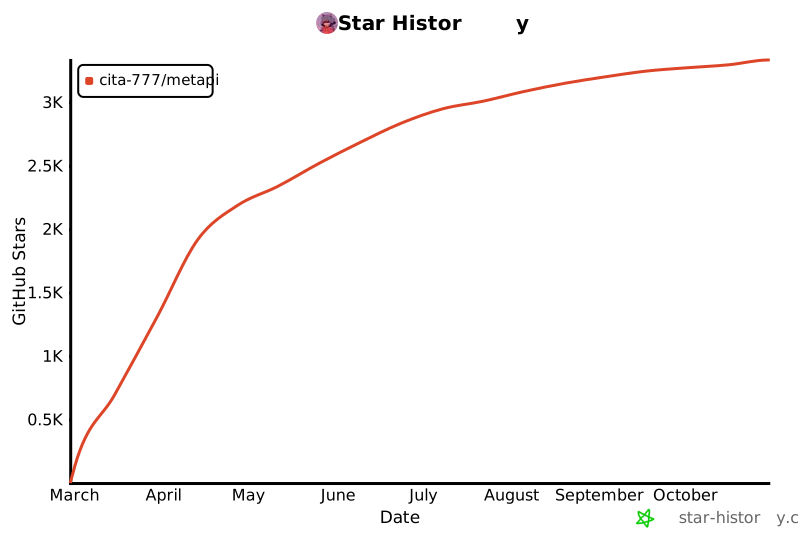](https://www.star-history.com/#cita-777/metapi&type=date&legend=top-left)
|
||
---
|
||
|
||
<div align="center">
|
||
|
||
**⭐ 如果 Metapi 对你有帮助,给个 Star 就是最大的支持!**
|
||
|
||
<sub>Built with ❤️ by the AI community</sub>
|
||
|
||
</div>
|