mirror of
https://github.com/dbeaver/cloudbeaver.git
synced 2026-09-24 16:04:36 +08:00

234 lines
8.6 KiB
Markdown
234 lines
8.6 KiB
Markdown
# CloudBeaver Community
|
||
|
||
<img src="https://github.com/dbeaver/cloudbeaver/wiki/images/cloudbeaver-logo.png" width="250"/>
|
||
|
||
Cloud Database Manager - Community Edition.
|
||
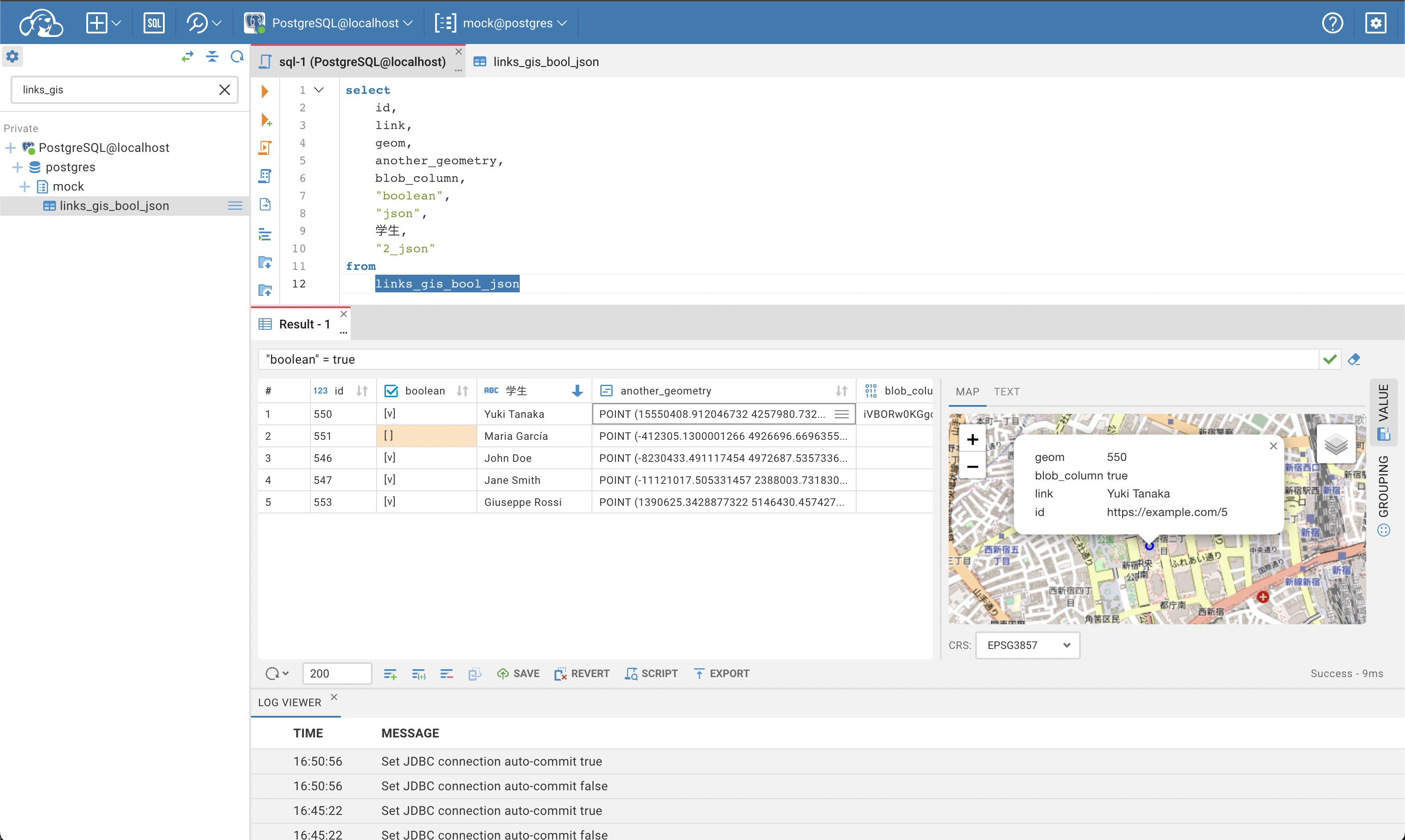
CloudBeaver is a web server which provides rich web interface. Server itself is a Java application, web part is written on TypeScript and React.
|
||
It is free to use and open-source (licensed under [Apache 2](https://github.com/dbeaver/cloudbeaver/blob/devel/LICENSE) license).
|
||
See out [WIKI](https://github.com/dbeaver/cloudbeaver/wiki) for more details.
|
||
|
||
|
||
|
||
## Run in Docker
|
||
|
||
- [Official Docker repository](https://hub.docker.com/r/dbeaver/cloudbeaver)
|
||
- [Running instructions](https://github.com/dbeaver/cloudbeaver/wiki/Run-Docker-Container)
|
||
|
||
## Demo server
|
||
|
||
You can see live demo of CloudBeaver here: https://demo.cloudbeaver.io
|
||
|
||
[Database access instructions](https://github.com/dbeaver/cloudbeaver/wiki/Demo-Server)
|
||
|
||
## Changelog
|
||
|
||
### CloudBeaver 21.1.3 - 2021-08-30
|
||
- Table rows can be created and deleted from the Data Editor.
|
||
- It is possible to preview scripts in the Data Editor.
|
||
- The dialog to enter the credentials appears when you test connections.
|
||
- Different UI bugs have been fixed.
|
||
|
||
|
||
### CloudBeaver 21.1.2 - 2021-08-11
|
||
- Option to run SQL Scripts is implemented.
|
||
- Radio buttons are added to the Value panel to edit Boolean values.
|
||
- Minor UI fixes and improvements are made.
|
||
|
||
### CloudBeaver 21.1.1 - 2021-08-02
|
||
- The new notification way prevents users from working after session expiration.
|
||
- The option to skip the Easy configuration step can be configured.
|
||
- Minor UI fixes and improvements are made.
|
||
|
||
### CloudBeaver 21.1.0 - 2021-07-15
|
||
|
||
Changes since 21.0.0
|
||
- Navigation tree:
|
||
- User's and shared connections are divided into different groups.
|
||
- Connection form:
|
||
- Read-only connections are marked in the connection form.
|
||
- It is possible to show and hide password in the connection dialog.
|
||
- Data editor:
|
||
- New actions are available from the context menu:
|
||
- filtering
|
||
- ordering
|
||
- cell editing.
|
||
- Support for different formats is added to the Value panel.
|
||
- Work with links is improved:
|
||
- Links to the web pages can be opened from the tables
|
||
- Links to the pictures are automatically transformed to the pictures on the Value panel.
|
||
- It is possible to edit Boolean values as checkboxes in the tables.
|
||
- Read-only columns and tables are marked in the result set.
|
||
- SQL editor:
|
||
- Query execution plan is added.
|
||
- Database logos are displayed in the top menu selector.
|
||
- Auto-complete for the SQL dialects works automatically.
|
||
- Log viewer:
|
||
- Detailed information for errors is opened on the panel.
|
||
- Administration part:
|
||
- Access management for users and connections is improved.
|
||
- It is possible to change the user password from the public part of CloudBeaver.
|
||
- New design for dialogs is implemented.
|
||
- Possibility to export data for users can be configured.
|
||
- A lot of UI fixes, enhancements and improvements are made.
|
||
|
||
### CloudBeaver 21.0.5 - 2021-06-30
|
||
- Query execution plan was added.
|
||
- Option to show/hide password in the connection dialog was added.
|
||
- Minor UI fixes and improvements.
|
||
|
||
### CloudBeaver 21.0.3 - 2021-06-11
|
||
|
||
- Filtering and Ordering from the context menu were added for the data editor .
|
||
- Read-only columns and result sets were marked in the data editor.
|
||
- Possibility to remove data export feature from UI was added.
|
||
- CloudBeaver docker image is based on Ubuntu Slim now.
|
||
- Minor UI fixes and improvements.
|
||
|
||
### CloudBeaver 21.0.2 - 2021-05-20
|
||
|
||
- User's and shared connections are divided to different groups in the navigation tree.
|
||
- New design for authentication and driver properties dialogs was applied.
|
||
- Management for administrators' accounts was improved.
|
||
- Minor UI fixes and improvements.
|
||
|
||
### CloudBeaver 21.0.1 - 2021-04-28
|
||
|
||
- Database logos were added to the top menu selector.
|
||
- New panel to show error details were added to Log Viewer.
|
||
- Read-only connections were marked in the connection details form.
|
||
- New design for dialogs was implemented.
|
||
- Minor UI fixes and improvements.
|
||
|
||
### CloudBeaver 21.0.0 - 2021-04-15
|
||
|
||
Changes since 20.0.0:
|
||
- Navigation tree:
|
||
- Simple and advanced view for database objects
|
||
- Show system objects option
|
||
- Connection form:
|
||
- New drivers: Oracle, SQL Server, Trino (Presto), Derby Server
|
||
- SSH support
|
||
- Editing for manual connections
|
||
- Custom fields for advanced connection settings
|
||
- Connection form redesign
|
||
- Fixes for the name duplicates and deletion of the template connections
|
||
- Data editor:
|
||
- Value panel for data review and editing
|
||
- Spatial data viewer
|
||
- Sorting indication for the data grid
|
||
- Performance improvements
|
||
- SQL editor:
|
||
- Improvements for autosuggest and highlighting
|
||
- Log viewer:
|
||
- Quick review for the error details
|
||
- All errors and warnings on the panel
|
||
- New page with the product information
|
||
- Administration part:
|
||
- Redesign for the authentication engine
|
||
- Server re-configuration without re-login
|
||
- Additional labels for the connections with SSH
|
||
- A lot of UI fixes, enhancements and improvements.
|
||
|
||
### CloudBeaver 20.0.6 - 2021-03-31
|
||
|
||
- Value panel for Data Viewer was added: a full text of your cell value on a special panel to view and edit.
|
||
- Spatial data support was added: single and multi objects can be shown on a map.
|
||
- Possibility to Show or Hide system objects was added to the context menu in the Navigator.
|
||
- All product information can be found in public settings.
|
||
- A lot of minor UI fixes and improvements.
|
||
|
||
### CloudBeaver 20.0.5 - 2021-03-18
|
||
|
||
- New design for the connection form
|
||
- Possibility to edit connections created manually in the public part of the application
|
||
- SSH support for connections in public part of the application
|
||
- Possibility to deny credentials saving
|
||
- Drivers for MS SQL Server, Oracle, DB2 LUW, Derby, Trino (Presto SQL)
|
||
- Performance improvements for data grid
|
||
- A lot of minor UI fixes and improvements
|
||
|
||
### CloudBeaver 20.0.3 - 2021-02-10
|
||
|
||
- New drivers are included in CloudBeaver CE: Oracle, MS SQL Server, DB2 LUW, Derby, Trino (Presto SQL)
|
||
- Simple view for the Navigation Tree is added
|
||
- Custom properties fields are added in the Connection dialog
|
||
- SSH support is added
|
||
- Shortcuts for Mac are improved
|
||
- Possibility to cancel data loading is available in data editor
|
||
- SQL Editor autosuggest and highlighting are improved
|
||
- A lot of minor UI fixes and improvements
|
||
|
||
### CloudBeaver 20.0.1 - 2020-12-29
|
||
|
||
- Notifications about the users and connections source are added to administration pages
|
||
- Connection name can be set in the New connection dialog
|
||
- Multiple execution context creation is fixed for SQL Editor
|
||
- Easy access to server logs was added for administrator (/api/logs/)
|
||
- Unsupported objects was hidden
|
||
- Primary keys editing was fixed
|
||
- Objects limit is added for Navigation Tree
|
||
- SQL Editor autosuggest is improved
|
||
- A lot of minor UI fixes and improvements
|
||
|
||
### CloudBeaver 1.2.3 - 2020-11-25
|
||
|
||
- New loading screen is added
|
||
- All connections and tabs are restored after re-login
|
||
- Active connections are highlighted in the Navigation tree
|
||
- Administration panel is improved:
|
||
- Administration page is available when the general authentication is disabled (/#/admin)
|
||
- Authentication and manual connections is enabled by default in the easy-configuration mode
|
||
- All notifications are redesigned
|
||
- A lot of minor UI fixes and improvements
|
||
|
||
### CloudBeaver 1.2.0 - 2020-10-19
|
||
|
||
- Docker environment support was added
|
||
- Filter panel was added in data editor
|
||
- User authentication and roles were added
|
||
- Administration panel was added:
|
||
- Server management
|
||
- Connection management
|
||
- Automatic search of databases
|
||
- User management
|
||
- A lot of minor fixes and improvements
|
||
|
||
### CloudBeaver 1.1.0 - 2020-07-14
|
||
|
||
- Connection management and authentication redesign
|
||
- Webpack build minimization
|
||
- A lot of minor UI improvements
|
||
- Many minor UI improvements
|
||
|
||
### CloudBeaver 1.0.4 - 2020-06-16
|
||
|
||
- Database navigator refresh
|
||
- Data viewer: filters support
|
||
- Many minor UI improvements
|
||
|
||
### CloudBeaver 1.0.3 - 2020-06-02
|
||
|
||
- Administrative panel
|
||
- User management
|
||
- Authentication model redesign
|
||
- Build artifacts minimization
|
||
- Many minor UI improvements
|
||
|
||
### CloudBeaver 1.0.2 - 2020-05-19
|
||
|
||
- Data export feature UI was improved
|
||
- User authentication and permission management
|
||
- Driver management was redesigned
|
||
- Clickhouse driver was added
|
||
- Build procedure was redesigned
|
||
- Many minor bugfixes
|
||
|
||
### CloudBeaver 1.0.1 - 2020-05-05
|
||
|
||
- Data export feature added to the data viewer
|
||
- H2 embedded database driver was added
|
||
- User authentication API was added
|
||
- Product configuration framework and API was added
|
||
- Embedded database for user management was added
|
||
- Many minor bugfixes
|