mirror of
https://github.com/dbeaver/cloudbeaver.git
synced 2026-10-16 06:40:05 +08:00

97 lines
4.3 KiB
Markdown
97 lines
4.3 KiB
Markdown
# CloudBeaver Community
|
||
|
||
<img src="https://github.com/dbeaver/cloudbeaver/wiki/images/cloudbeaver-logo.png" width="250"/>
|
||
|
||
Cloud Database Manager - Community Edition.
|
||
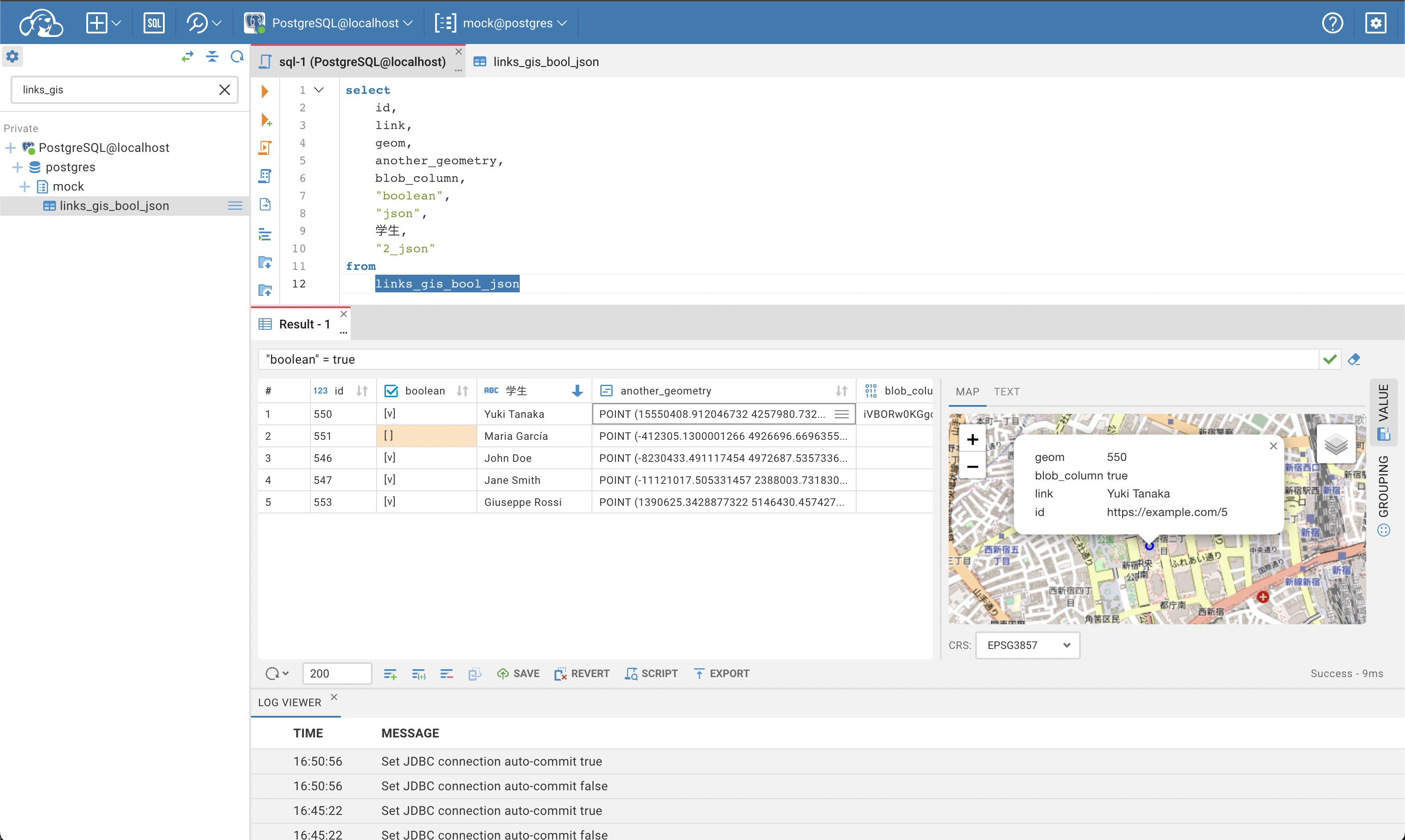
CloudBeaver is a web server which provides rich web interface. Server itself is a Java application, web part is written on TypeScript and React.
|
||
It is free to use and open-source (licensed under [Apache 2](https://github.com/dbeaver/cloudbeaver/blob/devel/LICENSE) license).
|
||
See out [WIKI](https://github.com/dbeaver/cloudbeaver/wiki) for more details.
|
||
|
||
|
||
|
||
## Run in Docker
|
||
|
||
- [Official Docker repository](https://hub.docker.com/r/dbeaver/cloudbeaver)
|
||
- [Running instructions](https://github.com/dbeaver/cloudbeaver/wiki/Run-Docker-Container)
|
||
|
||
## Demo server
|
||
|
||
You can see live demo of CloudBeaver here: https://demo.cloudbeaver.io
|
||
|
||
[Database access instructions](https://github.com/dbeaver/cloudbeaver/wiki/Demo-Server)
|
||
|
||
## Changelog
|
||
|
||
### CloudBeaver 22.3.4 - 2023-02-06
|
||
|
||
- "SQL script manager" in Tools menu is renamed to "Display Script".
|
||
- Every enabled user has permissions to log in.
|
||
- Different bugs have been fixed.
|
||
|
||
### CloudBeaver 22.3.3 - 2023-01-23
|
||
|
||
- Download button is added on a Value panel of Blob and JSON data
|
||
- The body of packages in Oracle databases now is displayed
|
||
- different bugs have been fixed.
|
||
|
||
### CloudBeaver 22.3.2 - 2023-01-09
|
||
|
||
- Administration menu:
|
||
- the User dialog displays available connections in alphabetical order.
|
||
- Connection dialog:
|
||
- users can now add new driver properties with the applied filter in the Driver Properties tab.
|
||
- Data Editor:
|
||
- edit shortcuts are no longer available for read-only tables.
|
||
|
||
### CloudBeaver 22.3.1 - 2022-12-26
|
||
|
||
- Administrators can grant access to all shared connections to the User team by changing one parameter in the configuration file;
|
||
- The shared project is now selected by default in the Create connection dialog in the Administration;
|
||
- Different bugs have been fixed.
|
||
|
||
### CloudBeaver 22.3.0 - 2022-12-05
|
||
|
||
Changes since 22.2.0
|
||
- Users receive notifications about any changes in:
|
||
- the server configuration,
|
||
- connections and scripts they are currently working with.
|
||
- The main menu has become more compact thanks to the new design.
|
||
- SQL scripts Manager:
|
||
- Users can specify the connection for the saved script. This connection will be selected by default when a user opens this script next time.
|
||
- The Settings button opens the new menu that allows users to:
|
||
- filter scripts,
|
||
- collapse all expanded folders,
|
||
- keep the tree view after refreshing the browser page,
|
||
- show the tree view as the path to the script,
|
||
- remove grouping of scripts by projects.
|
||
- Connections:
|
||
- new filter in connection driver properties simplifies search for driver settings;
|
||
- the connection configuration through URL has been added for drivers, that support it;
|
||
- only administrators have:
|
||
- access to the connection edit dialog of shared connections,
|
||
- permission to create connections in both projects, Shared and Private, when it’s restricted for other users,
|
||
- the search tool for local connections in the Connection menu on the public page.
|
||
- Authentication:
|
||
- Administrators can enable a reverse proxy for user authentication in the Server Settings.
|
||
- User administration:
|
||
- administrators can filter enabled and disabled users on the Access Management tab;
|
||
- the application saves all user history: users can be deactivated, but not deleted.
|
||
- The Value Panel:
|
||
- the size of displayed JSON values is limited to improve CloudBeaver performance;
|
||
- big JSON values can be saved to an external file.
|
||
- Table data export:
|
||
- character encoding can be changed for table data;
|
||
- the new setting (BOM) allows users to export specific Unicode characters correctly.
|
||
- Update to SSHJ library allows users to use more private key formats for SSH authentication.
|
||
- Local configuration:
|
||
- changing of a default view of the Navigation tree, Simple or Advanced, can be restricted;
|
||
- the edit connection dialog of shared connections can be made visible to all users;
|
||
- the size limit of displayed JSON values can be changed.
|
||
- A lot of small bug fixes, enhancements and improvements have been made.
|
||
|
||
|
||
### Old CloudBeaver releases
|
||
|
||
You can find information about earlier releases on the CloudBeaver wiki https://github.com/dbeaver/cloudbeaver/wiki/Releases.
|
||
|