In the context of Discover, we want to ease the installation process of Teleport.
Our current focus is Databases.
Adding a database resource requires at least one Database service/agent running with matching labels for that resource.
The focus of this PR is to ease the installation of those agents.
Those service/agents are currently installed in a multi step flow:
- install Teleport on the host (select OS/arch/distribution format)
- configure the service by running `teleport configure db ...`
- start the application (possibly configuring the systemd unit file.
As you can see, this is a lot of steps.
This PR adds a new installation script: install-database.sh
This script is actually the same used for installing Server Nodes or App Service/Agents but now can also install database service/agents.
So, how does the new flow look like?
After adding the Database info (type, hostname, port and labels), and if there's no agent available, a new step appears: add a database agent.
The user provides a list of labels they want the agent to monitor.
Those labels are stored as SuggestedAgentMatcherLabels within the token which is generate after confirming the labels.
The user then gets an URL which they can use to install the agent.
This URL contains the token and when invoked creates the install-database.sh script containing the `db_service` configuration.
The field `db_service.resources.0.labels` contains the previously defined labels.
This script is almost the same that exists today for installing Server Nodes and App services/agents, it only changes the `teleport.yaml` configuration.
When the user run this command, the UI gets notified and can then proceed to the next step.
**Demo**
```bash
root@marcoacme-node-001:/shared# install-database.sh
2022-10-20 16:56:27 UTC [teleport-installer] TELEPORT_VERSION: 11.0.0-rc.1
2022-10-20 16:56:27 UTC [teleport-installer] TARGET_HOSTNAME: 127.0.0.1.nip.io
2022-10-20 16:56:27 UTC [teleport-installer] TARGET_PORT: 3080
2022-10-20 16:56:27 UTC [teleport-installer] JOIN_TOKEN: 6417b719b68d979ac01d3039f4246ce3
2022-10-20 16:56:27 UTC [teleport-installer] CA_PIN_HASHES: sha256:9fa22af321476074164f40aa901e291df92f3dbeea1b1f641bc5bf47efd00174
2022-10-20 16:56:27 UTC [teleport-installer] Checking TCP connectivity to Teleport server (127.0.0.1.nip.io:3080)
2022-10-20 16:56:27 UTC [teleport-installer] Couldn't find nc, telnet or /dev/tcp to do a connection test
2022-10-20 16:56:27 UTC [teleport-installer] Going to blindly continue without testing connectivity
2022-10-20 16:56:27 UTC [teleport-installer] Detected host: linux-gnu, using Teleport binary type linux
2022-10-20 16:56:27 UTC [teleport-installer] Detected arch: x86_64, using Teleport arch amd64
2022-10-20 16:56:27 UTC [teleport-installer] Detected distro type: debian
2022-10-20 16:56:27 UTC [teleport-installer] Using Teleport distribution: deb
2022-10-20 16:56:27 UTC [teleport-installer] Created temp dir /tmp/teleport-PWn6zEcG9P
2022-10-20 16:56:27 UTC [teleport-installer] Downloading Teleport deb release 11.0.0-rc.1
2022-10-20 16:56:27 UTC [teleport-installer] Running curl -fsSL --retry 5 --retry-delay 5 https://get.gravitational.com/teleport_11.0.0-rc.1_amd64.deb
2022-10-20 16:56:27 UTC [teleport-installer] Downloading to /tmp/teleport-PWn6zEcG9P/teleport_11.0.0-rc.1_amd64.deb
2022-10-20 16:56:50 UTC [teleport-installer] Downloaded file size: 119220326 bytes
2022-10-20 16:56:50 UTC [teleport-installer] Will use sha256sum to validate the checksum of the downloaded file
2022-10-20 16:56:52 UTC [teleport-installer] The downloaded file's checksum validated correctly
2022-10-20 16:56:52 UTC [teleport-installer] Using dpkg to install /tmp/teleport-PWn6zEcG9P/teleport_11.0.0-rc.1_amd64.deb
Selecting previously unselected package teleport.
(Reading database ... 8182 files and directories currently installed.)
Preparing to unpack .../teleport_11.0.0-rc.1_amd64.deb ...
Unpacking teleport (11.0.0-rc.1) ...
Setting up teleport (11.0.0-rc.1) ...
2022-10-20 16:56:54 UTC [teleport-installer] Found: Teleport v11.0.0-rc.1 git:v11.0.0-rc.1-0-g6950d74 go1.19.2
2022-10-20 16:56:54 UTC [teleport-installer] Writing Teleport database service config to /etc/teleport.yaml
2022-10-20 16:56:54 UTC [teleport-installer] Host does not appear to be using systemd
2022-10-20 16:56:54 UTC [teleport-installer] ---> This host is not running systemd, so Teleport cannot be started automatically when it exits.
2022-10-20 16:56:54 UTC [teleport-installer] ---> Please investigate an alternative way to keep Teleport running.
2022-10-20 16:56:54 UTC [teleport-installer] ---> You can find information in our documentation: https://goteleport.com/docs/
2022-10-20 16:56:54 UTC [teleport-installer] ---> For now, Teleport will be started in the foreground - you can press Ctrl+C to exit.
Run this command to start Teleport in future:
/usr/local/bin/teleport start --config=/etc/teleport.yaml
------------------------------------------------------------------------
| IMPORTANT: TELEPORT WILL STOP RUNNING AFTER YOU CLOSE THIS TERMINAL! |
| YOU MUST CONFIGURE A SERVICE MANAGER TO MAKE IT RUN ON STARTUP! |
------------------------------------------------------------------------
2022-10-20 16:56:54 UTC [teleport-installer] Starting Teleport in the foreground
2022-10-20T16:56:54Z INFO Starting Teleport v11.0.0-rc.1 common/teleport.go:435
2022-10-20T16:56:54Z [PROC:1] INFO Generating new host UUID: 51b404d7-e501-43f1-83dc-8298c1fcab2b. pid:379.1 service/service.go:874
2022-10-20T16:56:54Z [PROC:1] INFO Joining the cluster with a secure token. pid:379.1 service/connect.go:582
2022-10-20T16:56:54Z [PROC:1] INFO Joining the cluster with a secure token. pid:379.1 service/connect.go:582
2022-10-20T16:56:55Z [AUTH] INFO Attempting registration via proxy server. auth/register.go:239
2022-10-20T16:56:55Z [AUTH] INFO Attempting registration via proxy server. auth/register.go:239
...
root@marcoacme-node-001:/shared# cat /etc/teleport.yaml
version: v3
teleport:
nodename: marcoacme-node-001
auth_token: 6417b719b68d979ac01d3039f4246ce3
ca_pin:
- sha256:9fa22af321476074164f40aa901e291df92f3dbeea1b1f641bc5bf47efd00174
proxy_server: 127.0.0.1.nip.io:3080
log:
output: stderr
severity: INFO
auth_service:
enabled: no
ssh_service:
enabled: no
proxy_service:
enabled: no
db_service:
enabled: "yes"
resources:
- labels:
dev: prod
```
**Tech Details**
Request to create token with `suggested_agent_matcher_labels`:
```shell
curl 'https://127.0.0.1.nip.io:3080/v1/webapi/token' \
-H 'accept: application/json' \
-H 'content-type: application/json; charset=utf-8' \
--data-raw '
{
"roles":["Db"],
"join_method":"token",
"allow":[],
"suggested_agent_matcher_labels": {"dev":"prod"}
}
'
```
Closes#17446
Recently we added a way to add labels on newly added nodes based on the
token.
https://github.com/gravitational/teleport/pull/15114
Each token now has a list of SuggestedLabels, which are used to feed
that list.

However, if that list is empty, the generated script would trigger the
following error when running the `teleport node configure ...` command:
`teleport: error: unexpected`

This happens because the command is generating an empty argument `""`
when running the `teleport node configure ...` command.
So it looks like this:
```bash
${TELEPORT_BINARY_DIR}/teleport node configure \
      --token token \
      joinmethod \
      --ca-pin pin \
      --auth-server host:port \
      "" \
      --output someport
```
That empty argument breaks things.

So, in order to fix it, we are going to change the default value when no
labels are provided.
Instead of an empty string, we'll use an empty array.

Demo (teleport node configure message removed for brev
No label
```bash
$ LABELS_FLAG=(); f=$(mktemp -d)/node.yaml; teleport node configure --auth-server w:1 "${LABELS_FLAG[@]}" --output $f && yq .s
sh_service.labels $f

enabled: "yes"
commands:
  - name: hostname
    command: [hostname]
    period: 1m0s

```

Single label
```bash
$ LABELS_FLAG=(--labels x=y); f=$(mktemp -d)/node.yaml; teleport node configure --auth-server w:1 "${LABELS_FLAG[@]}" --output $f && yq .ssh_service $f

enabled: "yes"
labels:
  x: "y"
commands:
  - name: hostname
    command: [hostname]
    period: 1m0s

```

Multiple labels
```bash
$ LABELS_FLAG=(--labels x=y,dev=prod); f=$(mktemp -d)/node.yaml; teleport node configure --auth-server w:1 "${LABELS_FLAG[@]}" --output $f && yq .ssh_service $f

enabled: "yes"
labels:
  dev: prod
  x: "y"
commands:
  - name: hostname
    command: [hostname]
    period: 1m0s
```
For Teleport Discover, the user will be able to test connecting to a
resource right after adding it.
The flow should look like this:
- User selects the resource type - in this case Server/Nodes
- WebUI generates a new Token
- WebUI shows the `sudo bash .../<token>/install.sh` to the user
- When the user runs this command, and assuming everything works out,
the WebUI should be able to receive the Server/Node that was
generated from that specific Token.
To achieve this, here's a more detailed flow, which this PR implements
- User selects the resource type - in this case Server/Nodes
- WebUI generates a new Token
This generates a Provision Token which contains a RefResourceID
WebUI receives back that ID
- WebUI shows the `sudo bash .../<token>/install.sh` to the user
This generates a script which includes setting the labels as part of
the `teleport configure` command:
`$ teleport configure ... --labels teleport.internal/resource-id=<refResourceID> ...`
- User runs the provided command on the target host
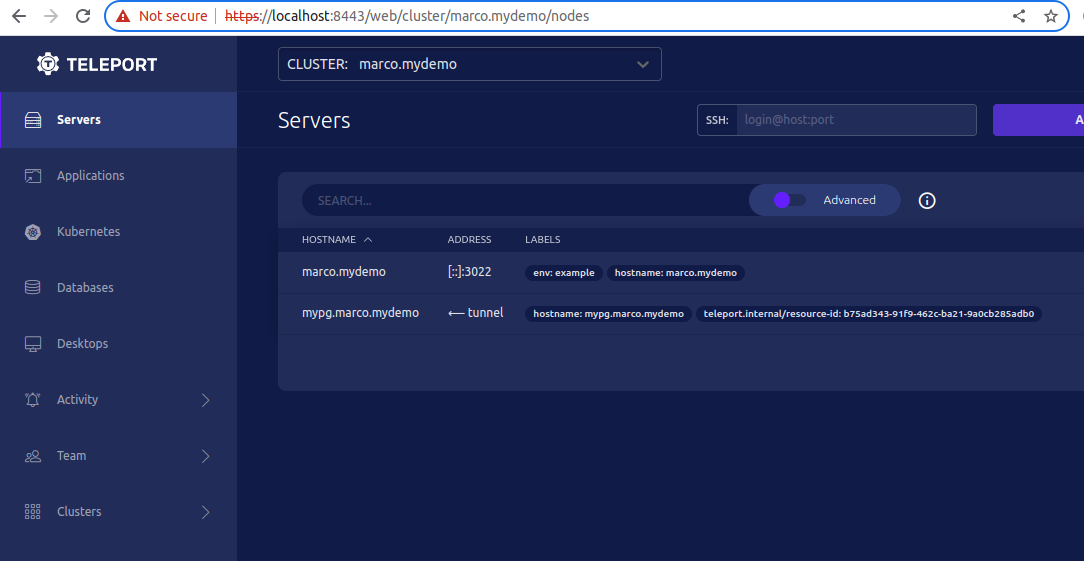
- WebUI should be able to query the Servers/Nodes which contain that
specific `<resource-id>` and allow the user to connect to it.
Demo:
The token value is provided via the HTTP request
and fed into the node join script. This could allow an attacker
to generate a node-join script with malicious code included.

Fix this by validating that tokens are valid and exist in the backend.

Additionally, we recently added the ability to specify labels via the
node-labels query parameter, which is also user-controlled. Since this
functionality was never integrated in the UI, we remove it here and
will add an alternative implementation in the future.

Also use single quotes in script to prevent expansion
 Marco André Dinis
