For Teleport Discover, the user will be able to test connecting to a
resource right after adding it.
The flow should look like this:
- User selects the resource type - in this case Server/Nodes
- WebUI generates a new Token
- WebUI shows the `sudo bash .../<token>/install.sh` to the user
- When the user runs this command, and assuming everything works out,
the WebUI should be able to receive the Server/Node that was
generated from that specific Token.
To achieve this, here's a more detailed flow, which this PR implements
- User selects the resource type - in this case Server/Nodes
- WebUI generates a new Token
This generates a Provision Token which contains a RefResourceID
WebUI receives back that ID
- WebUI shows the `sudo bash .../<token>/install.sh` to the user
This generates a script which includes setting the labels as part of
the `teleport configure` command:
`$ teleport configure ... --labels teleport.internal/resource-id=<refResourceID> ...`
- User runs the provided command on the target host
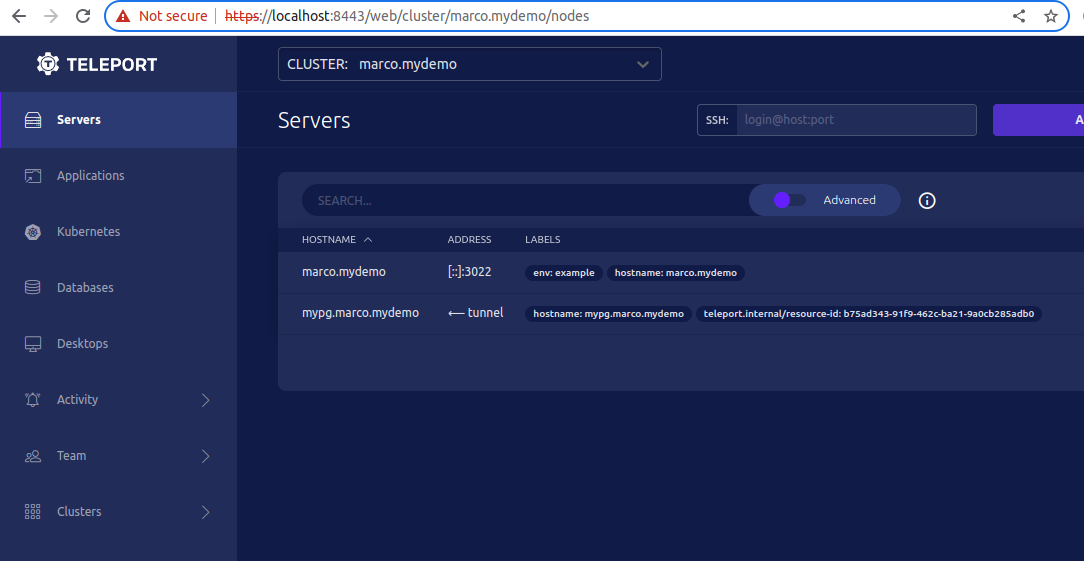
- WebUI should be able to query the Servers/Nodes which contain that
specific `<resource-id>` and allow the user to connect to it.
Demo:
The token value is provided via the HTTP request
and fed into the node join script. This could allow an attacker
to generate a node-join script with malicious code included.

Fix this by validating that tokens are valid and exist in the backend.

Additionally, we recently added the ability to specify labels via the
node-labels query parameter, which is also user-controlled. Since this
functionality was never integrated in the UI, we remove it here and
will add an alternative implementation in the future.

Also use single quotes in script to prevent expansion
 Steven Martin
