mirror of
https://github.com/freeCodeCamp/freeCodeCamp.git
synced 2026-09-24 23:01:18 +08:00
 Ahmad AbdolsahebandRandell Dawson
23ca5d9cc6
Ahmad AbdolsahebandRandell Dawson
23ca5d9cc6
* fix: imgur to s3 for chinese guide without conflict

(cherry picked from commit 21e3afaee0f23d700f76ea662bc193b392fc54ac)

* fix: remove extra links

Co-Authored-By: Randell Dawson <5313213+RandellDawson@users.noreply.github.com>

* fix: revert changes

* fix: revert changes

* fix: revert changes

* fix: revert changes
3.5 KiB
3.5 KiB
title, localeTitle
| title | localeTitle |
|---|---|
| AJAX | AJAX |
AJAX
AJAX代表异步JavaScript和XML 。它不是一种编程语言。它是一种使用HTML,CSS,JavaScript和XML开发更好,更快和交互式Web应用程序的技术。
- HTML:超文本标记语言(HTML)用于定义Web应用程序的结构。
- CSS:层叠样式表(CSS)用于为Web应用程序提供外观和样式。
- JavaScript:JavaScript用于使Web应用程序具有交互性,有趣和用户友好性。
- XML:可扩展标记语言(XML)是一种用于存储和传输来自Web服务器的数据的格式。
AJAX中Asynchronous的含义是什么?
异步意味着Web应用程序可以在不刷新页面的情况下从Web服务器发送和接收数据。从服务器发送和接收数据以及更新网页的不同部分的后台过程定义了AJAX的异步属性/特性。
AJAX如何工作?
AJAX利用浏览器内置的XMLHttpRequest对象从Web服务器和HTML DOM请求数据以显示或使用数据。
XMLHttpRequest对象 :它是一个对象形式的API,其方法有助于在Web浏览器和Web服务器之间传输数据。
HTML DOM :加载网页时,浏览器会创建页面的文档对象模型。
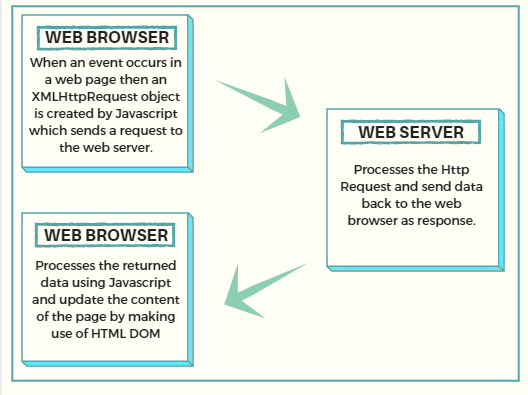
创建XMLHttpRequest对象:
var xhttp = new XMLHttpRequest();
XMLHttpRequest对象的属性:
readystate是XMLHttpRequest对象的一个属性,它保存XMLHttpRequest的状态。
- 0:请求未初始化
- 1:建立服务器连接
- 2:收到请求
- 3:处理请求
- 4:请求完成并且响应准备就绪
onreadystatechange是XMLHttpRequest对象的一个属性,它定义了readyState属性更改时要调用的函数。
status是XMLHttpRequest对象的属性,它返回请求的状态编号
- 200:“好的”
- 403:“禁止”
- 404:“未找到”
XMLHttpRequest对象方法: 要向Web服务器发送请求,我们使用XMLHttpRequest对象的open()和send()方法。
xhttp.open("GET", "content.txt", true);
 xhttp.send();
使用JavaScript创建一个函数changeContent():
function changeContent() {
  var xhttp = new XMLHttpRequest();
  xhttp.onreadystatechange = function() {
    if (this.readyState == 4 && this.status == 200) {
     document.getElementById("foo").innerHTML = this.responseText;
    }
  };
  xhttp.open("GET", "content.txt", true);
  xhttp.send();
 }
用于更改网页内容的AJAX示例:
<!DOCTYPE html>
 <html>
 <body>

 <div id="foo">
 <h2>The XMLHttpRequest Object</h2>
 <button type="button" onclick="changeContent()">Change Content</button>
 </div>

 <script>
 function changeContent() {
  var xhttp = new XMLHttpRequest();
  xhttp.onreadystatechange = function() {
    if (this.readyState == 4 && this.status == 200) {
      document.getElementById("foo").innerHTML =
      this.responseText;
    }
  };
  xhttp.open("GET", "content.txt", true);
  xhttp.send();
 }
 </script>

 </body>
 </html>
文件content.txt应该出现在Web应用程序的根目录中。