mirror of
https://github.com/coder/coder.git
synced 2026-10-24 11:43:39 +08:00
 Bryan
b964cb0380
Bryan
b964cb0380
This implements a simple Project listing page at `/projects` - just a table for a list of projects: 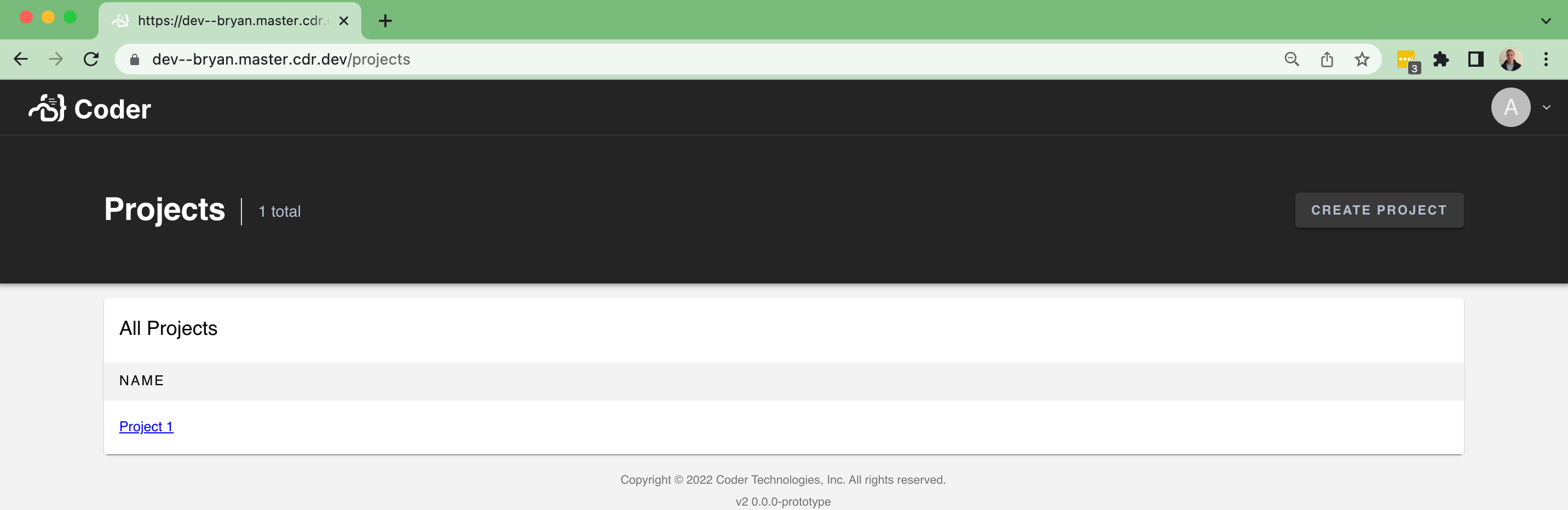 ...and an empty state: 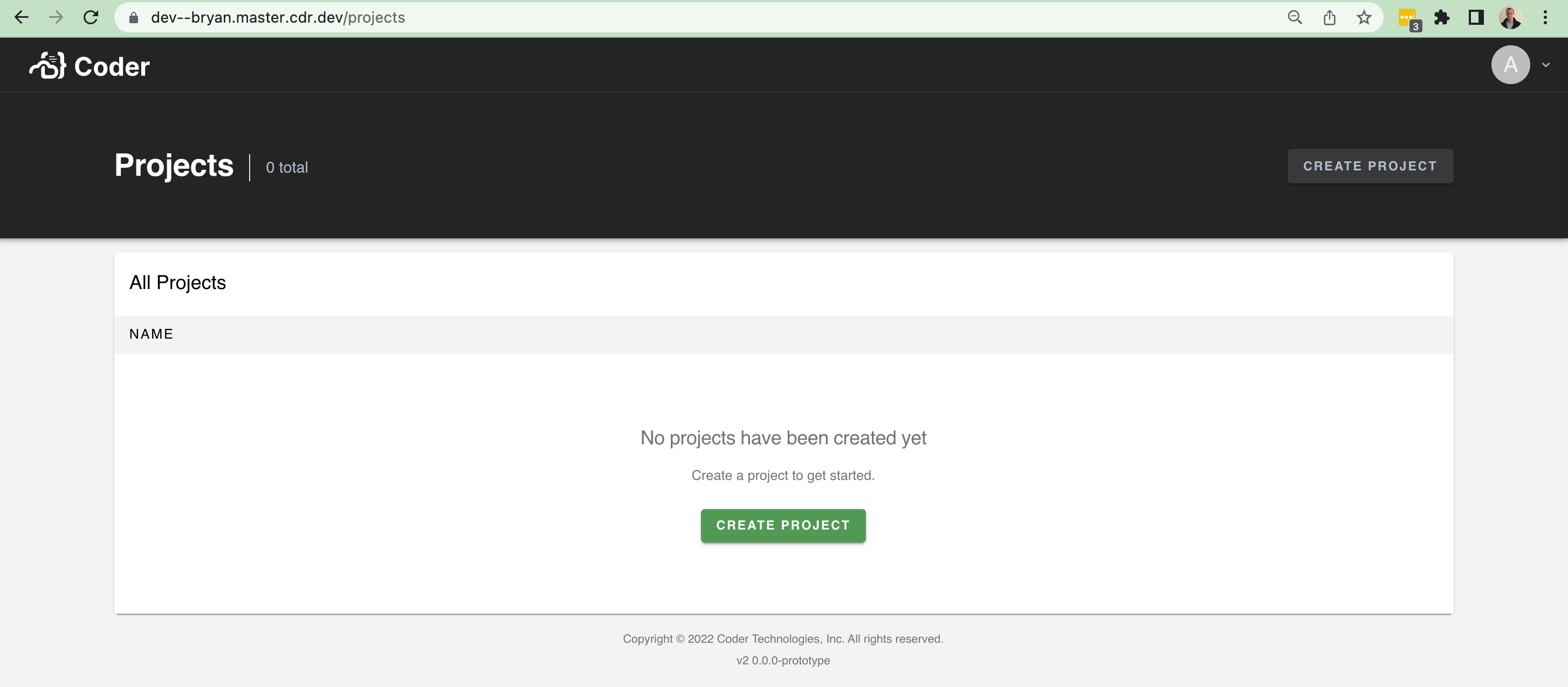 There isn't too much data to show at the moment. It'll be nice in the future to show the following fields and improve the UI with it: - An icon - A list of users using the project - A description However, this brings in a lot of scaffolding to make it easier to build pages like this (`/organizations`, `/workspaces`, etc). In particular, I brought over a few things from v1: - The `Hero` / `Header` component at the top of pages + sub-components - A `Table` component for help rendering table-like UI + sub-components - Additional palette settings that the `Hero`


138 lines
2.9 KiB
TypeScript
138 lines
2.9 KiB
TypeScript
import { Palette } from "@material-ui/core/styles/createPalette"
|
|
/**
|
|
* Augment MUI Palette with Coder-specific design system
|
|
*/
|
|
declare module "@material-ui/core/styles/createPalette" {
|
|
interface Palette {
|
|
navbar: {
|
|
main: string
|
|
}
|
|
// Styles for the 'hero' banner on several coder admin pages
|
|
hero: {
|
|
// Background color of the 'hero' banner
|
|
main: string
|
|
// Color for hero 'buttons'
|
|
button: string
|
|
}
|
|
}
|
|
|
|
interface PaletteOptions {
|
|
navbar: {
|
|
main: string
|
|
}
|
|
hero: {
|
|
main: string
|
|
button: string
|
|
}
|
|
}
|
|
}
|
|
/**
|
|
* CustomPalette implements a minimal subset of MUI Palette interface for our
|
|
* light and dark themes.
|
|
*/
|
|
export type CustomPalette = Pick<
|
|
Palette,
|
|
"action" | "background" | "divider" | "error" | "hero" | "info" | "navbar" | "primary" | "secondary" | "text" | "type"
|
|
>
|
|
|
|
/**
|
|
* Light theme color palette, the default
|
|
*
|
|
* This maps to our design system at:
|
|
* https://www.figma.com/file/VkXU4873QOsSprMQV02GgR/Design-System?node-id=3%3A2
|
|
*/
|
|
export const lightPalette: CustomPalette = {
|
|
type: "light",
|
|
background: {
|
|
default: "#F3F3F3",
|
|
paper: "#FFF",
|
|
},
|
|
|
|
primary: {
|
|
main: "#519A54",
|
|
light: "#A2E0A5",
|
|
dark: "#3A783D",
|
|
contrastText: "#FFF",
|
|
},
|
|
info: {
|
|
main: "#000",
|
|
light: "#000",
|
|
dark: "#000",
|
|
contrastText: "#FFF",
|
|
},
|
|
navbar: {
|
|
main: "#242424",
|
|
},
|
|
secondary: {
|
|
main: "#F7CD6F",
|
|
light: "#FFE7A0",
|
|
dark: "#BF9331",
|
|
contrastText: "#FFF",
|
|
},
|
|
error: {
|
|
main: "#DD4764",
|
|
light: "#A14E5E",
|
|
dark: "#912F42",
|
|
contrastText: "#FFF",
|
|
},
|
|
hero: {
|
|
main: "#242424",
|
|
button: "#747474",
|
|
},
|
|
text: {
|
|
primary: "#000",
|
|
secondary: "#747474",
|
|
disabled: "#749367",
|
|
hint: "#749367",
|
|
},
|
|
action: {
|
|
active: "#242424",
|
|
hover: "rgba(0, 0, 0, 0.1)",
|
|
hoverOpacity: 0.08,
|
|
selected: "#D0EFD2",
|
|
disabled: "#DDE2EC",
|
|
disabledBackground: "#F3F3F3",
|
|
},
|
|
divider: "#DDE2EC",
|
|
}
|
|
|
|
/**
|
|
* Dark theme color palette
|
|
*
|
|
* This maps to our design system at:
|
|
* https://www.figma.com/file/VkXU4873QOsSprMQV02GgR/Design-System?node-id=219%3A40
|
|
*/
|
|
export const darkPalette: CustomPalette = {
|
|
type: "dark",
|
|
primary: lightPalette.primary,
|
|
secondary: lightPalette.secondary,
|
|
info: lightPalette.info,
|
|
error: lightPalette.error,
|
|
hero: {
|
|
main: "#141414",
|
|
button: "#333333",
|
|
},
|
|
navbar: {
|
|
main: "rgb(8, 9, 10)",
|
|
},
|
|
background: {
|
|
default: "rgb(24, 26, 27)",
|
|
paper: "rgb(31, 33, 35)",
|
|
},
|
|
text: {
|
|
primary: "rgba(255, 255, 255, 0.95)",
|
|
secondary: "#BDBDBD",
|
|
disabled: "#BDBDBD",
|
|
hint: "#BDBDBD",
|
|
},
|
|
action: {
|
|
active: "#FFF",
|
|
hover: "rgba(255, 255, 255, 0.1)",
|
|
hoverOpacity: 0.1,
|
|
selected: "rgba(255, 255, 255, 0.2)",
|
|
disabled: "rgba(255, 255, 255, 0.1)",
|
|
disabledBackground: "rgba(255, 255, 255, 0.12)",
|
|
},
|
|
divider: "rgba(255, 255, 255, 0.12)",
|
|
}
|