 Bobby Ho
97c4031526
Bobby Ho
97c4031526
## TL;DR

**Problem.** A template can declare which external auth provider it
wants via `data "coder_external_auth" { id = "..." }`, and that
declaration is honored at every stage of the build. It was ignored at
runtime. Any git operation going through `GIT_ASKPASS` supplies only a
hostname, never a provider ID, and the handler scanned *every* provider
configured on the deployment and returned whichever matched the hostname
**last in config order**, with no reference to what the requesting
workspace's own template declared. Reordering
`CODER_EXTERNAL_AUTH_<N>_*` silently redirected a plain `git clone` from
one OAuth client's token to a completely different one.

**Fix.** For hostname-only requests, resolve the calling agent's
workspace and build *before* selecting a provider, then narrow
candidates to the providers declared by that build's template version.
Exactly one match wins regardless of config order. No matching declared
provider falls back to today's deployment-wide scan, so a template that
declares only a GitHub provider can still clone an unrelated host. Two
or more matching declared providers return `409` naming them, rather
than picking one arbitrarily: `external_auth_providers` is stored sorted
by ID, so HCL declaration order is already unavailable and no principled
tie-break exists.

Requests supplying an explicit provider ID are untouched. Server-side
only: no wire protocol, proto, manifest, or database schema change, so
already-running agents get the corrected behavior on their next askpass
call with no restart.

Refs #23718

<details>
<summary><b>Call flow</b></summary>

```mermaid
flowchart TD
    subgraph Push["1. Template import: coder templates push"]
        A1["Terraform extracts coder_external_auth id/optional attrs"]
        A2["CompleteJob(TemplateImport) validates each id<br/>against deployment config"]
        A4["template_versions.external_auth_providers persisted"]
        A1 --> A2 --> A4
    end

    subgraph PreBuild["2. Pre-build and workspace build (unaffected)"]
        B1["User authenticates declared provider(s), exact-ID lookup"]
        B2["Build resolves token by exact ID<br/>(provisionerdserver.go)"]
        A4 --> B1 --> B2
    end

    subgraph Runtime["3. Workspace running: a credential is needed"]
        B2 --> C0{"Caller supplies id or match?"}
        C0 -->|"id (explicit)"| D1["Exact-ID match<br/>UNCHANGED, already deterministic<br/>(coder external-auth access-token)"]
        C0 -->|"match only (GIT_ASKPASS)"| C1["git needs credentials for a hostname<br/>GIT_ASKPASS invoked, unchanged"]
        C1 --> C2["coder gitaskpass sends ExternalAuthRequest{Match: host}<br/>unchanged (cli/gitaskpass.go)"]
        C2 --> C3["workspaceAgentsExternalAuth<br/>(coderd/workspaceagents.go)"]
        C3 --> C4["CHANGED:<br/>1. resolve workspace/build BEFORE matching<br/>2. read that build's declared provider IDs<br/>3. filter: declared AND regex matches host"]
        C4 --> C5{"how many candidates?"}
        C5 -->|"exactly 1"| C6["use it, regardless of config order"]
        C5 -->|"0"| C7["fall back to deployment-wide scan<br/>(unchanged legacy behavior)"]
        C5 -->|"2 or more"| C8["409 naming every matching ID"]
    end

    D1 --> E1["Token returned"]
    C6 --> E1
    C7 --> E1

    style C4 fill:#1f4d2e,stroke:#4caf50,color:#fff
    style C6 fill:#1f4d2e,stroke:#4caf50,color:#fff
    style C8 fill:#1f4d2e,stroke:#4caf50,color:#fff
    style D1 fill:#333,stroke:#888,color:#fff
```

</details>

## Verification

Two test functions were added in `coderd/workspaceagents_test.go`, and
the behavior no unit test can reach was verified against a local dev
cluster with two real GitHub OAuth Apps whose regexes both match
`github.com`.

| Behavior | Unit | Manual |
|---|---|---|
| Declared provider wins over a colliding one | yes | yes |
| Outcome independent of deployment config order | yes | yes |
| No declared match falls back to the full scan | yes | yes |
| Host the template never declared still resolves | yes | via fallback |
| Two declared providers matching one host return `409` | yes | not run
|
| Declared but unauthenticated provider returns its auth URL | yes | not
run |
| Two templates resolve independently and concurrently | yes | no |
| Explicit-ID path unaffected | no | yes |
| Running agent corrected with no restart | **no** | **yes** |
| Declared ID since removed from config falls back | **no** | **yes** |
| Recomputed per build after a template update | **no** | **yes** |

The last three are properties a unit test cannot express: they involve
swapping the server binary underneath a live agent, removing deployment
configuration, and rebuilding a workspace against a new template
version.

<details>
<summary><b>Unit test detail</b></summary>

`TestWorkspaceAgentsExternalAuthTemplateScoped` builds a deployment with
two providers sharing a regex, a template declaring one of them, and a
seeded token for **every** provider, so a mis-selection returns a valid
token with the wrong identity rather than an error. Subtests:

- `DeclaredProviderLast` / `DeclaredProviderFirst`: the declared
provider wins in both config orders. Only the `First` arm is
discriminating, since the pre-change loop had no `break` and returned
the last regex match, which the `Last` arm happens to agree with.
- `NoDeclaredProvidersFallsBackToFullScan`: a template declaring nothing
keeps today's behavior exactly, pinning the legacy last-match rule.
- `UnrelatedHostStillResolvesViaFallback`: a template declaring only a
GitHub provider still resolves a GitLab host.
- `AmbiguousDeclaredSetReturnsError`: `409` whose message names both
colliding provider IDs.
- `OptionalUnauthenticatedDeclaredProviderReturnsAuthURL`: returns the
auth URL for the *declared* provider, not for an unrelated one the user
happens to hold a token for.

`TestWorkspaceAgentsExternalAuthMultipleTemplates` runs two workspaces
from two templates, each declaring a different provider, issuing
requests concurrently. Each resolves to its own template's provider.

</details>

<details>
<summary><b>Manual verification detail</b></summary>

Local dev cluster, two GitHub OAuth Apps both defaulting to
`^(https?://)?github\.com(/.*)?$`, both authorized by the workspace
owner so a wrong selection yields a usable token rather than an error.
Workspace built from a template declaring only `github-dotfiles`. Tokens
redacted.

**Order independence.** Same workspace, never rebuilt, config order
reversed between runs:

| Deployment config order | Token returned |
|---|---|
| `[github-broad, github-dotfiles]` | `gho_<dotfiles>` |
| `[github-dotfiles, github-broad]` | `gho_<dotfiles>` |

**A/B against the pre-fix binary.** Everything held constant except the
coderd build, with `/api/v2/buildinfo` checked on both sides so the
comparison rests on verified binary identity. The workspace was never
stopped, rebuilt, or re-authorized:

| coderd | buildinfo | Token | Honors declaration |
|---|---|---|---|
| pre-fix | `v2.35.3-devel+11e03cfb3a` | `gho_<broad>` | no |
| this branch | `v2.35.3-devel+e8b87d0333` | `gho_<dotfiles>` | yes |

This doubles as the demonstration that a coderd-only upgrade corrects
behavior on a live agent's next askpass call.

**Declared provider removed from config.** `github-dotfiles` deleted
from deployment configuration while the workspace's template still
declared it. Result: `HTTP/2 200` with `gho_<broad>` via the fallback.
No `500`, no fail-closed `404`. The orphaned `external_auth_link` row
remained in the database throughout and correctly had no effect.

**Recomputation after a template update.**

| Workspace state | Build's declared provider | Token returned |
|---|---|---|
| new version pushed, workspace not updated | `github-dotfiles` |
`gho_<dotfiles>` |
| after `coder update` | `github-broad` | `gho_<broad>` |

The pair is what makes it conclusive: the first rules out following the
template's newest version, the second rules out a cached value.

**Explicit-ID path.** `coder external-auth access-token github-broad`
returned that provider's result even though the template declared only
`github-dotfiles`, and did not substitute the declared provider's
already-valid token.

Raw traces were captured with `GIT_CURL_VERBOSE=1 git -c
credential.helper="" ls-remote <private repo>`, reading the unredacted
`== Info: Server auth using Basic with user '<token>'` line. A private
repo is required, since a public one never triggers a `401` and
therefore never invokes `GIT_ASKPASS`.

</details>
18 KiB
External Authentication
Coder supports external authentication via OAuth2.0. This allows enabling any OAuth provider as well as integrations with Git providers, such as GitHub, GitLab, and Bitbucket.
External authentication can also be used to integrate with external services like JFrog Artifactory and others.
To add an external authentication provider, you'll need to create an OAuth application. The following providers have been tested and work with Coder:
If you have experience with a provider that is not listed here, please file an issue
Configuration
Set environment variables
After you create an OAuth application, set environment variables to configure the Coder server to use it:
CODER_EXTERNAL_AUTH_0_ID="<USER_DEFINED_ID>"
CODER_EXTERNAL_AUTH_0_TYPE=<github|gitlab|azure-devops|bitbucket-cloud|bitbucket-server|etc>
CODER_EXTERNAL_AUTH_0_CLIENT_ID=<OAuth app client ID>
CODER_EXTERNAL_AUTH_0_CLIENT_SECRET=<OAuth app client secret>

# Optionally, configure a custom display name and icon:
CODER_EXTERNAL_AUTH_0_DISPLAY_NAME="Google Calendar"
CODER_EXTERNAL_AUTH_0_DISPLAY_ICON="https://mycustomicon.com/google.svg"
The CODER_EXTERNAL_AUTH_0_ID environment variable is used as an identifier for the authentication provider.
This variable is used as part of the callback URL path that you must configure in your OAuth provider settings.
If the value in your callback URL doesn't match the CODER_EXTERNAL_AUTH_0_ID value, authentication will fail with redirect URI is not valid.
Set it with a value that helps you identify the provider.
For example, if you use CODER_EXTERNAL_AUTH_0_ID="primary-github" for your GitHub provider,
configure your callback URL as https://example.com/external-auth/primary-github/callback.
Add an authentication button to the workspace template
Add the following code to any template to add a button to the workspace setup page which will allow you to authenticate with your provider:
data "coder_external_auth" "<github|gitlab|azure-devops|bitbucket-cloud|bitbucket-server|other>" {
    id = "<USER_DEFINED_ID>"
}

# GitHub Example (CODER_EXTERNAL_AUTH_0_ID="primary-github")
# makes a GitHub authentication token available at data.coder_external_auth.github.access_token
data "coder_external_auth" "github" {
   id = "primary-github"
}
Inside your Terraform code, you now have access to authentication variables. Reference the documentation for your chosen provider for more information on how to supply it with a token.
Workspace CLI
Use external-auth in the Coder CLI to access a token within the workspace:
coder external-auth access-token <USER_DEFINED_ID>
Git Authentication in Workspaces
Coder provides automatic Git authentication for workspaces through SSH authentication and Git-provider specific env variables.
When performing Git operations, Coder first attempts to use external auth provider tokens if available. If no tokens are available, it defaults to SSH authentication.
OAuth (external auth)
For Git providers configured with external authentication, Coder can use OAuth tokens for Git operations over HTTPS.
When using SSH URLs (like git@github.com:organization/repo.git), Coder uses SSH keys as described in the SSH Authentication section instead.
For Git operations over HTTPS, Coder automatically injects an external auth provider token.
This works through Git's GIT_ASKPASS mechanism, which Coder configures in each workspace.
GIT_ASKPASS tells Coder which Git host the operation is for, but never which provider to use.
Coder resolves the provider in two steps:
- Coder considers only the providers that the workspace's template declares with
data "coder_external_auth", and selects the one whoseCODER_EXTERNAL_AUTH_<N>_REGEXmatches the host. - If every declared provider is configured and none of them match the host, including when the template declares no providers at all, Coder matches the host against all providers configured on the deployment. This fallback keeps hosts that the template never declares, such as an unrelated Git server, reachable from the workspace.
Because the first step is scoped to the template, two workspaces built from different templates receive their own template's token for the same Git host, regardless of the order the providers appear in the deployment configuration.
To use OAuth tokens for Git authentication over HTTPS:
- Complete the OAuth authentication flow (Login with GitHub, Login with GitLab).
- Use HTTPS URLs when interacting with repositories (
https://github.com/organization/repo.git). - Coder automatically handles authentication. You can perform your Git operations as you normally would.
Behind the scenes, Coder:
- Stores your OAuth token securely in its database
- Sets up
GIT_ASKPASSat/tmp/coder.<random-string>/coderin your workspaces - Retrieves and injects the appropriate token when Git operations require authentication
To manually access these tokens within a workspace:
coder external-auth access-token <USER_DEFINED_ID>
SSH Authentication
Coder automatically generates an SSH key pair for each user that can be used for Git operations.
When you use SSH URLs for Git repositories, for example, git@github.com:organization/repo.git, Coder checks for and uses an existing SSH key.
If one is not available, it uses the Coder-generated one.
The coder gitssh command wraps the standard ssh command and injects the SSH key during Git operations.
This works automatically when you:
- Clone a repository using SSH URLs
- Pull/push changes to remote repositories
- Use any Git command that requires SSH authentication
You must add the SSH key to your Git provider.
Add your Coder SSH key to your Git provider
-
View your Coder Git SSH key:
coder publickey -
Add the key to your Git provider accounts:
PKCE Support
PKCE (Proof Key for Code Exchange) is an OAuth 2.0 security extension that prevents authorization code interception attacks. Coder supports PKCE when acting as an OAuth client to external identity providers.
Coder will usually assume PKCE support is available with "S256" as the code challenge method. Manual configuration is available to override any default behavior.
# Enable PKCE with S256 (recommended when supported)
CODER_EXTERNAL_AUTH_0_PKCE_METHODS="S256"

# Disable PKCE entirely
CODER_EXTERNAL_AUTH_0_PKCE_METHODS="none"
Git-provider specific env variables
Azure DevOps
Azure DevOps requires the following environment variables:
CODER_EXTERNAL_AUTH_0_ID="primary-azure-devops"
CODER_EXTERNAL_AUTH_0_TYPE=azure-devops
CODER_EXTERNAL_AUTH_0_CLIENT_ID=xxxxxx
# Ensure this value is your "Client Secret", not "App Secret"
CODER_EXTERNAL_AUTH_0_CLIENT_SECRET=xxxxxxx
CODER_EXTERNAL_AUTH_0_AUTH_URL="https://app.vssps.visualstudio.com/oauth2/authorize"
CODER_EXTERNAL_AUTH_0_TOKEN_URL="https://app.vssps.visualstudio.com/oauth2/token"
Azure DevOps (via Entra ID)
Azure DevOps (via Entra ID) requires the following environment variables:
CODER_EXTERNAL_AUTH_0_ID="primary-azure-devops"
CODER_EXTERNAL_AUTH_0_TYPE=azure-devops-entra
CODER_EXTERNAL_AUTH_0_CLIENT_ID=xxxxxx
CODER_EXTERNAL_AUTH_0_CLIENT_SECRET=xxxxxxx
CODER_EXTERNAL_AUTH_0_AUTH_URL="https://login.microsoftonline.com/<TENANT ID>/oauth2/authorize"
Note
Your app registration in Entra ID requires the
vso.code_writescope
Bitbucket Server
Bitbucket Server requires the following environment variables:
CODER_EXTERNAL_AUTH_0_ID="primary-bitbucket-server"
CODER_EXTERNAL_AUTH_0_TYPE=bitbucket-server
CODER_EXTERNAL_AUTH_0_CLIENT_ID=xxx
CODER_EXTERNAL_AUTH_0_CLIENT_SECRET=xxx
CODER_EXTERNAL_AUTH_0_AUTH_URL=https://bitbucket.example.com/rest/oauth2/latest/authorize
When configuring your Bitbucket OAuth application, set the redirect URI to
https://example.com/external-auth/primary-bitbucket-server/callback.
This callback path includes the value of CODER_EXTERNAL_AUTH_0_ID.
Gitea
CODER_EXTERNAL_AUTH_0_ID="gitea"
CODER_EXTERNAL_AUTH_0_TYPE=gitea
CODER_EXTERNAL_AUTH_0_CLIENT_ID=xxxxxxx
CODER_EXTERNAL_AUTH_0_CLIENT_SECRET=xxxxxxx
# If self managed, set the Auth URL to your Gitea instance
CODER_EXTERNAL_AUTH_0_AUTH_URL="https://gitea.com/login/oauth/authorize"
The redirect URI for Gitea should be
https://coder.example.com/external-auth/gitea/callback.
GitHub
Use this section as a reference for environment variables to customize your setup or to integrate with an existing GitHub authentication.
For a more complete, step-by-step guide, follow the configure a GitHub OAuth app section instead.
CODER_EXTERNAL_AUTH_0_ID="primary-github"
CODER_EXTERNAL_AUTH_0_TYPE=github
CODER_EXTERNAL_AUTH_0_CLIENT_ID=xxxxxx
CODER_EXTERNAL_AUTH_0_CLIENT_SECRET=xxxxxxx
CODER_EXTERNAL_AUTH_0_REVOKE_URL=https://api.github.com/applications/<CLIENT ID>/grant
When configuring your GitHub OAuth application, set the
authorization callback URL
as https://example.com/external-auth/primary-github/callback, where
primary-github matches your CODER_EXTERNAL_AUTH_0_ID value.
GitHub Enterprise
GitHub Enterprise requires the following environment variables:
CODER_EXTERNAL_AUTH_0_ID="primary-github"
CODER_EXTERNAL_AUTH_0_TYPE=github
CODER_EXTERNAL_AUTH_0_CLIENT_ID=xxxxxx
CODER_EXTERNAL_AUTH_0_CLIENT_SECRET=xxxxxxx
CODER_EXTERNAL_AUTH_0_VALIDATE_URL="https://github.example.com/api/v3/user"
CODER_EXTERNAL_AUTH_0_AUTH_URL="https://github.example.com/login/oauth/authorize"
CODER_EXTERNAL_AUTH_0_TOKEN_URL="https://github.example.com/login/oauth/access_token"
When configuring your GitHub Enterprise OAuth application, set the
authorization callback URL
as https://example.com/external-auth/primary-github/callback, where
primary-github matches your CODER_EXTERNAL_AUTH_0_ID value.
GitLab self-managed
GitLab self-managed requires the following environment variables:
CODER_EXTERNAL_AUTH_0_ID="primary-gitlab"
CODER_EXTERNAL_AUTH_0_TYPE=gitlab
# This value is the "Application ID"
CODER_EXTERNAL_AUTH_0_CLIENT_ID=xxxxxx
CODER_EXTERNAL_AUTH_0_CLIENT_SECRET=xxxxxxx
CODER_EXTERNAL_AUTH_0_VALIDATE_URL="https://gitlab.example.com/oauth/token/info"
CODER_EXTERNAL_AUTH_0_AUTH_URL="https://gitlab.example.com/oauth/authorize"
CODER_EXTERNAL_AUTH_0_TOKEN_URL="https://gitlab.example.com/oauth/token"
CODER_EXTERNAL_AUTH_0_REVOKE_URL="https://gitlab.example.com/oauth/revoke"
CODER_EXTERNAL_AUTH_0_REGEX=gitlab\.example\.com
When configuring your GitLab OAuth application,
set the redirect URI to https://example.com/external-auth/primary-gitlab/callback.
Note that the redirect URI must include the value of CODER_EXTERNAL_AUTH_0_ID (in this example, primary-gitlab).
JFrog Artifactory
Visit the JFrog Artifactory guide for instructions on how to set up for JFrog Artifactory.
Self-managed Git providers
Custom authentication and token URLs should be used for self-managed Git provider deployments.
CODER_EXTERNAL_AUTH_0_AUTH_URL="https://github.example.com/oauth/authorize"
CODER_EXTERNAL_AUTH_0_TOKEN_URL="https://github.example.com/oauth/token"
CODER_EXTERNAL_AUTH_0_REVOKE_URL="https://github.example.com/oauth/revoke"
CODER_EXTERNAL_AUTH_0_VALIDATE_URL="https://example.com/oauth/token/info"
CODER_EXTERNAL_AUTH_0_REGEX=github\.company\.com
Note
The
REGEXvariable must be set if using a custom Git domain.
Custom scopes
Optionally, you can request custom scopes:
CODER_EXTERNAL_AUTH_0_SCOPES="repo:read repo:write write:gpg_key"
OAuth provider
Configure a GitHub OAuth app
-
- Set the authorization callback URL to
https://coder.example.com/external-auth/primary-github/callback, whereprimary-githubis the value you set forCODER_EXTERNAL_AUTH_0_ID. - Deactivate Webhooks.
- Enable fine-grained access to specific repositories or a subset of permissions for security.
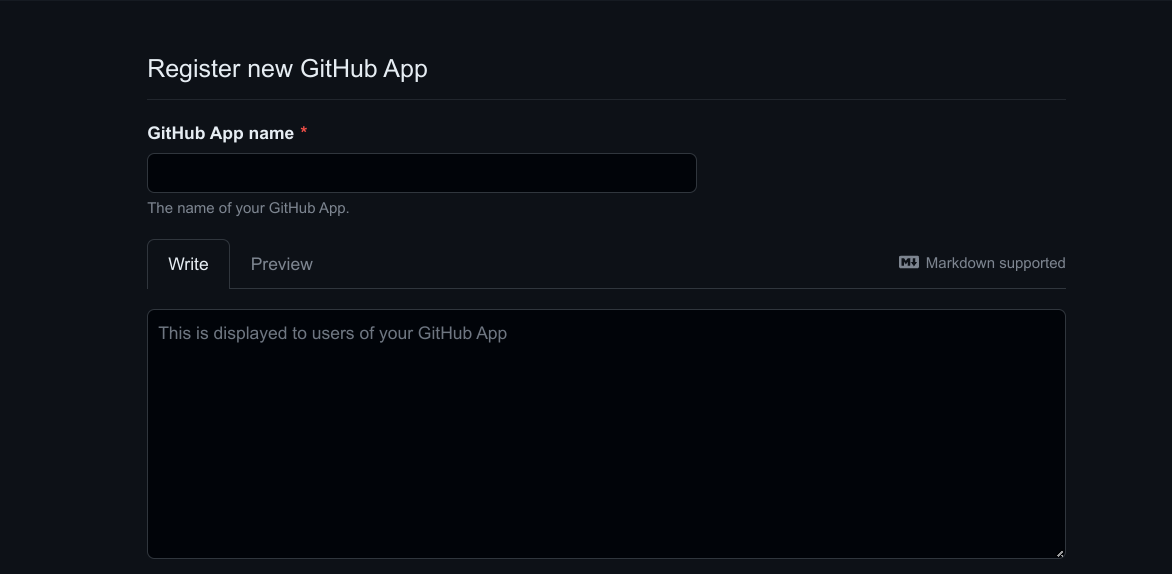
- Set the authorization callback URL to
-
Adjust the GitHub app permissions. You can use more or fewer permissions than are listed here, this example allows users to clone repositories:
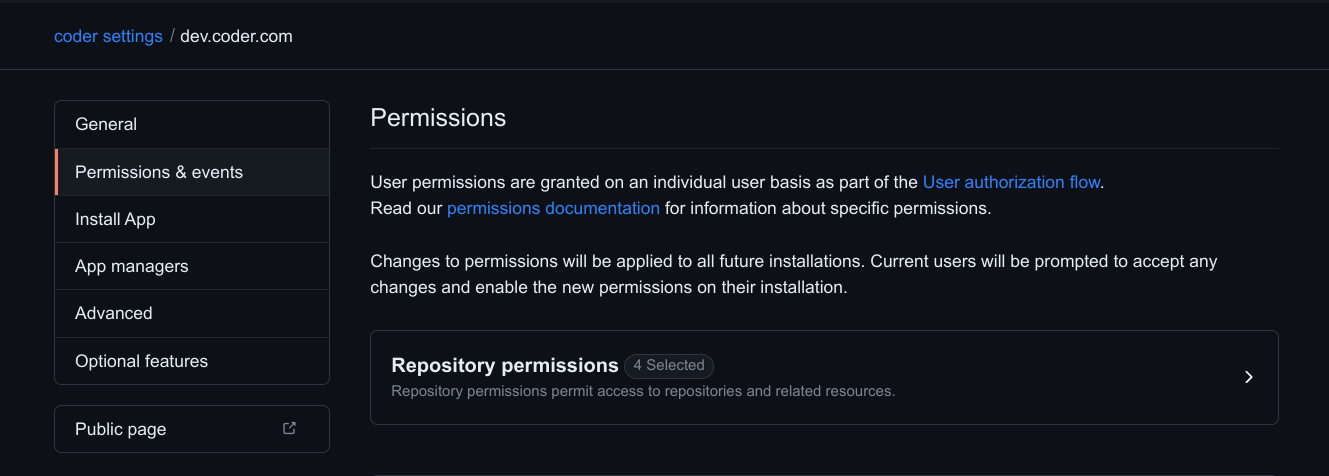
Name Permission Description Contents Read & Write Grants access to code and commit statuses. Pull requests Read & Write Grants access to create and update pull requests. Workflows Read & Write Grants access to update files in .github/workflows/.Metadata Read-only Grants access to metadata written by GitHub Apps. Members Read-only Grants access to organization members and teams. -
Install the App for your organization. You may select a subset of repositories to grant access to.
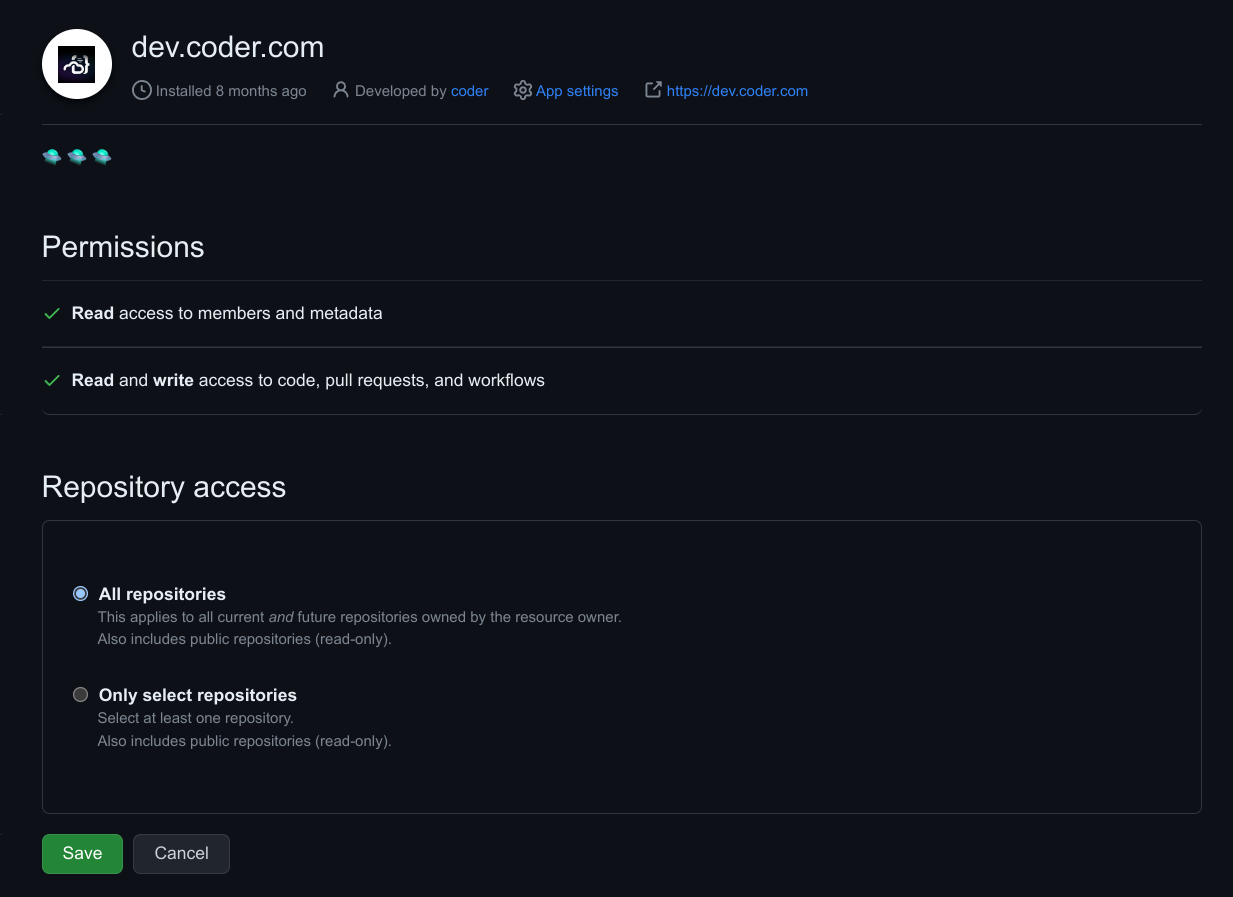
-
Make the app installable by other users. In the app's Advanced tab, select Make this GitHub App public.
Without this, anyone outside the app's owning account or owning organization gets a GitHub 404 when they select Link GitHub in Coder. Each user must also install the app on their own account before linking. To surface an Install GitHub App link in the Coder UI, set the following environment variable:
CODER_EXTERNAL_AUTH_0_APP_INSTALL_URL=https://github.com/apps/<your-app-slug>/installations/new


Multiple External Providers (Premium)
Below is an example configuration with multiple providers:
Important
To support regex matching for paths like
github\.com/org, add the followinggit configline to the Coder agent startup script:git config --global credential.useHttpPath true
# Provider 1) github.com
CODER_EXTERNAL_AUTH_0_ID=primary-github
CODER_EXTERNAL_AUTH_0_TYPE=github
CODER_EXTERNAL_AUTH_0_CLIENT_ID=xxxxxx
CODER_EXTERNAL_AUTH_0_CLIENT_SECRET=xxxxxxx
CODER_EXTERNAL_AUTH_0_REGEX=github\.com/org

# Provider 2) github.example.com
CODER_EXTERNAL_AUTH_1_ID=secondary-github
CODER_EXTERNAL_AUTH_1_TYPE=github
CODER_EXTERNAL_AUTH_1_CLIENT_ID=xxxxxx
CODER_EXTERNAL_AUTH_1_CLIENT_SECRET=xxxxxxx
CODER_EXTERNAL_AUTH_1_REGEX=github\.example\.com
CODER_EXTERNAL_AUTH_1_AUTH_URL="https://github.example.com/login/oauth/authorize"
CODER_EXTERNAL_AUTH_1_TOKEN_URL="https://github.example.com/login/oauth/access_token"
CODER_EXTERNAL_AUTH_1_REVOKE_URL="https://github.example.com/login/oauth/revoke"
CODER_EXTERNAL_AUTH_1_VALIDATE_URL="https://github.example.com/api/v3/user"
When Coder can't resolve a single provider
When several providers serve the same Git host, HTTPS Git operations resolve the provider from the workspace template's declared providers, as described in OAuth (external auth).
Coder stops in two cases rather than pick a provider the template didn't ask for.
In both, the request fails and coder gitaskpass prints a warning and falls back to Git's own credential behavior, so the Git operation prompts for credentials or fails instead of using an unexpected token.
- Several of the template's declared providers match the host.
Coder can't tell which one the operation needs, so it returns an HTTP 404 naming each match.
Give the providers non-overlapping
CODER_EXTERNAL_AUTH_<N>_REGEXvalues so that only one matches the host, or fetch a token with an explicit provider ID usingcoder external-auth access-token <USER_DEFINED_ID>in your template's startup script. - The template declares a provider that the deployment no longer configures, and none of its other declared providers match the host. This happens when a provider is renamed or removed after a template started declaring it. Coder returns an HTTP 404 naming the missing provider instead of falling back to a provider the template never declared. A provider that the template declares and the deployment still configures keeps serving its own host, so only the hosts that relied on the missing provider are affected. Restore that provider's configuration, or update the template to declare a provider that the deployment configures.