Previously, the workspace "Download logs" dialog formatted the original byte
count with the promoted unit, so sizes above 1 KiB could be shown incorrectly,
for example `4472 KB` instead of `4.37 KB`. Exact 1024-byte files also stayed
in bytes.
> AI tools where used when creating this PR

This PR removes environment variable parsing from `/aibridge` directory.

Added env variables/flags for dump dir as coder options.
Only added to new indexed provider options
(`CODER_AIBRIDGE_PROVIDER_<N>_*`) not to deprecated legacy env variables
(`CODER_AIBRIDGE_ANTHROPIC_*` and `CODER_AIBRIDGE_OPENAI_KEY_*`).

Reverted adding `MaxRetries` option as it will be removed soon due to
key failover work:
https://github.com/coder/coder/pull/24783#discussion_r3155544808
Adds a role selector to the create user form so admins can assign
site-level roles at creation time rather than navigating to the user
afterward.

The `POST /api/v2/users` endpoint now accepts an optional `roles` field,
wiring it through to the existing `RBACRoles` field on the internal
`CreateUserRequest`. No database changes are needed since roles are
already stored inline on the user row.

On the frontend, a `RoleSelector` component renders the assignable roles
as a scrollable multiselect checklist with the non-assignable Member
role pinned as a non-interactive footer. The selector appears once a
login type is chosen.

Also adds a `condensed` size (690px) to `Margins` between the existing
`small` (460px) and `medium` (1080px), and exposes a `size` prop on
`FullPageForm`. The create user form uses `condensed` to give the role
selector more breathing room. Also fixes `MockUserAdminRole` and
`MockTemplateAdminRole` in test helpers to use hyphenated names
(`user-admin`, `template-admin`) matching the canonical names in the Go
RBAC layer.

Fixes `sortRolesByAccessLevel` in `UserRoleCell` to sort unranked roles
(e.g. `member`) after all known roles. Previously, `indexOf` returned -1
for unknown names, placing them first; now they receive
`POSITIVE_INFINITY` as their rank.

🤖 Generated with [Claude Code](<https://claude.ai/claude-code>)

---


https://github.com/user-attachments/assets/75e7c8c5-d0d2-481d-86e8-1fcfb574517c

---------

Co-authored-by: Claude Sonnet 4.6 <noreply@anthropic.com>
This pull request updates the `CreateTemplateGalleryPageView` component
to enhance the page header actions by grouping them vertically and
adding a new external link button for users. The most important changes
are:

**UI improvements:**

* Groups the header action buttons into a vertical stack using a flex
container with column direction and spacing for better layout and
accessibility.

**New feature:**

* Adds a new button linking to the "template agent skill" documentation
on GitHub, allowing users to easily access guidance on using the
template agent skill.

**Screenshot**

<img width="1674" height="813" alt="image"
src="https://github.com/user-attachments/assets/8d12df13-2310-464b-936c-1b4e2215c7aa"
/>
Follow-up to #24742. Navigation paths were dropping `?archived` search
params, silently resetting the filter now that it's URL-derived.

Fixed all sibling navigation that used bare `/agents` paths or stored
only `location.pathname` without `location.search`:

- **ChatTopBar** mobile back button (`md:hidden`)
- **ChatTopBar** parent chat breadcrumb
- **AgentsSidebar** settings gear link (stored `state.from` without
search)
- **AgentPageHeader** mobile menu settings link (same `state.from` bug)
- **AgentAnalyticsPage** mobile back button (widened `mobileBack.to`
type to accept `To`)
- **SubagentTool** "View agent" external link
- **AgentsPage** `navigateAfterArchive` and `handleNewAgent` navigate
calls

Two Storybook play stories cover the ChatTopBar back button and the
sidebar settings round-trip.


_Generated by Coder Agents._
When tryAutoPromoteQueuedMessage's insert fails, return the error
instead of swallowing it so the transaction rolls back and the
queued message survives. Previously the POP DELETE committed while
the INSERT silently failed, permanently losing the message.

Remove clearStreamState() from the pending/waiting status handler
in the frontend. The durable message event clears stream state via
the existing needsStreamReset path, eliminating the visual gap
where content vanishes before the persisted message arrives.

Fixes CODAGT-61
Tighten visual rhythm and typography in the agent chat page so tool
calls, reasoning, and assistant text share the same baseline.

## Highlights

- Unify font size to **13px** across user messages, assistant
`Response`, reasoning, and every tool-call label.
- Reuse the `text-content-secondary → hover:text-content-primary`
transition on tool-call rows so labels, chevrons, and lucide icons
brighten together. Icons inside hover-aware headers switch to
`text-current` so they inherit the parent transition; static icons in
non-collapsible cards (`ExecuteTool`, `ProcessOutputTool`) keep the
constant secondary color.
- Collapse padding between adjacent tool/thinking blocks via a shared
`data-tool-call` attribute and adjacent-sibling selectors
(`[&:has(+[data-tool-call])]:pb-0` + `[[data-tool-call]+&]:pt-0`).
First/last items keep their padding against text and reasoning siblings.
- `read_file` now mirrors `write_file`: `Reading <name>…` while running,
`Read <name>` once complete.
- `ask_user_question` flips the inline label from `Asking:` to `Asked:`
once answered.
- Subagent row layout: status icon + label + chevron sit together at the
start of the row, while the `Worked for <duration>` text uses `ml-auto`
to anchor the right edge.
- New Storybook story `WithEveryTool` (under `Pages / AgentsPage /
AgentChatPage`) exercises every tool renderer plus subagent variants and
the generic MCP fallback in a single completed-then-streaming turn.

---

_Authored with help from a Coder Agent._
Persists the agents page archived filter in the URL via
`?archived=archived`,
so deep-linking to archived agents and restoring the filter from history
work
as expected. Unknown values fall back to active. Toggling back to active
removes the param from the URL so the default state has one canonical
form.

Also fixes a regression that surfaced once the filter became
URL-derived:
clicking a chat in the sidebar previously navigated to `/agents/:id`
with no
search params, silently resetting the filter. The sidebar's chat
`NavLink`
now preserves `location.search`.

Coverage:
- `useArchivedFilterParam` is unit-tested with `renderHook`, covering
URL
parsing variants and the `deleteValue` semantics for the default state.
- Cross-route preservation is covered by a Storybook play story
(`PreservesArchivedFilterOnChatNavigation`) that renders the real
`NavLink`
  and asserts on a probe child route.
- The pre-existing sidebar callback tests in `AgentsSidebar.test.tsx`
cover
wiring that exists on `main`; they're kept here for completeness rather
  than as new feature gates.

_Generated by Coder Agent._
Follow-up to #24650.

Canceling the terminal command confirmation dialog now calls
`window.close()` instead of stripping the `?command=` query parameter
and opening a plain terminal. The terminal always opens in a new tab,
so closing it is the expected UX when the user declines.

> 🤖 Generated by Coder Agents
Depends on #24642

Adds per-owner digest notifications onto the chat auto-archive
subsystem.

Each tick's archived rows are grouped by owner, the top 25 titles per
owner are rendered into a new `Chats Auto-Archived` notification
template, and any remainder surfaces as `and N more`. Each digest is
per-tick, so users with large amounts of purgeable data may get multiple
notifications in sequence (one per user per tick).

The template body branches on `retention_days`: when retention is
disabled (`retention_days=0`), users are told archived chats are kept
indefinitely rather than falsely claiming imminent deletion.

### Changes
- migration `000XXX_chat_auto_archive_notification_template` adds new
notification template
- `dbpurge`: threads `notifications.Enqueuer` through `New`; and
enqueues notification message.
- `cli/server.go`: passes `options.NotificationsEnqueuer` into
`dbpurge.New`.
- `coderd/notifications/events.go`: new `TemplateChatAutoArchiveDigest`
UUID.
- `coderd/inboxnotifications.go`: inbox registration.
- Docs: adds a `Notifications` section to `chat-auto-archive.md`.

> 🤖
The agent chat thinking disclosure used a smaller label with the caret
on the left, which made collapsed and in-progress thinking look
different from collapsible tool calls.

Align the thinking disclosure with the shared tool-call row treatment by
using the same label size, trailing caret placement, and hover color
while preserving the streaming shimmer. Adds a Storybook story that
renders collapsed thinking next to a tool call.

<details>
<summary>Storybook screenshots</summary>

Captured from Storybook:

-
`pages/AgentsPage/ChatConversation/ConversationTimeline/ThinkingBlockWithToolCall`
-
`pages/AgentsPage/ChatConversation/ConversationTimeline/ThinkingBlockWithToolCall`
hovered
-
`pages/AgentsPage/ChatConversation/StreamingOutput/ThinkingDuringStreamingWithToolCalls`

Screenshots are attached in the Coder task.

</details>

Generated by Coder Agents.
> Mux is acting on Mike's behalf.

Adds explicit star, edit, and duplicate actions to each Agents model
configuration row, replacing the chevron-only affordance.

Duplicate opens a prefilled create form backed by the existing create
mutation when the provider can manage models. The form copies editable
model fields and provider config while clearing default status so saving
a duplicate does not change the current default model.
The terminal page auto-executed commands from the `?command=` query
parameter
on page load without user confirmation. Because session auth uses
`SameSite=Lax`
cookies, an attacker could craft a link (phishing email, Slack DM,
external page)
that executes arbitrary commands in a victim's workspace when clicked.

Adds a `ConfirmDialog` that shows the exact command and requires
explicit user
approval before it is passed to the terminal WebSocket. Canceling
removes the
`command` parameter from the URL and opens a plain terminal.

<details>
<summary>Implementation details</summary>

### Data flow (before)

`TerminalPage.tsx` reads `searchParams.get("command")` and passes it
directly
as `initialCommand` to `WorkspaceTerminal`, which embeds it in the
WebSocket
URL. `proxy.go` forwards it to the agent, which runs `bash -c
"<command>"`
immediately.

### Fix

- Added `commandConfirmed` state and `commandPendingConfirmation` flag
in
  `TerminalPage.tsx`.
- The `loading` prop passed to `WorkspaceTerminal` includes
`commandPendingConfirmation`, keeping the terminal in loading state
until
  the user confirms or cancels.
- The command is only passed as `initialCommand` after the user clicks
  "Run command" in the confirmation dialog.
- Trusted `?app=` commands (resolved from agent apps) bypass the dialog.
- Cancel removes the `?command=` parameter from the URL entirely.
- No backend changes needed; the frontend gates the command before it
  reaches the WebSocket.

### Terminal focus after dialog

`WorkspaceTerminal`'s autoFocus effect previously depended on
`[terminal, isVisible, autoFocus]` but not `loading`. It fired while the
Radix dialog's focus trap was active, so `terminal.focus()` was
intercepted. When `loading` became false after confirming the dialog,
the
effect did not re-fire. Fixed by adding `loading` to the effect deps and
skipping focus while `loading` is true.

### Files changed

| File | Change |
|------|--------|
| `site/src/pages/TerminalPage/TerminalPage.tsx` | Confirmation dialog,
`commandPendingConfirmation` in loading prop |
| `site/src/pages/TerminalPage/TerminalCommandConsentDialog.tsx` | New
dialog component |
| `site/src/pages/TerminalPage/TerminalCommandConsentDialog.stories.tsx`
| Storybook story for dialog |
| `site/src/pages/TerminalPage/TerminalPage.stories.tsx` |
`CommandConfirmation` story |
| `site/src/pages/TerminalPage/TerminalPage.test.tsx` | 4 new dialog
tests, `renderTerminalRaw` helper for non-blocking render |
| `site/src/modules/terminal/WorkspaceTerminal.tsx` | Add `loading` to
autoFocus effect deps |
| `site/e2e/helpers.ts` | Dismiss dialog in `openTerminalWindow` helper
|
| `site/e2e/tests/webTerminal.spec.ts` | Wait for
`data-status="connected"` + click terminal for focus |

</details>

> 🤖 Generated by Coder Agents

---------

Co-authored-by: Jakub Domeracki <jakub@coder.com>
closes CODAGT-142

The Agents right-panel tabs (Git, Terminal, Desktop) reset to the
default tab (Git) every time the user switches between agent sessions.
This happens because `KeyedAgentChatPage` forces a full remount on
`agentId` change, discarding the `useState` that holds the active tab.

Persist the active tab per agent session in `localStorage`, following
the existing `agents.draft-input.<chatID>` pattern. When the user
returns to a session, the last tab they selected is restored. If the
stored tab is temporarily unavailable (e.g. Desktop while the workspace
is stopped), `SidebarTabView`'s existing fallback to the first
available tab applies, and the stored value survives so it can be
honoured once that tab reappears.

Archiving a chat clears its stored tab entry so unarchiving starts
fresh with the default tab.
Relates to #24642

Adds admin UI controls for managing chat auto-archive (days) under
"Lifecycle".
Also adds a "Days" label to the right of the pre-existing unitless
numeric input for consistency.

Exemplary screenshot below. More screens available in Storybook.

<img width="847" height="585" alt="Screenshot 2026-04-24 at 16 48 59"
src="https://github.com/user-attachments/assets/d38de5f8-d379-4b06-b175-ac399f31e578"
/>
When switching between existing `/agents` chats, unsent file attachments
were kept only in React state and were lost when the chat page
remounted.

This adds chat-scoped draft attachment persistence for the compose
input, keeps edit-mode attachments isolated from compose drafts, warns
when a file cannot be saved to localStorage, and cleans up restored
draft payloads after upload or send.

> Mux is acting on Mike's behalf.
> 🤖 This PR was modified by Coder Agents on behalf of Jake Howell.

Fixes the `outsideBox` variant styling for tabs and simplifies the kebab
overflow logic. The overflow calculation now accounts for `column-gap`
between tabs so the menu trigger appears at the correct breakpoint.

- Fix Tailwind hover selector syntax for `outsideBox` variant
(`[&_[data-slot=tabs-trigger]:hover]` instead of
`[&_[data-slot=tabs-trigger]]:hover`)
- Account for `column-gap` in `useKebabMenu` overflow calculation via a
new `getTabGap` helper
- Use content-box width (`getContentBoxWidth`) for the initial overflow
pass so it matches `ResizeObserver`'s `contentRect.width`
- Consolidate `calculateTabValues` into a single-pass loop, removing the
separate `findFirstTabIndex` function
- Drop `FC` wrapper in favor of inline prop destructuring across all tab
components
- Forward `ref` through `TabsList` so consumers can attach refs directly
- Add `useKebabMenu` unit tests covering both all-visible and overflow
scenarios
Once a user has touched a field, it is better to leave it alone and display explicit validation errors over silently overwriting their inputs. Same for auto-filled values (whether from query parameters or a previous build).
Previously, `chats.last_model_config_id` was not updated when a user
sent a mid-chat message with a different model, and queued messages did
not store their own per-turn model, so promotion ran against whatever
the chat row said at promote time. Chat watch events also did not merge
`last_model_config_id` into the site's root, child, and per-chat
caches, so sidebar labels stayed stale after direct sends and queued
promotions.

- Add nullable `chat_queued_messages.model_config_id`, backfilled from
  `chats.last_model_config_id`. Queued inserts round-trip the effective
  model id at enqueue time.
- In `coderd/x/chatd`, direct sends update `chats.last_model_config_id`
  inside the same transaction that inserts the admitted user message.
  Manual promotion and auto-promotion use the queued row's stored
  `model_config_id`, with a fallback to `chats.last_model_config_id`
for legacy NULL rows during rollout.
`PromoteQueuedOptions.ModelConfigID`
  is now ignored.
- On the site, extract `mergeWatchedChatSummary` and
  `mergeWatchedChatIntoCaches` in `site/src/api/queries/chats.ts` so
  status-change watch events merge `last_model_config_id` into the
  root infinite chat list, the parent-embedded child entry, and the
  per-chat `chatKey(chatId)` cache. `updated_at` guards against stale
  watch payloads clobbering newer cached state, while diff status
  events still merge their PR metadata because they are timestamped
  outside the chat row. Watch timestamps are compared as instants so
  variable fractional precision does not make fresh events look stale.
- Queued promotion validates stored model config IDs before admission.
  Invalid legacy queued IDs fall back to the chat's current model config
  instead of dropping the queued message during auto-promotion.
- Backend and frontend regression coverage added for admission, queue
  promotion (including FIFO across mixed models, legacy NULL fallback,
  and invalid queued model IDs), and chat watch cache merging.

> Mux is acting on Mike's behalf.
*Disclaimer: implemented by a Coder Agent using Claude Opus 4.6*

Follow-up to https://github.com/coder/coder/pull/24630 which added
backend Charm Crush client detection.

## Summary

Adds a `"Charm Crush"` case to the `AIBridgeClientIcon` switch so the
client filter and request logs show an icon instead of the generic
question mark fallback.

Uses a 💘 emoji-based SVG as a placeholder, matching Crush's branding.
Replace with an official brand SVG when one becomes available from the
Charm team.

## Changes

- `site/static/icon/charm-crush.svg`: new emoji-based placeholder icon.
-
`site/src/pages/AIBridgePage/RequestLogsPage/icons/AIBridgeClientIcon.tsx`:
added `"Charm Crush"` case.
Adds a deployment-wide admin override for general delegated subagents.

## What changed
- store the general override in `site_configs` and expose it through the
shared `agent-model-override/{context}` API
- apply the general override when spawning delegated general subagents,
while preserving the existing Explore override behavior
- reuse a shared Agents settings form for the general and Explore
override sections

## Validation
- `make gen`
- `go test ./coderd -run 'TestChatModelOverrides'`
- `go test ./coderd/x/chatd -run
'TestSpawnAgent_(GeneralUsesConfiguredModelOverride|GeneralOverrideLogsAndFallsBackWhenCredentialsUnavailable|GeneralOverrideLogsAndFallsBackWhenProviderDisabled)'`
- `pnpm -C site lint:types`
- `pnpm -C site test:storybook --
AgentSettingsAgentsPageView.stories.tsx`
- `make lint`
- `make pre-commit`

> Mux is acting on Mike's behalf.
The agents-access role previously granted chat permissions at user
scope, but chats are org-scoped objects. Rego skips user-level perms
when org_owner is set, making the grants invisible. Handler-level
band-aids used synthetic non-org-scoped objects as a workaround.
- Migrates agents-access from users.rbac_roles (site-level) to
organization_members.roles (org-scoped) via DB migration
- Redefines agents-access as a predefined org-scoped builtin role
alongside organization-admin, organization-auditor, etc., with
Member permissions granting chat create/read/update
- Excludes ResourceChat from OrgMemberPermissions so org membership
alone no longer grants chat access
- Fixes handler Authorize checks to use org-scoped objects with
semantically correct actions (ActionUpdate for message/tool operations)
- Grants org admins the ability to assign agents-access
Closes#24250
Fixes CODAGT-174
Note: this does not update the "Usage" endpoints. Tracked by CODAGT-161.
> 🤖
`OpensAdminSubPanelOnMobile` story has been failing due to not finding a
role="link" with name "Settings".

Agent investigated and claimed the Settings icon gets hidden in mobile
view.
Suggested fix is to start the story directly at `/agents/settings`.

> Generated with [Coder Agents](https://coder.com/agents)
## Summary

Fixes the warning badge color in light mode by switching text and border
tokens from `content-warning`/`border-warning` to `highlight-orange`.

## What changed

The `warning` variant in `Badge` was the only colored badge variant not
using the `highlight-*` token pattern:

| Variant | Before | After |
|---|---|---|
| warning (text) | `text-content-warning` | `text-highlight-orange` |
| warning (border) | `border-border-warning` | `border-highlight-orange`
|

In light mode, `content-warning` (HSL 27 96% 61%) produced a washed-out
orange. `highlight-orange` (HSL 30 100% 32%) gives a darker, more
legible result that matches the screenshot in the issue.

> [!NOTE]
> This PR was authored by Coder Agents.
Adds an inline `X` button to the "Planning" indicator so users can
disengage plan mode directly from the chat input, without reopening the
`+` menu. Reuses the same pattern that already ships on the
attached-workspace and MCP-server badges.
- When `onPlanModeToggle` is provided and plan mode is on, the pill
renders a dismiss `X` next to the label; clicking it calls
`onPlanModeToggle(false)`.
- When no toggle handler is passed, no `X` renders (matches the other
badges).
- Extracts `BadgeDismissButton` inside `AgentChatInput.tsx` now that the
dismiss pattern lives in three places, collapsing ~24 lines of
duplicated markup.
- Storybook coverage: tightened `PlanningIndicator`, new
`DisablePlanModeFromBadge` (click fires `onPlanModeToggle(false)`), new
`PlanningIndicatorWithoutToggle` (no handler, no `X`).
### Demo

<sub>Higher-quality
[MP4](https://github.com/david-fraley/coder/raw/pr-24651-media/plan-mode-dismiss.mp4)
also available.</sub>
<details>
<summary>Implementation plan</summary>
### Red / Green / Refactor
1. **Red**: Extended `AgentChatInput.stories.tsx` to assert the `X`
button exists in the Planning pill, clicking it fires
`onPlanModeToggle(false)`, and no `X` renders when `onPlanModeToggle` is
absent. Two stories failed as expected.
2. **Green**: Added an inline `<button aria-label="Disable plan mode">`
with `XIcon` to the Planning pill, gated on `onPlanModeToggle`, reusing
the existing `handlePlanModeToggle` handler. All 35 stories pass.
3. **Refactor**: Rule-of-three met with three duplicated dismiss-button
sites (workspace, MCP, planning). Extracted `BadgeDismissButton` with
`onClick` + `ariaLabel` props and replaced all three copies. Stories
still pass.
### Design notes
- `aria-label` is `"Disable plan mode"` (mode toggle, not item removal)
rather than `"Remove planning"` which would be misleading.
- Planning pill stays outside the `badgeContainerRef` overflow container
by design so it never collapses into the `+N` popover.
- No changes to the `Plan first` menu item in the `+` popover or its
behavior.
</details>
---
_This PR was opened by a Coder agent on behalf of @david-fraley._
---------
Co-authored-by: Jaayden Halko <jaayden@coder.com>
A customer reported that on the `/agents` MCP server create form, the
Create button stays disabled even after filling in Slug and Server URL.
The form also requires a non-empty display name, but the display name
was rendered as a placeholder-style inline title, so it looked optional.
Addressing [Tracy's
feedback](https://github.com/coder/coder/pull/24652#issuecomment-4301473164),
this PR promotes the display name to a proper labeled form field,
matching Slug and Server URL.
## Changes
- Remove the inline editable title input and pencil icon from the
header.
- Header now shows a static server name (or `New MCP server` when
creating).
- Add a labeled `Display name` field as the first field in the form,
with the same required marker treatment used by Slug and Server URL.
- Update the `CreateServer` story to match (no longer asserts the
removed pencil icon).
## Screenshot
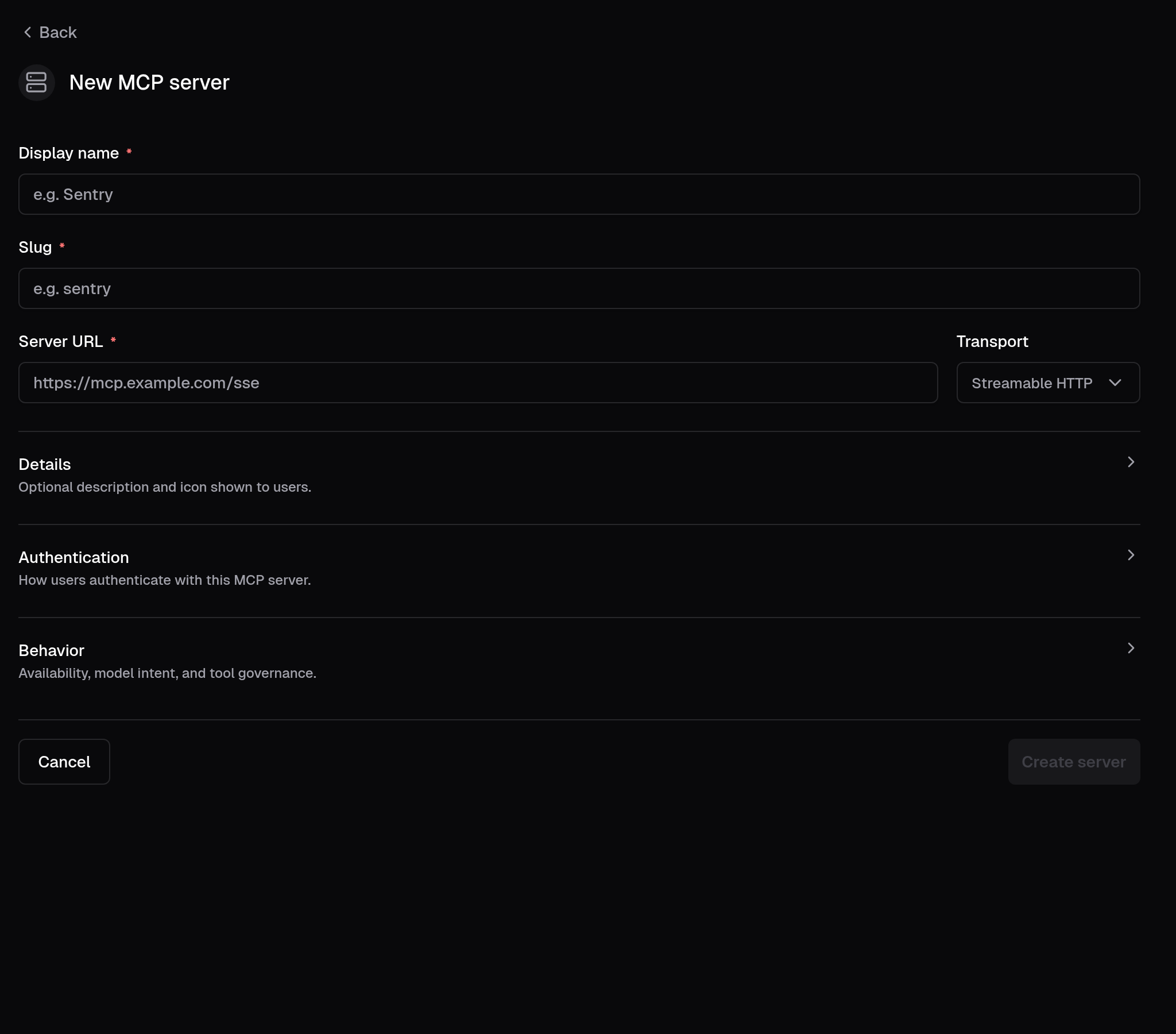
Reported via Support for a Netflix user on the MCP server admin panel.
---
_Filed on behalf of the user by Coder Agents._
---------
Co-authored-by: Jaayden Halko <jaayden@coder.com>
closes CODAGT-121

When an invisible assistant message (e.g. a `provider_executed`
tool-result with no text content) appeared between a visible assistant
message and the next user message, the visible assistant's action bar
was incorrectly hidden. The chain logic computed `isLastInChain` from
the raw `parsedMessages` array, which includes entries that
`ChatMessageItem` returns `null` for.

Extract a shared `isTimelineMessageVisible` helper that encodes the
three null-return conditions (`provider_executed` tool-result-only,
all-provider-executed parts, metadata-only) in one place. Use it both to
guard the early return in `ChatMessageItem` and to skip invisible
entries when computing `isLastInChain`, so chain boundaries are based on
the next *rendered* message.
- feat(agent/agentgit): shorten fallback poll to 5s
- fix(site/AgentsPage): keep git tab visible after reverting to clean
- feat(site/AgentsPage): show last-checked time in git tab

> 🤖
closes DES-22030

## Summary

Mobile view cleanup for the agents page — all changes are behind the
`md:` breakpoint so desktop is unchanged.

**Dropdowns:** Full-width on mobile with dynamic positioning via a
`--mobile-dropdown-bottom` CSS custom property set by a `ResizeObserver`
on the chat input box. Three position variants: `-bottom` (above chat
input), `-top` (below header), `-top-below-header` (below sidebar
header). Viewport branching uses a new `isBelowMdViewport()` helper (`<
768px`) so 640–767 px landscape phones pick the mobile branch instead of
the desktop flyout.

**Layout:** On the main agents page, mobile ordering is header → chat
list → chat input using CSS `order` and `contents` on the content
wrapper. The chat input aligns to the bottom of available space. The
sidebar list uses a top/bottom fade mask on mobile to hint at scrollable
content.

**Header:** Settings, Analytics, sound, and notification icons
consolidated into a single meatball menu dropdown on mobile.
Sound/notification toggles use `e.preventDefault()` to keep the menu
open for state feedback. Chime and notification state is lifted into
`AgentCreatePage` and passed down, so the mobile meatball menu and the
desktop `ChimeButton`/`WebPushButton` stay in sync.

**Workspace pill:** Icon-only on mobile (`size-7` round button with
`StatusIcon`), full pill on desktop. Tooltip hidden on mobile to prevent
ghost tooltip after dropdown close.

**Plus menu:** Workspace picker replaces the flyout with an inline
sub-panel on mobile (back button + search list). Desktop flyout
unchanged. `modal={false}` prevents double-tap when switching between
dropdowns.

**Model selector:** Truncated via `shrink` + `min-w-0` on mobile
(flex-based, no fixed max-width), inline provider/context subtext per
item, tooltip hidden on mobile. Added `open` / `onOpenChange` /
`onTriggerTouchStart` props for external control.

**Consistency:** All back/close buttons normalized to `ArrowLeftIcon`.
Right panel, sidebar settings, header `mobileBack`, and workspace
sub-panel all match the chat top bar pattern.

**Misc polish:** Chat tree nodes use `select-none` +
`-webkit-touch-callout:none` on coarse pointers to suppress the
long-press selection/callout on mobile.

<details>
<summary>Files changed (18)</summary>

- `site/src/index.css` — mobile dropdown CSS with 3 position variants
- `site/src/utils/mobile.ts` — new `isBelowMdViewport()` helper
(`<768px`)
- `site/src/pages/AgentsPage/AgentChatPageView.tsx` — bottom padding
`pb-3`
- `site/src/pages/AgentsPage/AgentCreatePage.tsx` — lift chime + webpush
state; pass handlers to header and buttons
- `site/src/pages/AgentsPage/AgentsPageView.tsx` — `contents` wrapper +
sidebar `border-b`
- `site/src/pages/AgentsPage/components/AgentChatInput.tsx` —
`ResizeObserver` composer ref, `plusMenuView` state, inline workspace
picker, `modal={false}`, mobile branching via `isBelowMdViewport`, bg
- `site/src/pages/AgentsPage/components/AgentCreateForm.tsx` —
`order-last` + `items-end` on mobile
- `site/src/pages/AgentsPage/components/AgentPageHeader.tsx` — meatball
menu (controlled chime/webpush props), `ArrowLeftIcon`, `order-first`,
padding, desktop/mobile branching via `matchMedia`
- `site/src/pages/AgentsPage/components/AgentPageHeader.stories.tsx` —
new Storybook coverage + `play` assertions that toggle state stays in
sync across breakpoints
- `site/src/pages/AgentsPage/components/ChimeButton.tsx` — optional
controlled `enabled` / `onToggle` props
- `site/src/pages/AgentsPage/components/WebPushButton.tsx` — optional
controlled `webPush` / `onToggle` props
-
`site/src/pages/AgentsPage/components/ChatElements/CompactOrgSelector.tsx`
— full-width dropdown class
- `site/src/pages/AgentsPage/components/ChatElements/ModelSelector.tsx`
— truncation, inline subtext, tooltip hidden on mobile, new props
(`open`, `onOpenChange`, `onTriggerTouchStart`)
- `site/src/pages/AgentsPage/components/ChatTopBar.tsx` — full-width
dropdown class
- `site/src/pages/AgentsPage/components/ContextUsageIndicator.tsx` —
full-width dropdown class (mobile branch)
- `site/src/pages/AgentsPage/components/Sidebar/AgentsSidebar.tsx` —
`ArrowLeftIcon`, filter dropdown class, top/bottom fade mask on scroll
area, `select-none` on tree nodes
- `site/src/pages/AgentsPage/components/Sidebar/SidebarTabView.tsx` —
`ArrowLeftIcon`, padding, back button placement
- `site/src/pages/AgentsPage/components/WorkspacePill.tsx` — compact
icon trigger, tooltip hidden on mobile, full-width dropdown class

</details>

> 🤖 Generated by Coder Agents

---------

Co-authored-by: Jaayden Halko <jaayden@coder.com>
> Mux created this PR on behalf of Mike.

This removes the Insights entry from the Coder Agents settings menu.

The underlying page and route stay in place. This PR only stops linking
to that page from the sidebar.
> [!WARNING]
> The change of the status code from `404` to `204` could break peoples
code downstream. Adding this as a breaking change incase.

Theres a whole ton of noise around failed requests, these are all
unrelated to the actual thing that is broken at hand (and are
confusing).

* Change `/api/v2/organizations/.../templates/.../versions/.../previous`
to return `204` instead of `404` (actually makes more sense because the
content doesn't exist, but the route is found.
* Remove unnecessary calls to `/api/v2/users/me/appearance` when the
user isn't logged in.
* Remove unnecessary calls to `/api/v2/deployment/stats` when the
deployment stats aren't allowed to be seen.
* Various changes to `workspace-sharing` so we don't make unnecessary
calls.

Whats left:

* `/api/v2/users/me` still `401`s on the login page. This persists as
when the user is logged in but tries to reach the sign-in page they
should be redirected to the app, not sign in again.
* `monaco-editor` is still upset... we theoretically could inject an
environment that can serve workers... but eh.

#### Old

```sh
% pnpm playwright:test -g "create workspace with default and required parameters"

> coder-v2@ playwright:test /home/coder/coder/site
> playwright test --config=e2e/playwright.config.ts -g 'create workspace with default and required parameters'

...

Running 2 tests using 1 worker

  ✓  1 …e/setup/addUsersAndLicense.spec.ts:7:5 › setup deployment (8.2s)
     2 ….ts:79:5 › create workspace with default and required parameters
[console][error] Failed to load resource: the server responded with a status of 401 (Unauthorized)
[console][error] Failed to load resource: the server responded with a status of 401 (Unauthorized)
[response] url=http://localhost:3111/api/v2/users/me/appearance status=401 body={"message":"You are signed out or your session has expired. Please sign in again to continue.","detail":"Cookie \"coder_session_token\" or query parameter must be provided."}
[response] url=http://localhost:3111/api/v2/users/me status=401 body={"message":"You are signed out or your session has expired. Please sign in again to continue.","detail":"Cookie \"coder_session_token\" or query parameter must be provided."}
[console][error] Failed to load resource: the server responded with a status of 403 (Forbidden)
[response] url=http://localhost:3111/api/v2/deployment/stats status=403 body={"message":"Forbidden.","detail":"You don't have permission to view this content. If you believe this is a mistake, please contact your administrator or try signing in with different credentials."}
[console][error] Failed to load resource: the server responded with a status of 403 (Forbidden)
[response] url=http://localhost:3111/api/v2/deployment/stats status=403 body={"message":"Forbidden.","detail":"You don't have permission to view this content. If you believe this is a mistake, please contact your administrator or try signing in with different credentials."}
[console][error] Failed to load resource: the server responded with a status of 404 (Not Found)
[response] url=http://localhost:3111/api/v2/organizations//provisionerdaemons status=404 body={"message":"Resource not found or you do not have access to this resource"}
[console][error] Failed to load resource: the server responded with a status of 404 (Not Found)
[response] url=http://localhost:3111/api/v2/organizations/default/templates/a4e8096d/versions/agreeable_glenn33/previous status=404 body={"message":"No previous template version found for \"agreeable_glenn33\"."}
[console][warning] Could not create web worker(s). Falling back to loading web worker code in main thread, which might cause UI freezes. Please see https://github.com/microsoft/monaco-editor#faq
[console][warning] You must define a function MonacoEnvironment.getWorkerUrl or MonacoEnvironment.getWorker
[console][error] Failed to load resource: the server responded with a status of 401 (Unauthorized)
[console][error] Failed to load resource: the server responded with a status of 401 (Unauthorized)
[response] url=http://localhost:3111/api/v2/users/me/appearance status=401 body={"message":"You are signed out or your session has expired. Please sign in again to continue.","detail":"Cookie \"coder_session_token\" or query parameter must be provided."}
[response] url=http://localhost:3111/api/v2/users/me status=401 body={"message":"You are signed out or your session has expired. Please sign in again to continue.","detail":"Cookie \"coder_session_token\" or query parameter must be provided."}
[console][error] Failed to load resource: the server responded with a status of 403 (Forbidden)
[response] url=http://localhost:3111/api/v2/deployment/stats status=403 body={"message":"Forbidden.","detail":"You don't have permission to view this content. If you believe this is a mistake, please contact your administrator or try signing in with different credentials."}
  ✓  2 …5 › create workspace with default and required parameters (7.0s)atus of 403 (Forbidden)
[response] url=http://localhost:3111/api/v2/deployment/stats status=403 body={"message":"Forbidden.","detail":"You don't have permission to view this content. If you believe this is a mistake, please contact your administrator or try signing in with different credentials."}
[console][error] Failed to load resource: the server responded with a status of 403 (Forbidden)
[response] url=http://localhost:3111/api/v2/deployment/stats status=403 body={"message":"Forbidden.","detail":"You don't have permission to view this content. If you believe this is a mistake, please contact your administrator or try signing in with different credentials."}

  2 passed (56.1s)
```

`23 LOL` (Lines of logs)

#### New

```sh
% pnpm playwright:test -g "create workspace with default and required parameters"

> coder-v2@ playwright:test /home/coder/coder/site
> playwright test --config=e2e/playwright.config.ts -g 'create workspace with default and required parameters'

...

Running 2 tests using 1 worker

  ✓  1 …e/setup/addUsersAndLicense.spec.ts:7:5 › setup deployment (8.7s)
     2 ….ts:79:5 › create workspace with default and required parameters
[console][error] Failed to load resource: the server responded with a status of 401 (Unauthorized)
[console][error] Failed to load resource: the server responded with a status of 401 (Unauthorized)
[response] url=http://localhost:3111/api/v2/users/me/appearance status=401 body={"message":"You are signed out or your session has expired. Please sign in again to continue.","detail":"Cookie \"coder_session_token\" or query parameter must be provided."}
[response] url=http://localhost:3111/api/v2/users/me status=401 body={"message":"You are signed out or your session has expired. Please sign in again to continue.","detail":"Cookie \"coder_session_token\" or query parameter must be provided."}
[console][warning] Could not create web worker(s). Falling back to loading web worker code in main thread, which might cause UI freezes. Please see https://github.com/microsoft/monaco-editor#faq
[console][warning] You must define a function MonacoEnvironment.getWorkerUrl or MonacoEnvironment.getWorker
  ✓  2 …5 › create workspace with default and required parameters (7.1s)atus of 401 (Unauthorized)
[console][error] Failed to load resource: the server responded with a status of 401 (Unauthorized)
[response] url=http://localhost:3111/api/v2/users/me/appearance status=401 body={"message":"You are signed out or your session has expired. Please sign in again to continue.","detail":"Cookie \"coder_session_token\" or query parameter must be provided."}
[response] url=http://localhost:3111/api/v2/users/me status=401 body={"message":"You are signed out or your session has expired. Please sign in again to continue.","detail":"Cookie \"coder_session_token\" or query parameter must be provided."}

  2 passed (32.0s)
```

`9 LOL` (Lines of logs)
Description:

The workspace notification pills were implemented using Tooltip, which
is hover-only and not reachable via keyboard navigation.

Replace Tooltip/TooltipProvider/TooltipTrigger with
Popover/PopoverContent/PopoverTrigger, and change the trigger element
from a non-interactive div to a button. This makes the notification
pills fully keyboard accessible.


Screenshot:
**Issue**
<img width="640" height="211" alt="not-working"
src="https://github.com/user-attachments/assets/3cb12fdf-704b-41a2-ab9c-c198d03158a7"
/>


**Fix**
<img width="640" height="211" alt="working"
src="https://github.com/user-attachments/assets/25807a6b-7065-4753-b55e-d8db103ba501"
/>
 George K

