> 🤖 This PR was written by Coder Agents on behalf of Jake Howell.

## Problem

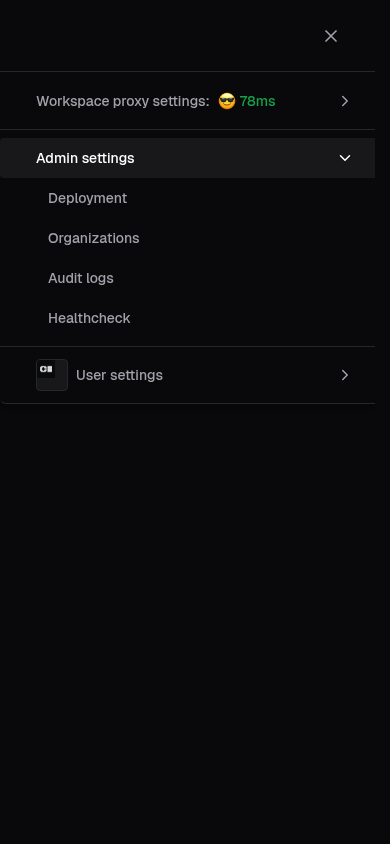
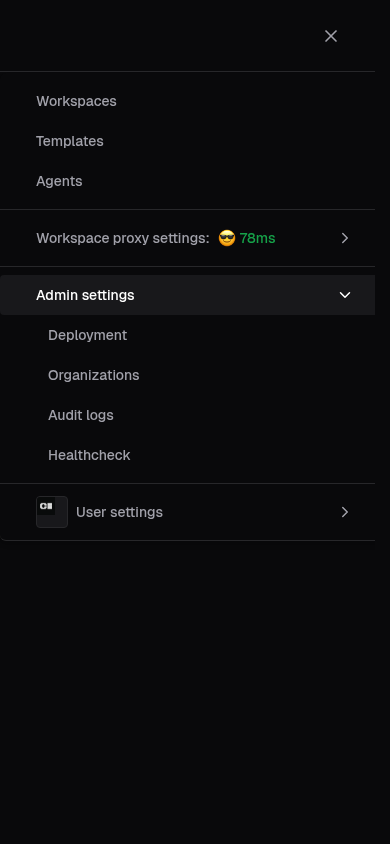
#27191 fixed the mobile menu missing the **AI** / **AI sessions** items,
but did so by duplicating the item list. The desktop
`DeploymentDropdown` and mobile `MobileMenu` each hardcode the same
Admin settings links and permission gates. That duplication is exactly
why the two drifted out of sync in the first place, and it will happen
again the next time an item is added.

## Fix

Extract a single source of truth in `adminSettings.ts`:

- `AdminSettingsPermissions` type shared by both surfaces.
- `getAdminSettingsItems(permissions)` builds the ordered item list
using conditional spreads, e.g.

  ```ts
  ...(canViewAISettings ? [{ label: "AI", to: "/ai/settings" }] : []),
  ```

- `canViewAdminSettings(permissions)` for the desktop visibility gate.

`DeploymentDropdown` and `MobileMenu` now just `.map()` over the shared
list, so adding or changing an item is a one-line edit in one place.

No backend, permission, routing, or user-visible behavior changes. Item
labels, links, and order match the current desktop dropdown (mobile now
inherits the same `linkToAuditing` constant instead of a hardcoded
`/audit`, same value).

<details>
<summary>Rationale / approach</summary>

Following Larry Wall's virtues: laziness (one list to maintain, not
two), impatience (kill the class of bug where the two menus silently
diverge), and hubris (leave a shared module nobody has to apologize
for).

Kept `canViewOrganizations` in the permission type and visibility gate
even though Organizations always renders, preserving prior behavior
rather than changing it as part of a refactor.

Validated with `biome check` and `tsc --noEmit`; existing
`MobileMenu.stories.tsx` args already cover the Admin / Auditor /
OrgAdmin / Member permission matrices.

</details>
## Problem

The desktop `DeploymentDropdown` surfaces **AI** and **AI sessions**
items under Admin settings (behind `canViewAISettings` /
`canViewAIBridge`), but the mobile `MobileMenu` was never updated to
match — its `AdminSettingsSub` only knows about Deployment,
Organizations, Audit logs, Connection logs, and Healthcheck.

This is a leftover from #25582 ("promote AI settings to a top-level
section"), which threaded `canViewAISettings` through `Navbar` /
`NavbarView` / `DeploymentDropdown` but did not touch `MobileMenu.tsx`.
`canViewAIBridge` has the same oversight.

## Fix

- Extend `MobileMenuPermissions` with `canViewAIBridge` and
`canViewAISettings`.
- Render **AI** (→ `/ai/settings`) and **AI Sessions** (→
`/ai-gateway/sessions`) in the mobile Admin settings collapsible, in the
same order as the desktop dropdown.
- Thread the two flags through `NavbarView` into `MobileMenu`.
- Cover the new args in `MobileMenu.stories.tsx` (Admin story now shows
the AI items; Auditor / OrgAdmin / Member keep them hidden).

No backend, permission, or routing changes.

> 🤖 This PR was drafted by Coder Agents on behalf of @tracyjohnsonux and
needs a human review.
Finishing touches for the AI cost control group members table.
- Spend stays primary-colored until near the budget limit, via a new
AIBudgetAmount component
- "AI budget period" label shows the current spend window in local
time, next to the members tab
- Budget tooltip notes the reset date and the group's default limit
- "Budget type" renamed to "Budget group", with a badge for the
governing group or override
- Distinguishes $0 budget ("None") from no budget ("Unlimited")
- Unattributed spend from another group shows a note instead of a dash
- "Manage AI budget" disabled only when another named group governs
- Replaces UserAISpend with generated UserAISpendStatus, fixing
limit_source
Closes#26401
ref DEVEX-567

Fixes a bug I noticed where #26881 claims to have made the template
builder's `SelectionSummary` sidebar sticky-positioned, but the sidebar
position wasn't actually sticky in practice:

## template builder's `SelectionSummary` (top right)

### before


https://github.com/user-attachments/assets/1e9360b5-4b0e-45b4-a859-f8edab51add7

### after


https://github.com/user-attachments/assets/3cee75e9-9813-401e-9922-d2563185f8f5

---

Why I removed `overflow-y-auto` from `#main-content`:

>`position: sticky` resolves against the nearest ancestor scroll
container — any ancestor whose overflow is not visible. `#main-content`
had `overflow-y-auto`, so it _was_ that container for the sidebar. But
because the layout wrapper is `min-h-screen`, `<main>` grows to fit its
content and never actually scrolls — the window scrolls. So the sidebar
was pinning relative to a container that never moves → no effect.

That was necessary for the main goal of this PR, which was to fix sticky
positioning for the template builder's `SelectionSummary` sidebar.
However, removing that style from `#main-content` affected 2 other
sticky-positioned elements within the site:

>Two other pages have sticky elements that, like our sidebar, were
resolving against the non-scrolling `<main>` and were therefore
effectively inert:
>- CreateWorkspacePageView.tsx:397 — `sticky top-5` side panel
>- modules/templates/TemplateFiles/TemplateFiles.tsx:64 — `sticky top-8`
file tree

^Like `SelectionSummary`, these 2 elements hadn't been behaving with
sticky positioning as expected; they would just scroll away past the top
of the screen.

For all 3 of these sticky elements, since their `top` is now relative to
the window instead of `#main-content`, they have to be positioned
farther downward so that they don't get covered by the navbar.

## `TemplateFiles`' `TemplateFileTree` (top left)

### before


https://github.com/user-attachments/assets/ee79ea36-1a47-4b1b-86ef-c65b493ea455

### after


https://github.com/user-attachments/assets/a1b0a949-b5e3-4434-acaa-ab24e82b1669

## `CreateWorkspacePageView`'s "Go back" button (top left)

### before


https://github.com/user-attachments/assets/00b076f6-8e55-4a96-8b92-d33d92c85334

### after


https://github.com/user-attachments/assets/10ae05e1-3112-4dfc-84b4-2c44fee23e06

co-authored with Claude Code

---------

Co-authored-by: Jeremy Ruppel <jeremyruppel@users.noreply.github.com>
Adds the current user's AI spend progress to the top navbar avatar
dropdown when /api/v2/users/me/ai/spend reports a configured spend
limit. The shared dropdown content accepts an optional profileExtra
slot so the Agents sidebar can opt in later without changing the
default sidebar UI.

Introduces a temporary site API type and a React Query helper for
AIGOV-473 that refetches each time the dropdown opens, plus shared
budget progress helpers used by both the new dropdown bar and the
existing Agents usage indicator. The shared AIBudgetUsage component
moves to site/src/components so the dropdown and group budget UI
format spend identically, including the unlimited case. The avatar
border polls the spend endpoint and is colored by severity while the
dropdown is closed.

Closes AIGOV-473
## Description

Moves frontend routes from `/aibridge` to `/ai-gateway` and adds client-side redirects so existing bookmarks and deep links continue to work.

## Changes

- Move React Router paths from `/aibridge` to `/ai-gateway`
- Add `<Navigate>` redirects from `/aibridge`, `/aibridge/sessions`, and `/aibridge/sessions/:sessionId`
- Update `navigate()` calls and `Link` components to use new paths

Closes https://linear.app/coder/issue/AIGOV-233

> Generated with the assistance of Coder Agents (@ssncferreira)
> Vibe-coded using Coder Agents, author with limited frontend knowledge,
manually tested.

Adds an `AI Gateway Keys` page under `Admin settings > AI > AI Gateway
Keys` for key management of keys used by standalone AI Gateway replicas
to authenticate into `coderd`.
The page is shown to users with `viewAIGatewayKeys` permission and a
Premium license with AI Gateway enabled.
Adds Storybook coverage.

---------

Co-authored-by: Jake Howell <jacob@coder.com>
fixes DEVEX-402

Alternative to #26077, which aimed to address this flake in
UsersPage.stories.tsx only:

>Unable to perform pointer interaction as the element has
`pointer-events: none`

In the original PR I was going to "fix" the flake by adding
`pointerEventsCheck: Never` like we have in 2 other tests. However,
resetting `pointer-events` during `beforeEach` in our global Vitest
setup removes the need for that `pointerEventsCheck` workaround. 🙂

tl;dr: Each of these 3 tests were failing because of an immediately
preceding test which opens a Radix Dialog, setting `pointer-events:
none` on the body element.

Co-written with Coder Agents. Relevant chat responses:

>**The actual root cause is story isolation.** The previous story
(`UpdateUserRoleSuccess`) opens a Radix Dialog, which triggers Radix's
`DismissableLayer` to set `document.body.style.pointerEvents = "none"`.
When that story completes, Storybook unmounts the React tree, but the
cleanup of `body.style.pointerEvents` is tied to a `useEffect` cleanup
in `DismissableLayer`. If Storybook begins the next story's play
function before the browser has fully flushed the previous unmount
cycle, `document.body.style.pointerEvents` is still `"none"`. The "Open
menu" button, which is a plain table button with no Radix modal layer
above it providing `pointer-events: auto`, inherits `"none"` from body,
and the first click fails.
>
>**Why it's flaky:** The Storybook Vitest plugin
(`@storybook/addon-vitest`) runs stories sequentially in the same
browser page. When `UpdateUserRoleSuccess` finishes, React unmounts the
tree, and `DismissableLayer`'s `useEffect` cleanup should restore
`body.pointerEvents`. But there's a race between unmount cleanup
completing and the next story's play function starting. Sometimes
cleanup wins (test passes), sometimes the play function wins (test
fails).
>
>**[#26077]'s `pointerEventsCheck: Never`** works but is a workaround.
It doesn't address the leaked state, and `UpdateUserRoleSuccess` itself
could be flaky too (if whatever story precedes it leaves the same stale
state). The other stories in the same file (Suspend, Delete, Activate,
ResetPassword) all open Radix Dialogs too, so any of them could leak
this state to the next story.
The descendant selector `[&_img]:size-icon-sm` in `menuItemClass` was
matching the `<img>` nested inside `<Avatar>` on the User settings row
of the mobile menu, pinning the avatar image to `1.125rem` instead of
letting it fill its Avatar container. The same descendant rule also
applied to nested SVGs.

Switch both rules to direct-child selectors (`[&>svg]`, `[&>img]`),
matching the symmetric `shrink-0` rules already next to them and the
same pattern used in `Button.tsx`. Menu items that contain nested
`<img>`s already set their own sizes explicitly (`w-4 h-4` in
`ProxySettingsSub`, `!size-3.5` in `WorkspacePill`), so this only stops
overriding components like `Avatar` that manage their own internal
sizing.

Also removes the now-dead `[&_img]:w-full [&_img]:h-full` workaround in
`UserDropdownContent.tsx` that fought the same bug per-item; that menu
item no longer renders an `<img>`, and the root fix makes the workaround
unnecessary anyway.

Refs
[CODAGT-552](https://linear.app/codercom/issue/CODAGT-552/mobile-menu-user-avatar-image-is-undersized-inside-its-container)

<details>
<summary>Investigation notes</summary>

**Repro (before):** mobile viewport, user has an image avatar set, open
hamburger menu, observe the avatar in the User settings row is smaller
than its bordered square.

**Root cause:** `site/src/components/DropdownMenu/menuClasses.ts` set
`[&_img]:size-icon-sm` using a Tailwind descendant selector (`_`). That
matches every `<img>` *inside* a menu item, including the one nested
inside `<AvatarPrimitive.Root>`. The Avatar's inner image is supposed to
be `aspect-square size-full object-contain` and inherit its size from
the Avatar root (`--avatar-default` ≈ 24px by default), but the
descendant rule overrides that and pins it to 1.125rem.

**Prior workaround:** `UserDropdownContent.tsx` previously added
`[&_img]:w-full [&_img]:h-full` per-item to fight the same bug on
desktop. That menu item no longer renders an `<img>`, so the override
was already dead code; removed here for hygiene.

**Safety check on the wider change:** every other menu item that
contains a nested `<img>` already sets its own sizes explicitly:
- `ProxySettingsSub` (`MobileMenu.tsx`): `<ExternalImage className="w-4
h-4" />`
- `WorkspacePill.tsx`: `[&_svg]:!size-3.5 [&_img]:!size-3.5` on the menu
content

Direct-child icons (`ChevronRightIcon`, `CircleHelpIcon`, `XIcon`,
lucide icons in `UserDropdownContent.tsx`) remain direct children of the
menu item, so `[&>svg]:size-icon-sm` keeps sizing them as before.

</details>

---

_Authored by Coder Agent on behalf of @tracyjohnsonux._
> 🤖 This PR was written by Coder Agents on behalf of Jake Howell.

Linear: [DEVEX-355](https://linear.app/coder/issue/DEVEX-355)

Fifth and final PR in a 5-PR stack splitting #25328. Surfaces the AI
settings section in the dashboard chrome and moves the existing AI
Governance page out of `/deployment`.

- `Navbar` / `NavbarView` / `DeploymentDropdown` gain a
`canViewAISettings` prop sourced from the `viewAnyAIProvider` permission
added in PR 2. The deployment dropdown gets a new AI entry that links to
`/ai/settings`.
- `DeploymentSidebarView` drops the AI-related entries that now live
under `/ai/settings`.
- `AISettingsSidebarView` expands to include AI Governance and a
cross-section link to Manage Coder Agents.
- `router.tsx` removes the `/deployment/ai-governance` route and mounts
the matching `/ai/settings/governance` child route under the new AI
settings layout.
- `ChatsSidebar` settings panel repoints the Providers link from
`/deployment/ai-providers` to `/ai/settings`.

<details>
<summary>Stack</summary>

1. #25579 jakehwll/DEVEX-355/01-primitives, primitives
2. #25580 jakehwll/DEVEX-355/02-api, API client and query layer
3. #25581 jakehwll/DEVEX-355/03-components, provider form components
4. #25583 jakehwll/DEVEX-355/04-pages, pages and routes
5. **jakehwll/DEVEX-355/05-section, section reshuffle (this PR)**

Replaces #25328 once the stack lands.
</details>
The workspace quota meter in the Agents chat sidebar previously only
refreshed on a full page reload, while the AI cost-usage meter rendered
next to it already polled every 60 seconds.

This change gives the Agents usage indicator the same 60s
workspace-quota polling and refreshes derived workspace caches
immediately when workspace-affecting chat tools complete.
`create_workspace`, `start_workspace`, and `stop_workspace` now
invalidate the workspace quota and `workspaces` query family, so both
the credit numbers and the workspace-count detail stay in sync.

`create_workspace` still invalidates the chat record to resolve
workspace bindings, and archive-and-delete uses the shared workspace
mutation invalidation helper so deleting an agent workspace refreshes
the same derived workspace data.

Closes CODAGT-444


Tested manually and it works perfectly.
Fixes https://linear.app/codercom/issue/CODAGT-350

On OSS or no-license single-org deployments, the Organizations admin
link was hidden because `canViewOrganizationSettings` was gated on
`showOrganizations`, which requires either a multi-org entitlement or >1
org. The page was still reachable via direct URL, but the members view
displayed a raw "Template RBAC is a Premium feature. Contact sales!"
error from the groups API.

Two fixes:

1. Always render the Organizations link inside the `DeploymentDropdown`.
The dropdown itself is only shown to users with admin-level permissions,
so Organizations is effectively gated on having admin access.

2. Remove `groupsByUserIdQuery.error` from the error chain on the
members page. The groups endpoint is gated behind
`templateRBACEnabledMW` on enterprise, returning a 403 on OSS. The
groups data is already optional, so the page renders fine without it.

> Generated by Coder Agents
Remove the `ExperimentAgents` feature flag so the Agents feature is
always available without requiring `--experiments=agents`. The feature
is now in beta.

Existing deployments that still pass `--experiments=agents` will get a
harmless "ignoring unknown experiment" warning on startup.

### Changes

**Backend:**
- Remove `RequireExperimentWithDevBypass` middleware from chat and MCP
server routes
- Always include `AgentsAccessRole` in assignable site roles (later
refactored to org-scoped on main; rebase keeps that)
- Always set `AgentsTabVisible = true`, then drop the entire dead
`AgentsTabVisible` metadata pipeline (Go htmlState field,
populateHTMLState goroutine, HTML meta tag, useEmbeddedMetadata
registration, mock); no production consumer reads it. `AgentsNavItem`
already gates on `permissions.createChat`.
- Make `blob:` CSP `img-src` addition unconditional
- Remove `ExperimentAgents` constant, `DisplayName` case, and
`ExperimentsKnown` entry

**CLI:**
- Graduate the agents TUI from `coder exp agents` to `coder agents`
(moved from `AGPLExperimental()` to `CoreSubcommands()`)
- Drop the `agent` alias so it does not collide with the hidden
workspace-agent command
- Rename implementation files `cli/exp_agents_*.go` -> `cli/agents_*.go`
and internal identifiers (`expChatsTUIModel` -> `chatsTUIModel`,
`newExpChatsTUIModel` -> `newChatsTUIModel`, `setupExpAgentsBackend` ->
`setupAgentsBackend`, `startExpAgentsSession` -> `startAgentsSession`,
`expAgentsPtr` -> `agentsPtr`, `expAgentsSession` -> `agentsSession`,
`TestExpAgents*` -> `TestAgents*`). `expClient` (the
`*codersdk.ExperimentalClient` local) is kept; `coderd/exp_chats*.go`
and other still-experimental `cli/exp_*.go` commands are intentionally
untouched.

**Frontend:**
- Remove experiment check from `AgentsNavItem` - render when
`canCreateChat` is true
- Remove `agentsEnabled` experiment check from `WorkspacesPage`, then
gate `chatsByWorkspace` on `permissions.createChat` so users without
chat access don't trigger the per-page DB query (Copilot review
feedback)
- Add `FeatureStageBadge` (beta) next to the Coder logo in the Agents
sidebar (desktop + mobile)

**Docs:**
- Remove experiment flag setup instructions from `early-access.md` and
`getting-started.md` (and rename `early-access.md`'s "Enable Coder
Agents" heading to "Set up Coder Agents", since there is no enablement
step left)
- Update `chats-api.md` and `getting-started.md`'s Chats API note to say
"beta" instead of "experimental"
- `docs/manifest.json`: drop "experimental" from the Chats API sidebar
description
- `make gen` regenerated `docs/reference/cli/agents.md` and the CLI
index
- `scripts/check_emdash.sh`: exclude `cli/testdata/*.golden` and
`enterprise/cli/testdata/*.golden` from the new repo-wide emdash lint,
since serpent emits emdash borders in every generated `--help` golden
file

**Tests:**
- Remove `ExperimentAgents` setup from all test files (14 occurrences
across 7 files)
- Update stale "with the agents experiment" comments in
`coderd/x/chatd/integration_test.go` and `coderd/mcp_test.go`


<img width="1185" height="900" alt="image"
src="https://github.com/user-attachments/assets/b420bc8f-41d6-42c6-abd8-ad572533d651"
/>


> 🤖 Generated by Coder Agents
*Disclaimer: implemented by a Coder Agent using Claude Opus 4.6*

Remove the "AI Bridge Logs" menu item from the Admin settings dropdown,
keeping only the "AI Bridge Sessions" link. The `/aibridge` index now
redirects to `/aibridge/sessions` instead of `/aibridge/request-logs`.

The request-logs route and view remain accessible via direct URL
(`/aibridge/request-logs`) for users who still need it.

Fixes https://linear.app/codercom/issue/AIGOV-205

<details><summary>Changes</summary>

- `DeploymentDropdown.tsx`: Removed "AI Bridge Logs" menu item; the
`canViewAIBridge` block now only renders the "AI Bridge Sessions" link
- `router.tsx`: Changed `/aibridge` index redirect from `request-logs`
to `/aibridge/sessions`
- All request-logs page files, route, and components are preserved for
direct URL access

</details>
> [!WARNING]
> The change of the status code from `404` to `204` could break peoples
code downstream. Adding this as a breaking change incase.

Theres a whole ton of noise around failed requests, these are all
unrelated to the actual thing that is broken at hand (and are
confusing).

* Change `/api/v2/organizations/.../templates/.../versions/.../previous`
to return `204` instead of `404` (actually makes more sense because the
content doesn't exist, but the route is found.
* Remove unnecessary calls to `/api/v2/users/me/appearance` when the
user isn't logged in.
* Remove unnecessary calls to `/api/v2/deployment/stats` when the
deployment stats aren't allowed to be seen.
* Various changes to `workspace-sharing` so we don't make unnecessary
calls.

Whats left:

* `/api/v2/users/me` still `401`s on the login page. This persists as
when the user is logged in but tries to reach the sign-in page they
should be redirected to the app, not sign in again.
* `monaco-editor` is still upset... we theoretically could inject an
environment that can serve workers... but eh.

#### Old

```sh
% pnpm playwright:test -g "create workspace with default and required parameters"

> coder-v2@ playwright:test /home/coder/coder/site
> playwright test --config=e2e/playwright.config.ts -g 'create workspace with default and required parameters'

...

Running 2 tests using 1 worker

  ✓  1 …e/setup/addUsersAndLicense.spec.ts:7:5 › setup deployment (8.2s)
     2 ….ts:79:5 › create workspace with default and required parameters
[console][error] Failed to load resource: the server responded with a status of 401 (Unauthorized)
[console][error] Failed to load resource: the server responded with a status of 401 (Unauthorized)
[response] url=http://localhost:3111/api/v2/users/me/appearance status=401 body={"message":"You are signed out or your session has expired. Please sign in again to continue.","detail":"Cookie \"coder_session_token\" or query parameter must be provided."}
[response] url=http://localhost:3111/api/v2/users/me status=401 body={"message":"You are signed out or your session has expired. Please sign in again to continue.","detail":"Cookie \"coder_session_token\" or query parameter must be provided."}
[console][error] Failed to load resource: the server responded with a status of 403 (Forbidden)
[response] url=http://localhost:3111/api/v2/deployment/stats status=403 body={"message":"Forbidden.","detail":"You don't have permission to view this content. If you believe this is a mistake, please contact your administrator or try signing in with different credentials."}
[console][error] Failed to load resource: the server responded with a status of 403 (Forbidden)
[response] url=http://localhost:3111/api/v2/deployment/stats status=403 body={"message":"Forbidden.","detail":"You don't have permission to view this content. If you believe this is a mistake, please contact your administrator or try signing in with different credentials."}
[console][error] Failed to load resource: the server responded with a status of 404 (Not Found)
[response] url=http://localhost:3111/api/v2/organizations//provisionerdaemons status=404 body={"message":"Resource not found or you do not have access to this resource"}
[console][error] Failed to load resource: the server responded with a status of 404 (Not Found)
[response] url=http://localhost:3111/api/v2/organizations/default/templates/a4e8096d/versions/agreeable_glenn33/previous status=404 body={"message":"No previous template version found for \"agreeable_glenn33\"."}
[console][warning] Could not create web worker(s). Falling back to loading web worker code in main thread, which might cause UI freezes. Please see https://github.com/microsoft/monaco-editor#faq
[console][warning] You must define a function MonacoEnvironment.getWorkerUrl or MonacoEnvironment.getWorker
[console][error] Failed to load resource: the server responded with a status of 401 (Unauthorized)
[console][error] Failed to load resource: the server responded with a status of 401 (Unauthorized)
[response] url=http://localhost:3111/api/v2/users/me/appearance status=401 body={"message":"You are signed out or your session has expired. Please sign in again to continue.","detail":"Cookie \"coder_session_token\" or query parameter must be provided."}
[response] url=http://localhost:3111/api/v2/users/me status=401 body={"message":"You are signed out or your session has expired. Please sign in again to continue.","detail":"Cookie \"coder_session_token\" or query parameter must be provided."}
[console][error] Failed to load resource: the server responded with a status of 403 (Forbidden)
[response] url=http://localhost:3111/api/v2/deployment/stats status=403 body={"message":"Forbidden.","detail":"You don't have permission to view this content. If you believe this is a mistake, please contact your administrator or try signing in with different credentials."}
  ✓  2 …5 › create workspace with default and required parameters (7.0s)atus of 403 (Forbidden)
[response] url=http://localhost:3111/api/v2/deployment/stats status=403 body={"message":"Forbidden.","detail":"You don't have permission to view this content. If you believe this is a mistake, please contact your administrator or try signing in with different credentials."}
[console][error] Failed to load resource: the server responded with a status of 403 (Forbidden)
[response] url=http://localhost:3111/api/v2/deployment/stats status=403 body={"message":"Forbidden.","detail":"You don't have permission to view this content. If you believe this is a mistake, please contact your administrator or try signing in with different credentials."}

  2 passed (56.1s)
```

`23 LOL` (Lines of logs)

#### New

```sh
% pnpm playwright:test -g "create workspace with default and required parameters"

> coder-v2@ playwright:test /home/coder/coder/site
> playwright test --config=e2e/playwright.config.ts -g 'create workspace with default and required parameters'

...

Running 2 tests using 1 worker

  ✓  1 …e/setup/addUsersAndLicense.spec.ts:7:5 › setup deployment (8.7s)
     2 ….ts:79:5 › create workspace with default and required parameters
[console][error] Failed to load resource: the server responded with a status of 401 (Unauthorized)
[console][error] Failed to load resource: the server responded with a status of 401 (Unauthorized)
[response] url=http://localhost:3111/api/v2/users/me/appearance status=401 body={"message":"You are signed out or your session has expired. Please sign in again to continue.","detail":"Cookie \"coder_session_token\" or query parameter must be provided."}
[response] url=http://localhost:3111/api/v2/users/me status=401 body={"message":"You are signed out or your session has expired. Please sign in again to continue.","detail":"Cookie \"coder_session_token\" or query parameter must be provided."}
[console][warning] Could not create web worker(s). Falling back to loading web worker code in main thread, which might cause UI freezes. Please see https://github.com/microsoft/monaco-editor#faq
[console][warning] You must define a function MonacoEnvironment.getWorkerUrl or MonacoEnvironment.getWorker
  ✓  2 …5 › create workspace with default and required parameters (7.1s)atus of 401 (Unauthorized)
[console][error] Failed to load resource: the server responded with a status of 401 (Unauthorized)
[response] url=http://localhost:3111/api/v2/users/me/appearance status=401 body={"message":"You are signed out or your session has expired. Please sign in again to continue.","detail":"Cookie \"coder_session_token\" or query parameter must be provided."}
[response] url=http://localhost:3111/api/v2/users/me status=401 body={"message":"You are signed out or your session has expired. Please sign in again to continue.","detail":"Cookie \"coder_session_token\" or query parameter must be provided."}

  2 passed (32.0s)
```

`9 LOL` (Lines of logs)
> 🤖 This PR was modified by Coder Agent on behalf of Jake Howell

Removes the bottom-line navbar effect in `<NavbarView />` and cleans up
prerelease CSS.

- Remove `relative` from `<NavbarView />` as it was redundant with the
`sticky` class.
- Refactor `getPrereleaseFlag` to simplify version classification.
- Clean up unused prerelease CSS from `index.css`.

<img width="920" height="83" alt="image"
src="https://github.com/user-attachments/assets/84e351e6-d7a2-4fe2-a331-27c651266256"
/>
Addresses review findings from #23827 that were added post-merge:

- Persisted attachments now store `organizationId`; mismatched orgs
pruned on restore
- Workspace selection reconciliation: stale IDs from previous orgs
dropped via derived `effectiveWorkspaceId`
- Org picker uses `permittedOrganizations()` for RBAC-aware filtering
- Org picker hidden when user belongs to only one org
- Ref-sync `useEffect` replaced with `useEffectEvent`
- `CreateWorkspace()` and `ListTemplates()` take `organizationID` and
`db` as required function parameters instead of optional struct fields —
compiler enforces them, removes scattered nil guards
- Cross-org template check in `CreateWorkspace` is now unconditional
- `ListTemplates` org-scoping filter now has test coverage
- `setupChatInfra` comment fixed; test helpers use params structs
instead of positional UUIDs
- Enterprise test documents that org admin only sees own chats (handler
hardcodes `OwnerID` — future work needs sidebar UI before lifting that
restriction)

> 🤖
Replaces remaining MUI `<Skeleton />` usages with our shared `Skeleton`
component to keep loading states consistent and reduce MUI/Emotion
coupling. Also cleans up a few adjacent touched styles while preserving
existing behavior.

- Replace `@mui/material/Skeleton` with `#/components/Skeleton/Skeleton`
- Remove a few MUI-specific skeleton patterns at callsites
- De-mui adjacent Emotion styles
- Simplify filter layout handling with class-based responsive wrapping
\`InlineMarkdown\` and \`MemoizedInlineMarkdown\` lived in
\`Markdown.tsx\`
alongside a static \`import { Prism as SyntaxHighlighter } from
"react-syntax-highlighter"\` — the full PrismJS build with ~300 language
grammars. Because \`DashboardLayout\` eagerly imports
\`AnnouncementBannerView → InlineMarkdown\`, every authenticated page
loaded and evaluated the entire Prism/refractor bundle on startup even
though syntax highlighting is only used in secondary views.

This PR moves \`InlineMarkdown\` and \`MemoizedInlineMarkdown\` into
their
own \`InlineMarkdown.tsx\` file that depends only on \`react-markdown\`
and
updates all six consumers to import from the new module.
\`Markdown.tsx\`
keeps the PrismJS import for the full \`Markdown\` component, which is
only reached through lazy-loaded routes.

> 🤖 Generated by Coder Agents
Dev and RC builds now show diagonal warning stripes in the navbar plus a
centered version badge, making it impossible to miss which build you're
running.

**Devel build:** amber "warning" from theme

**RC build:** sky "pending" from theme

> 🤖 Written by a Coder Agent. Will be reviewed by a human.
Updates the descriptive text in the proxy selection dropdown menu to be
clearer and more concise.

**Before:**
> Workspace proxies improve terminal and web app connections to
workspaces. This does not apply to CLI connections. A region must be
manually selected, otherwise the default primary region will be used.

**After:**
> Workspace proxies improve terminal and web app connections. CLI
connections are unaffected. If no region is selected, the primary region
will be used.

---------

Co-authored-by: blink-so[bot] <211532188+blink-so[bot]@users.noreply.github.com>
## Summary

Add site-wide banners for AI Governance seat usage thresholds:

1. **90% capacity warning (admin-only):** When actual AI Governance
seats are ≥90% and <100% of the license limit, admins see:
   > "You have used 90% of your AI governance add-on seats."

2. **Over-limit banner (admin-only):** When actual seats exceed the
license limit, admins see a prominent warning:
> "Your organization is using {actual} / {limit} AI Governance user
seats ({X}% over the limit). Contact sales@coder.com"
   - Uses floor whole percentage (Go int division / `Math.floor`)
   - Includes a clickable `mailto:sales@coder.com` link
## Summary

Adds an entitlement-gated **AI add-on** column to both the **Users**
table and the **Organization Members** table. When
`ai_governance_user_limit` is entitled, each row shows whether the user
is consuming an AI seat.

## Background

The AI governance add-on tracks which users are consuming AI seats.
Admins need visibility into per-user seat consumption directly from the
user management tables. This change surfaces that information through
both the site-wide Users table and the per-organization Members table,
gated behind the `ai_governance_user_limit` entitlement so the column
only appears when the feature is licensed.

## Implementation

### Backend
- **New SQL query** `GetUserAISeatStates`
(`coderd/database/queries/aiseatstate.sql`) — returns user IDs consuming
an AI seat, derived from:
  - Users with entries in `aibridge_interceptions` (AI Bridge usage)
- Users who own workspaces with `has_ai_task = true` builds (AI Tasks
usage)
- **SDK types** — added `has_ai_seat: boolean` to `codersdk.User` and
`codersdk.OrganizationMemberWithUserData`
- **Handler wiring** — both the Users list endpoint (`coderd/users.go`)
and all Members endpoints (`coderd/members.go`) query AI seat state per
page of user IDs and populate the response field
- **dbauthz** — per-user `ActionRead` checks on `ResourceUserObject`

### Frontend
- **Shared `AISeatCell` component**
(`site/src/modules/users/AISeatCell.tsx`) — green `CircleCheck` for
consuming, gray `X` for non-consuming
- **`TableColumnHelpTooltip`** — extended with `ai_addon` variant with
tooltip: *"Users with access to AI features like AI Bridge, Boundary, or
Tasks who are actively consuming a seat."*
- **Column visibility** gated behind
`useFeatureVisibility().ai_governance_user_limit`

## Validation

- Backend: dbauthz full method suite (`TestMethodTestSuite`) passes
including new `GetUserAISeatStates` test
- Backend: `TestGetUsers`, `TestUsersFilter`, CLI golden file tests pass
- Frontend: 7/7 tests pass across `UsersPage.test.tsx` and
`OrganizationMembersPage.test.tsx` (column visibility gating both
directions)
- `go build ./coderd/...` compiles clean
- `pnpm --dir site run lint:types` passes
- `make gen` clean

## Risks

- **Pagination performance**: The AI seat query is scoped to the current
page's user IDs (not a full table scan), keeping it efficient for
paginated views.
- **Semantic scope**: The workspace-side AI seat derivation uses "any
build with `has_ai_task = true`" rather than "latest build only". If the
product intent is latest-build-only, this can be tightened in a
follow-up.

---

_Generated with `mux` • Model: `anthropic:claude-opus-4-6` • Thinking:
`xhigh` • Cost: `$27.25`_

<!-- mux-attribution: model=anthropic:claude-opus-4-6 thinking=xhigh
costs=27.25 -->
Add UI components for viewing and managing LLM chat cost analytics.

## Changes
- `UserAnalyticsDialog`: personal cost summary with 30-day date range
- `ChatCostSummaryView`: shared component for cost breakdowns by model
and chat
- `ConfigureAgentsDialog`: admin Usage tab with deployment-wide cost
rollup
- Storybook stories for all new and existing components
- Replace `ModelsSection.test.tsx`, `DashboardLayout.test.tsx`,
`AuditPage.test.tsx` with Storybook stories
- Cost-related API client methods and React Query hooks
- Analytics utilities for formatting microdollar values

Backend: #23036
## Summary

When the deployment banner's horizontal scrollbar appears on narrow
viewports, it triggers an unwanted vertical scrollbar on the page.
<img width="2262" height="598" alt="image"
src="https://github.com/user-attachments/assets/5ef98d44-87ba-4db0-baa1-d9914abfae0e"
/>

## Root Cause

The app sets `scrollbar-gutter: stable` on `<html>` (in `index.css`)
which reserves space for a vertical scrollbar. The `DashboardLayout`
uses `min-h-screen` with `justify-between`, making content fill exactly
100vh. When the deployment banner's `overflow-x: auto` activates a
horizontal scrollbar, the scrollbar track adds height that pushes the
document past 100vh, triggering the vertical scrollbar.

## Fix

Add `overflow-y-hidden` to the deployment banner. This prevents the
horizontal scrollbar's track height from contributing to the document's
vertical overflow.

## Changes

- `DeploymentBannerView.tsx`: Added `overflow-y-hidden` alongside
existing `overflow-x-auto`
## Problem

Two network requests were blocking the initial page render with
fullscreen `<Loader fullscreen />` spinners:

1. **`POST /api/v2/authcheck`** (permissions) — blocked in `RequireAuth`
via `AuthProvider.isLoading`
2. **`GET /api/v2/organizations`** — blocked in `DashboardProvider`

All other bootstrap queries (`user`, `entitlements`, `appearance`,
`experiments`, `build-info`, `regions`) already used server-side
metadata injection via `index.html` meta tags and resolved instantly.
These two did not.

## Solution

Follow the existing `cachedQuery` + `<meta>` tag pattern to inject both
datasets server-side:

### Server-side (`site/site.go`)
- Add `Permissions` and `Organizations` fields to `htmlState`
- Fetch organizations via `GetOrganizationsByUserID` in parallel with
existing queries
- Evaluate all `permissionChecks` using the RBAC authorizer directly
- Inject results as HTML-escaped JSON into `<meta>` tags

### Frontend
- Register `permissions` and `organizations` in `useEmbeddedMetadata`
- Update `checkAuthorization()` to accept optional metadata and use
`disabledRefetchOptions` when available
- Update `organizations()` to accept optional metadata and use
`cachedQuery` when available
- Wire metadata through `AuthProvider` and `DashboardProvider`

### Note
The Go `permissionChecks` map in `site/site.go` mirrors
`site/src/modules/permissions/index.ts` and must be kept in sync.
 Jake Howell