When switching between existing `/agents` chats, unsent file attachments
were kept only in React state and were lost when the chat page
remounted.

This adds chat-scoped draft attachment persistence for the compose
input, keeps edit-mode attachments isolated from compose drafts, warns
when a file cannot be saved to localStorage, and cleans up restored
draft payloads after upload or send.

> Mux is acting on Mike's behalf.
> 🤖 This PR was modified by Coder Agents on behalf of Jake Howell.

Fixes the `outsideBox` variant styling for tabs and simplifies the kebab
overflow logic. The overflow calculation now accounts for `column-gap`
between tabs so the menu trigger appears at the correct breakpoint.

- Fix Tailwind hover selector syntax for `outsideBox` variant
(`[&_[data-slot=tabs-trigger]:hover]` instead of
`[&_[data-slot=tabs-trigger]]:hover`)
- Account for `column-gap` in `useKebabMenu` overflow calculation via a
new `getTabGap` helper
- Use content-box width (`getContentBoxWidth`) for the initial overflow
pass so it matches `ResizeObserver`'s `contentRect.width`
- Consolidate `calculateTabValues` into a single-pass loop, removing the
separate `findFirstTabIndex` function
- Drop `FC` wrapper in favor of inline prop destructuring across all tab
components
- Forward `ref` through `TabsList` so consumers can attach refs directly
- Add `useKebabMenu` unit tests covering both all-visible and overflow
scenarios
Once a user has touched a field, it is better to leave it alone and display explicit validation errors over silently overwriting their inputs. Same for auto-filled values (whether from query parameters or a previous build).
Previously, `chats.last_model_config_id` was not updated when a user
sent a mid-chat message with a different model, and queued messages did
not store their own per-turn model, so promotion ran against whatever
the chat row said at promote time. Chat watch events also did not merge
`last_model_config_id` into the site's root, child, and per-chat
caches, so sidebar labels stayed stale after direct sends and queued
promotions.

- Add nullable `chat_queued_messages.model_config_id`, backfilled from
  `chats.last_model_config_id`. Queued inserts round-trip the effective
  model id at enqueue time.
- In `coderd/x/chatd`, direct sends update `chats.last_model_config_id`
  inside the same transaction that inserts the admitted user message.
  Manual promotion and auto-promotion use the queued row's stored
  `model_config_id`, with a fallback to `chats.last_model_config_id`
for legacy NULL rows during rollout.
`PromoteQueuedOptions.ModelConfigID`
  is now ignored.
- On the site, extract `mergeWatchedChatSummary` and
  `mergeWatchedChatIntoCaches` in `site/src/api/queries/chats.ts` so
  status-change watch events merge `last_model_config_id` into the
  root infinite chat list, the parent-embedded child entry, and the
  per-chat `chatKey(chatId)` cache. `updated_at` guards against stale
  watch payloads clobbering newer cached state, while diff status
  events still merge their PR metadata because they are timestamped
  outside the chat row. Watch timestamps are compared as instants so
  variable fractional precision does not make fresh events look stale.
- Queued promotion validates stored model config IDs before admission.
  Invalid legacy queued IDs fall back to the chat's current model config
  instead of dropping the queued message during auto-promotion.
- Backend and frontend regression coverage added for admission, queue
  promotion (including FIFO across mixed models, legacy NULL fallback,
  and invalid queued model IDs), and chat watch cache merging.

> Mux is acting on Mike's behalf.
*Disclaimer: implemented by a Coder Agent using Claude Opus 4.6*

Follow-up to https://github.com/coder/coder/pull/24630 which added
backend Charm Crush client detection.

## Summary

Adds a `"Charm Crush"` case to the `AIBridgeClientIcon` switch so the
client filter and request logs show an icon instead of the generic
question mark fallback.

Uses a 💘 emoji-based SVG as a placeholder, matching Crush's branding.
Replace with an official brand SVG when one becomes available from the
Charm team.

## Changes

- `site/static/icon/charm-crush.svg`: new emoji-based placeholder icon.
-
`site/src/pages/AIBridgePage/RequestLogsPage/icons/AIBridgeClientIcon.tsx`:
added `"Charm Crush"` case.
Adds a deployment-wide admin override for general delegated subagents.

## What changed
- store the general override in `site_configs` and expose it through the
shared `agent-model-override/{context}` API
- apply the general override when spawning delegated general subagents,
while preserving the existing Explore override behavior
- reuse a shared Agents settings form for the general and Explore
override sections

## Validation
- `make gen`
- `go test ./coderd -run 'TestChatModelOverrides'`
- `go test ./coderd/x/chatd -run
'TestSpawnAgent_(GeneralUsesConfiguredModelOverride|GeneralOverrideLogsAndFallsBackWhenCredentialsUnavailable|GeneralOverrideLogsAndFallsBackWhenProviderDisabled)'`
- `pnpm -C site lint:types`
- `pnpm -C site test:storybook --
AgentSettingsAgentsPageView.stories.tsx`
- `make lint`
- `make pre-commit`

> Mux is acting on Mike's behalf.
The agents-access role previously granted chat permissions at user
scope, but chats are org-scoped objects. Rego skips user-level perms
when org_owner is set, making the grants invisible. Handler-level
band-aids used synthetic non-org-scoped objects as a workaround.
- Migrates agents-access from users.rbac_roles (site-level) to
organization_members.roles (org-scoped) via DB migration
- Redefines agents-access as a predefined org-scoped builtin role
alongside organization-admin, organization-auditor, etc., with
Member permissions granting chat create/read/update
- Excludes ResourceChat from OrgMemberPermissions so org membership
alone no longer grants chat access
- Fixes handler Authorize checks to use org-scoped objects with
semantically correct actions (ActionUpdate for message/tool operations)
- Grants org admins the ability to assign agents-access
Closes#24250
Fixes CODAGT-174
Note: this does not update the "Usage" endpoints. Tracked by CODAGT-161.
> 🤖
`OpensAdminSubPanelOnMobile` story has been failing due to not finding a
role="link" with name "Settings".

Agent investigated and claimed the Settings icon gets hidden in mobile
view.
Suggested fix is to start the story directly at `/agents/settings`.

> Generated with [Coder Agents](https://coder.com/agents)
## Summary

Fixes the warning badge color in light mode by switching text and border
tokens from `content-warning`/`border-warning` to `highlight-orange`.

## What changed

The `warning` variant in `Badge` was the only colored badge variant not
using the `highlight-*` token pattern:

| Variant | Before | After |
|---|---|---|
| warning (text) | `text-content-warning` | `text-highlight-orange` |
| warning (border) | `border-border-warning` | `border-highlight-orange`
|

In light mode, `content-warning` (HSL 27 96% 61%) produced a washed-out
orange. `highlight-orange` (HSL 30 100% 32%) gives a darker, more
legible result that matches the screenshot in the issue.

> [!NOTE]
> This PR was authored by Coder Agents.
Adds an inline `X` button to the "Planning" indicator so users can
disengage plan mode directly from the chat input, without reopening the
`+` menu. Reuses the same pattern that already ships on the
attached-workspace and MCP-server badges.
- When `onPlanModeToggle` is provided and plan mode is on, the pill
renders a dismiss `X` next to the label; clicking it calls
`onPlanModeToggle(false)`.
- When no toggle handler is passed, no `X` renders (matches the other
badges).
- Extracts `BadgeDismissButton` inside `AgentChatInput.tsx` now that the
dismiss pattern lives in three places, collapsing ~24 lines of
duplicated markup.
- Storybook coverage: tightened `PlanningIndicator`, new
`DisablePlanModeFromBadge` (click fires `onPlanModeToggle(false)`), new
`PlanningIndicatorWithoutToggle` (no handler, no `X`).
### Demo

<sub>Higher-quality
[MP4](https://github.com/david-fraley/coder/raw/pr-24651-media/plan-mode-dismiss.mp4)
also available.</sub>
<details>
<summary>Implementation plan</summary>
### Red / Green / Refactor
1. **Red**: Extended `AgentChatInput.stories.tsx` to assert the `X`
button exists in the Planning pill, clicking it fires
`onPlanModeToggle(false)`, and no `X` renders when `onPlanModeToggle` is
absent. Two stories failed as expected.
2. **Green**: Added an inline `<button aria-label="Disable plan mode">`
with `XIcon` to the Planning pill, gated on `onPlanModeToggle`, reusing
the existing `handlePlanModeToggle` handler. All 35 stories pass.
3. **Refactor**: Rule-of-three met with three duplicated dismiss-button
sites (workspace, MCP, planning). Extracted `BadgeDismissButton` with
`onClick` + `ariaLabel` props and replaced all three copies. Stories
still pass.
### Design notes
- `aria-label` is `"Disable plan mode"` (mode toggle, not item removal)
rather than `"Remove planning"` which would be misleading.
- Planning pill stays outside the `badgeContainerRef` overflow container
by design so it never collapses into the `+N` popover.
- No changes to the `Plan first` menu item in the `+` popover or its
behavior.
</details>
---
_This PR was opened by a Coder agent on behalf of @david-fraley._
---------
Co-authored-by: Jaayden Halko <jaayden@coder.com>
A customer reported that on the `/agents` MCP server create form, the
Create button stays disabled even after filling in Slug and Server URL.
The form also requires a non-empty display name, but the display name
was rendered as a placeholder-style inline title, so it looked optional.
Addressing [Tracy's
feedback](https://github.com/coder/coder/pull/24652#issuecomment-4301473164),
this PR promotes the display name to a proper labeled form field,
matching Slug and Server URL.
## Changes
- Remove the inline editable title input and pencil icon from the
header.
- Header now shows a static server name (or `New MCP server` when
creating).
- Add a labeled `Display name` field as the first field in the form,
with the same required marker treatment used by Slug and Server URL.
- Update the `CreateServer` story to match (no longer asserts the
removed pencil icon).
## Screenshot
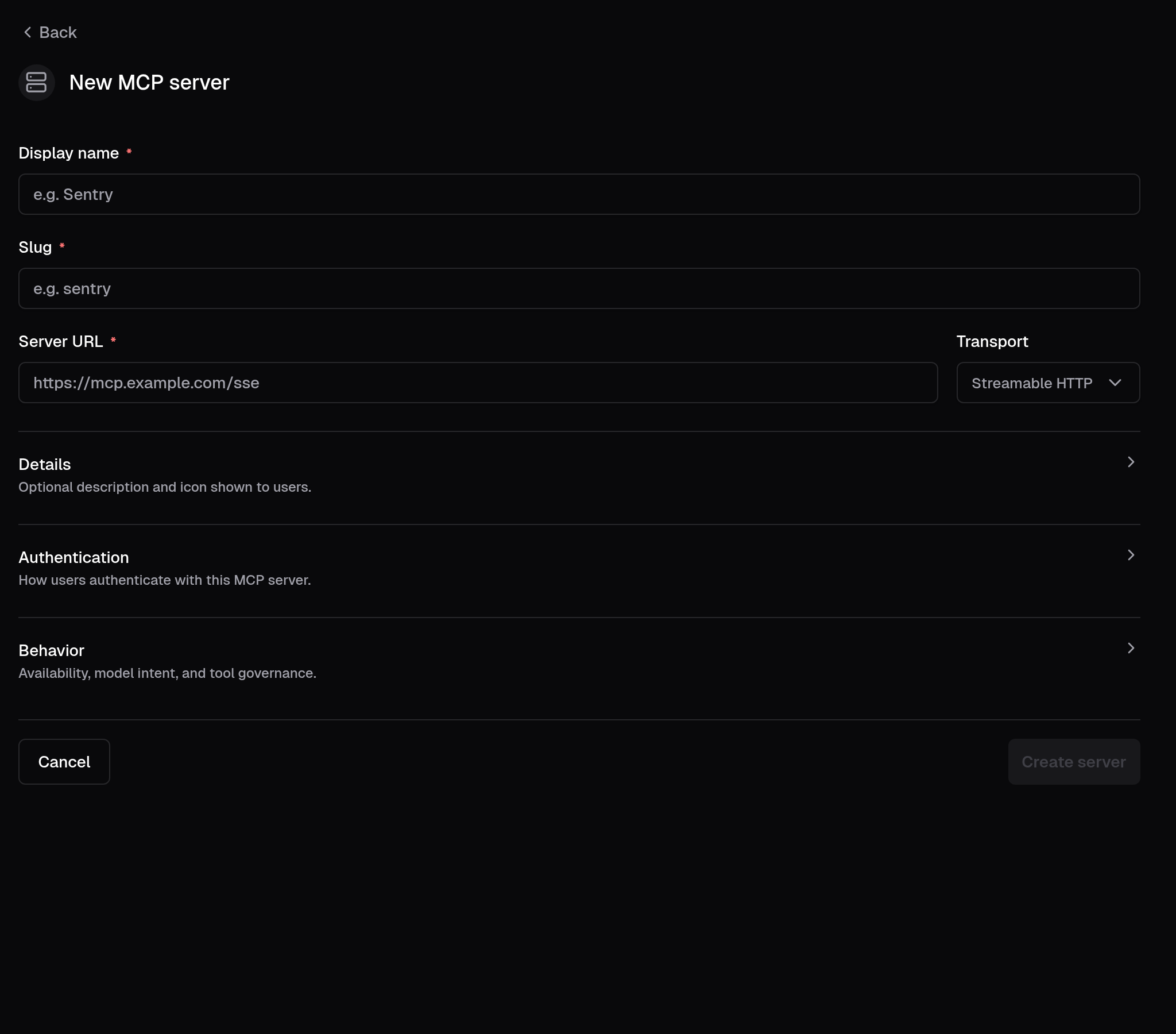
Reported via Support for a Netflix user on the MCP server admin panel.
---
_Filed on behalf of the user by Coder Agents._
---------
Co-authored-by: Jaayden Halko <jaayden@coder.com>
closes CODAGT-121

When an invisible assistant message (e.g. a `provider_executed`
tool-result with no text content) appeared between a visible assistant
message and the next user message, the visible assistant's action bar
was incorrectly hidden. The chain logic computed `isLastInChain` from
the raw `parsedMessages` array, which includes entries that
`ChatMessageItem` returns `null` for.

Extract a shared `isTimelineMessageVisible` helper that encodes the
three null-return conditions (`provider_executed` tool-result-only,
all-provider-executed parts, metadata-only) in one place. Use it both to
guard the early return in `ChatMessageItem` and to skip invisible
entries when computing `isLastInChain`, so chain boundaries are based on
the next *rendered* message.
- feat(agent/agentgit): shorten fallback poll to 5s
- fix(site/AgentsPage): keep git tab visible after reverting to clean
- feat(site/AgentsPage): show last-checked time in git tab

> 🤖
closes DES-22030

## Summary

Mobile view cleanup for the agents page — all changes are behind the
`md:` breakpoint so desktop is unchanged.

**Dropdowns:** Full-width on mobile with dynamic positioning via a
`--mobile-dropdown-bottom` CSS custom property set by a `ResizeObserver`
on the chat input box. Three position variants: `-bottom` (above chat
input), `-top` (below header), `-top-below-header` (below sidebar
header). Viewport branching uses a new `isBelowMdViewport()` helper (`<
768px`) so 640–767 px landscape phones pick the mobile branch instead of
the desktop flyout.

**Layout:** On the main agents page, mobile ordering is header → chat
list → chat input using CSS `order` and `contents` on the content
wrapper. The chat input aligns to the bottom of available space. The
sidebar list uses a top/bottom fade mask on mobile to hint at scrollable
content.

**Header:** Settings, Analytics, sound, and notification icons
consolidated into a single meatball menu dropdown on mobile.
Sound/notification toggles use `e.preventDefault()` to keep the menu
open for state feedback. Chime and notification state is lifted into
`AgentCreatePage` and passed down, so the mobile meatball menu and the
desktop `ChimeButton`/`WebPushButton` stay in sync.

**Workspace pill:** Icon-only on mobile (`size-7` round button with
`StatusIcon`), full pill on desktop. Tooltip hidden on mobile to prevent
ghost tooltip after dropdown close.

**Plus menu:** Workspace picker replaces the flyout with an inline
sub-panel on mobile (back button + search list). Desktop flyout
unchanged. `modal={false}` prevents double-tap when switching between
dropdowns.

**Model selector:** Truncated via `shrink` + `min-w-0` on mobile
(flex-based, no fixed max-width), inline provider/context subtext per
item, tooltip hidden on mobile. Added `open` / `onOpenChange` /
`onTriggerTouchStart` props for external control.

**Consistency:** All back/close buttons normalized to `ArrowLeftIcon`.
Right panel, sidebar settings, header `mobileBack`, and workspace
sub-panel all match the chat top bar pattern.

**Misc polish:** Chat tree nodes use `select-none` +
`-webkit-touch-callout:none` on coarse pointers to suppress the
long-press selection/callout on mobile.

<details>
<summary>Files changed (18)</summary>

- `site/src/index.css` — mobile dropdown CSS with 3 position variants
- `site/src/utils/mobile.ts` — new `isBelowMdViewport()` helper
(`<768px`)
- `site/src/pages/AgentsPage/AgentChatPageView.tsx` — bottom padding
`pb-3`
- `site/src/pages/AgentsPage/AgentCreatePage.tsx` — lift chime + webpush
state; pass handlers to header and buttons
- `site/src/pages/AgentsPage/AgentsPageView.tsx` — `contents` wrapper +
sidebar `border-b`
- `site/src/pages/AgentsPage/components/AgentChatInput.tsx` —
`ResizeObserver` composer ref, `plusMenuView` state, inline workspace
picker, `modal={false}`, mobile branching via `isBelowMdViewport`, bg
- `site/src/pages/AgentsPage/components/AgentCreateForm.tsx` —
`order-last` + `items-end` on mobile
- `site/src/pages/AgentsPage/components/AgentPageHeader.tsx` — meatball
menu (controlled chime/webpush props), `ArrowLeftIcon`, `order-first`,
padding, desktop/mobile branching via `matchMedia`
- `site/src/pages/AgentsPage/components/AgentPageHeader.stories.tsx` —
new Storybook coverage + `play` assertions that toggle state stays in
sync across breakpoints
- `site/src/pages/AgentsPage/components/ChimeButton.tsx` — optional
controlled `enabled` / `onToggle` props
- `site/src/pages/AgentsPage/components/WebPushButton.tsx` — optional
controlled `webPush` / `onToggle` props
-
`site/src/pages/AgentsPage/components/ChatElements/CompactOrgSelector.tsx`
— full-width dropdown class
- `site/src/pages/AgentsPage/components/ChatElements/ModelSelector.tsx`
— truncation, inline subtext, tooltip hidden on mobile, new props
(`open`, `onOpenChange`, `onTriggerTouchStart`)
- `site/src/pages/AgentsPage/components/ChatTopBar.tsx` — full-width
dropdown class
- `site/src/pages/AgentsPage/components/ContextUsageIndicator.tsx` —
full-width dropdown class (mobile branch)
- `site/src/pages/AgentsPage/components/Sidebar/AgentsSidebar.tsx` —
`ArrowLeftIcon`, filter dropdown class, top/bottom fade mask on scroll
area, `select-none` on tree nodes
- `site/src/pages/AgentsPage/components/Sidebar/SidebarTabView.tsx` —
`ArrowLeftIcon`, padding, back button placement
- `site/src/pages/AgentsPage/components/WorkspacePill.tsx` — compact
icon trigger, tooltip hidden on mobile, full-width dropdown class

</details>

> 🤖 Generated by Coder Agents

---------

Co-authored-by: Jaayden Halko <jaayden@coder.com>
> Mux created this PR on behalf of Mike.

This removes the Insights entry from the Coder Agents settings menu.

The underlying page and route stay in place. This PR only stops linking
to that page from the sidebar.
> [!WARNING]
> The change of the status code from `404` to `204` could break peoples
code downstream. Adding this as a breaking change incase.

Theres a whole ton of noise around failed requests, these are all
unrelated to the actual thing that is broken at hand (and are
confusing).

* Change `/api/v2/organizations/.../templates/.../versions/.../previous`
to return `204` instead of `404` (actually makes more sense because the
content doesn't exist, but the route is found.
* Remove unnecessary calls to `/api/v2/users/me/appearance` when the
user isn't logged in.
* Remove unnecessary calls to `/api/v2/deployment/stats` when the
deployment stats aren't allowed to be seen.
* Various changes to `workspace-sharing` so we don't make unnecessary
calls.

Whats left:

* `/api/v2/users/me` still `401`s on the login page. This persists as
when the user is logged in but tries to reach the sign-in page they
should be redirected to the app, not sign in again.
* `monaco-editor` is still upset... we theoretically could inject an
environment that can serve workers... but eh.

#### Old

```sh
% pnpm playwright:test -g "create workspace with default and required parameters"

> coder-v2@ playwright:test /home/coder/coder/site
> playwright test --config=e2e/playwright.config.ts -g 'create workspace with default and required parameters'

...

Running 2 tests using 1 worker

  ✓  1 …e/setup/addUsersAndLicense.spec.ts:7:5 › setup deployment (8.2s)
     2 ….ts:79:5 › create workspace with default and required parameters
[console][error] Failed to load resource: the server responded with a status of 401 (Unauthorized)
[console][error] Failed to load resource: the server responded with a status of 401 (Unauthorized)
[response] url=http://localhost:3111/api/v2/users/me/appearance status=401 body={"message":"You are signed out or your session has expired. Please sign in again to continue.","detail":"Cookie \"coder_session_token\" or query parameter must be provided."}
[response] url=http://localhost:3111/api/v2/users/me status=401 body={"message":"You are signed out or your session has expired. Please sign in again to continue.","detail":"Cookie \"coder_session_token\" or query parameter must be provided."}
[console][error] Failed to load resource: the server responded with a status of 403 (Forbidden)
[response] url=http://localhost:3111/api/v2/deployment/stats status=403 body={"message":"Forbidden.","detail":"You don't have permission to view this content. If you believe this is a mistake, please contact your administrator or try signing in with different credentials."}
[console][error] Failed to load resource: the server responded with a status of 403 (Forbidden)
[response] url=http://localhost:3111/api/v2/deployment/stats status=403 body={"message":"Forbidden.","detail":"You don't have permission to view this content. If you believe this is a mistake, please contact your administrator or try signing in with different credentials."}
[console][error] Failed to load resource: the server responded with a status of 404 (Not Found)
[response] url=http://localhost:3111/api/v2/organizations//provisionerdaemons status=404 body={"message":"Resource not found or you do not have access to this resource"}
[console][error] Failed to load resource: the server responded with a status of 404 (Not Found)
[response] url=http://localhost:3111/api/v2/organizations/default/templates/a4e8096d/versions/agreeable_glenn33/previous status=404 body={"message":"No previous template version found for \"agreeable_glenn33\"."}
[console][warning] Could not create web worker(s). Falling back to loading web worker code in main thread, which might cause UI freezes. Please see https://github.com/microsoft/monaco-editor#faq
[console][warning] You must define a function MonacoEnvironment.getWorkerUrl or MonacoEnvironment.getWorker
[console][error] Failed to load resource: the server responded with a status of 401 (Unauthorized)
[console][error] Failed to load resource: the server responded with a status of 401 (Unauthorized)
[response] url=http://localhost:3111/api/v2/users/me/appearance status=401 body={"message":"You are signed out or your session has expired. Please sign in again to continue.","detail":"Cookie \"coder_session_token\" or query parameter must be provided."}
[response] url=http://localhost:3111/api/v2/users/me status=401 body={"message":"You are signed out or your session has expired. Please sign in again to continue.","detail":"Cookie \"coder_session_token\" or query parameter must be provided."}
[console][error] Failed to load resource: the server responded with a status of 403 (Forbidden)
[response] url=http://localhost:3111/api/v2/deployment/stats status=403 body={"message":"Forbidden.","detail":"You don't have permission to view this content. If you believe this is a mistake, please contact your administrator or try signing in with different credentials."}
  ✓  2 …5 › create workspace with default and required parameters (7.0s)atus of 403 (Forbidden)
[response] url=http://localhost:3111/api/v2/deployment/stats status=403 body={"message":"Forbidden.","detail":"You don't have permission to view this content. If you believe this is a mistake, please contact your administrator or try signing in with different credentials."}
[console][error] Failed to load resource: the server responded with a status of 403 (Forbidden)
[response] url=http://localhost:3111/api/v2/deployment/stats status=403 body={"message":"Forbidden.","detail":"You don't have permission to view this content. If you believe this is a mistake, please contact your administrator or try signing in with different credentials."}

  2 passed (56.1s)
```

`23 LOL` (Lines of logs)

#### New

```sh
% pnpm playwright:test -g "create workspace with default and required parameters"

> coder-v2@ playwright:test /home/coder/coder/site
> playwright test --config=e2e/playwright.config.ts -g 'create workspace with default and required parameters'

...

Running 2 tests using 1 worker

  ✓  1 …e/setup/addUsersAndLicense.spec.ts:7:5 › setup deployment (8.7s)
     2 ….ts:79:5 › create workspace with default and required parameters
[console][error] Failed to load resource: the server responded with a status of 401 (Unauthorized)
[console][error] Failed to load resource: the server responded with a status of 401 (Unauthorized)
[response] url=http://localhost:3111/api/v2/users/me/appearance status=401 body={"message":"You are signed out or your session has expired. Please sign in again to continue.","detail":"Cookie \"coder_session_token\" or query parameter must be provided."}
[response] url=http://localhost:3111/api/v2/users/me status=401 body={"message":"You are signed out or your session has expired. Please sign in again to continue.","detail":"Cookie \"coder_session_token\" or query parameter must be provided."}
[console][warning] Could not create web worker(s). Falling back to loading web worker code in main thread, which might cause UI freezes. Please see https://github.com/microsoft/monaco-editor#faq
[console][warning] You must define a function MonacoEnvironment.getWorkerUrl or MonacoEnvironment.getWorker
  ✓  2 …5 › create workspace with default and required parameters (7.1s)atus of 401 (Unauthorized)
[console][error] Failed to load resource: the server responded with a status of 401 (Unauthorized)
[response] url=http://localhost:3111/api/v2/users/me/appearance status=401 body={"message":"You are signed out or your session has expired. Please sign in again to continue.","detail":"Cookie \"coder_session_token\" or query parameter must be provided."}
[response] url=http://localhost:3111/api/v2/users/me status=401 body={"message":"You are signed out or your session has expired. Please sign in again to continue.","detail":"Cookie \"coder_session_token\" or query parameter must be provided."}

  2 passed (32.0s)
```

`9 LOL` (Lines of logs)
Description:

The workspace notification pills were implemented using Tooltip, which
is hover-only and not reachable via keyboard navigation.

Replace Tooltip/TooltipProvider/TooltipTrigger with
Popover/PopoverContent/PopoverTrigger, and change the trigger element
from a non-interactive div to a button. This makes the notification
pills fully keyboard accessible.


Screenshot:
**Issue**
<img width="640" height="211" alt="not-working"
src="https://github.com/user-attachments/assets/3cb12fdf-704b-41a2-ab9c-c198d03158a7"
/>


**Fix**
<img width="640" height="211" alt="working"
src="https://github.com/user-attachments/assets/25807a6b-7065-4753-b55e-d8db103ba501"
/>
## Problem

The GitPanel's DiffViewer had several performance and correctness issues
that
manifested as CPU spikes and scrollbar jank, especially on Safari with
large
diffs:

1. The `onScroll` handler called `getBoundingClientRect()` on every file
   wrapper per scroll tick (O(N) forced layouts per frame).
2. `setActiveFile()` re-rendered the entire DiffViewer tree on every
active
   file change.
3. `parsePatchFiles()` ran on every render in `LocalDiffPanel`,
   `RemoteDiffPanel`, and `GitPanel`.
4. File header `rootMargin` used a percentage, which resolves against
the
   root's width (not height), collapsing the observation strip in wide
   viewports.
5. The IntersectionObserver effect didn't re-run when the viewport
mounted
   after an initial empty state, or when the viewport was resized.

## Fix

### Scroll tracking
Replaced the `getBoundingClientRect` scroll handler with an
`IntersectionObserver` watching a narrow strip at the top of the
viewport.
The observation strip is a pixel value derived from
`viewport.clientHeight`
(the previous `-95%` margin was broken in wide viewports because CSS
margin
percentages resolve against width). A `ResizeObserver` tracks viewport
height so the strip adapts to layout changes, and the effect keys off a
stable `fileListKey` string so scroll-driven re-renders don't tear down
the
observer.

### Memoization: React Compiler
`src/pages/AgentsPage/` is opted into the React Compiler via
`site/vite.config.mts`. The compiler automatically memoizes values,
callbacks, and JSX at build time. This PR removed the manual `useMemo` /
`useCallback` wrappers that were added earlier in the review cycle and
lets the compiler handle memoization.

`React.memo()` is retained on `FileTreeNodeView` and `LazyFileDiff` —
the
documented list-item exception from `site/AGENTS.md`. Their `memo()`
effectiveness depends on the compiler stabilizing prop references;
moving
these components outside the compiler scope without adding manual
memoization would silently regress scroll performance.

`useParsedDiff` uses explicit `useMemo` as a documented exception: the
compiler cannot prove purity of the external `parsePatchFiles` function
from `@pierre/diffs`, so without `useMemo` the parser would run on every
render even when inputs are unchanged.

### `activeCommentBoxRef` (stable annotation handler)
`CommentableDiffViewer` wraps `activeCommentBox` in a ref that's synced
in event handlers (not during render). This gives `renderAnnotation`,
`handleSubmitComment`, and the annotation getters stable identities via
the compiler, so comment-box toggles no longer force every
`LazyFileDiff`
to re-render.

### CSS containment for Safari
Added `will-change: transform` on the scroll container and
`contain: layout style` on each file wrapper. Programmatic
`scrollIntoView` / `scrollBy` calls use `behavior: "instant"` to avoid
fighting Safari's scroll compositor.

### Hook extraction
Extracted `useActiveFileTracking` (observer setup, viewport sizing,
scroll-to-file) and `useParsedDiff` (shared diff parsing with
memoization) to keep `DiffViewer` focused on layout and eliminate
duplication between `LocalDiffPanel` and `RemoteDiffPanel`.

### Testing
Added a `LargeDiff` Storybook story (40 files × 60+ context lines,
~2,400 diff lines) with `isExpanded: true` so the observer code path is
exercised, plus a `play` function that scrolls the viewport and asserts
the sidebar highlight updates.

## Expected impact
- Scroll handler: O(N) `getBoundingClientRect` calls per frame → 0
- Re-renders on scroll: full DiffViewer tree → sidebar only
- Diff parsing: on every render → only when `diffString` changes
The Ctrl+D diff drawer in `coder exp agents` only rendered PR-backed
diffs returned by `/api/experimental/chats/{id}/diff`. Local working
tree changes in a chat's workspace returned an empty diff, so the
drawer showed "No diff contents" with no file summary.

Centralise diff loading behind a single `fetchChatDiffContents` helper
that first hits `/diff`, then falls back to the chat git watcher
WebSocket (`/stream/git`) when the remote diff is empty. Aggregate the
agent's `WorkspaceAgentRepoChanges` into a `ChatDiffContents` value so
the drawer can derive the file summary and styled body from the local
unified diff. Missing workspaces, missing agents, and watcher timeouts
are treated as graceful fallbacks that render the empty-diff
placeholder instead of a hard error.

> Mux is opening this PR on Mike's behalf.
Previously, the sessions list sorted by `MIN(started_at)` across
interceptions, so sessions with old start times but recent activity
would sink to the bottom of the list regardless of how recently they
were used.

`ListAIBridgeSessions` now sorts by `COALESCE(MAX(prompt.created_at),
MIN(started_at)) DESC`, exposed as the non-nullable `last_active_at`
field. Sessions with prompts surface by last activity; sessions with no
prompts fall back to their start time.

The original implementation used two separate columns (`last_active_at`
as a nullable prompt timestamp and `sort_at` as the non-nullable cursor
key). This revision collapses them into a single `last_active_at` that
is always set — simplifying the SQL, the Go conversion, the API type,
and the frontend.

🤖 Generated with [Claude Code](https://claude.ai/claude-code)

---------

Co-authored-by: Claude Sonnet 4.6 <noreply@anthropic.com>
Reorganizes Agents Settings navigation. Previously a flat sidebar with
admin items gated by a role check; now a two-level drill-down with user
settings at the top and admin destinations nested under a "Manage
Agents" sub-panel.

**Top Settings panel** (all users, sidebar title "Settings"):

| Destination | Route |
| --- | --- |
| General | `/agents/settings/general` |
| Compaction | `/agents/settings/compaction` |
| Secrets (API keys) | `/agents/settings/api-keys` |
| Manage Agents › (admin only) | drills into the admin sub-panel |

**Manage Agents sub-panel** (admin only, sidebar title "Manage Agents"):

| Destination | Route |
| --- | --- |
| Agents | `/agents/settings/agents` |
| Providers | `/agents/settings/providers` |
| Models | `/agents/settings/models` |
| MCP Servers | `/agents/settings/mcp-servers` |
| Templates | `/agents/settings/templates` |
| Spend | `/agents/settings/spend` |
| Instructions | `/agents/settings/instructions` |
| Experiments | `/agents/settings/experiments` |
| Lifecycle | `/agents/settings/lifecycle` |
| Insights | `/agents/settings/insights` |

On mobile, tapping "Manage Agents" lands on `/agents/settings/admin`, an
admin sub-panel index URL that shows the admin nav in the sidebar (so
admins can still reach every admin destination without desktop-width
viewports).

Key changes:

- **Split the monolithic Behavior page into five focused destinations**
(General, Compaction, Instructions, Experiments, Lifecycle) so non-admin
users no longer trigger deployment-scoped queries like
`chatSystemPrompt`, `chatDesktopEnabled`, or `chatWorkspaceTTL`.
Admin-only pages gate both route (via `RequirePermission`) and query
`enabled` flags.
- **Split chat debug logging into audience-specific components** so no
admin-gated controls remain in user-facing pages.
`AdminChatDebugLoggingSettings` (admin "Let users record chat debug
logs") now lives in the Experiments tab; `UserChatDebugLoggingSettings`
("Record debug logs for my chats") stays in General and only renders
when the admin has allowed user-level toggling.
- **Nested admin sub-panel** in the sidebar. `SidebarView` gains a
`"settings-admin"` panel; `sidebarViewFromPath` routes admin sections
into it. The slide animation and back button behavior extend cleanly. A
small `isSettingsView` helper was extracted alongside to avoid
duplicating the panel-membership check.
- **Renamed `/agents/settings/system-instructions` to
`/agents/settings/instructions`**. Sidebar label is "Instructions". Page
files renamed to `AgentSettingsInstructionsPage(View)` to match the
route slug (the other split pages all do).
- **Renamed "API Keys" to "Secrets (API keys)"** in the sidebar and page
header.
- **Added MCP Servers** entry to the sidebar (route already existed).
- **Added "Manage Coder Agents"** link at the bottom of the Deployment
settings sidebar (gated by `editDeploymentConfig`, matches the existing
`Groups ↗` external-link style).
- **Updated icons** across the sidebar: General uses `UserIcon`,
Compaction `ShrinkIcon`, Secrets `KeyIcon`, Manage Agents
`Settings2Icon`, Providers `PlugIcon`, MCP Servers `ServerIcon`, Spend
`CoinsIcon`, Instructions `ReceiptTextIcon`, Lifecycle `RefreshCwIcon`,
Insights `SparklesIcon`.
- **Storybook interaction coverage** restored and extended for the split
views: user-prompt save flow, invisible-Unicode warning detection,
system-prompt default toggle, workspace-TTL validation, virtual-desktop
toggle, compaction threshold save/reset/validation, retention
toggle/save-error/load-error parity, plan-mode instructions save, and a
mobile story verifying the admin sub-panel remains reachable after the
"Manage Agents" tap.
- **Unit tests** added for `sidebarViewFromPath` and `isSettingsView`
(17 cases covering chats, analytics, user sections, admin sections, the
new `/admin` index, non-admin fallthrough, and defaults).

> Mux opened this PR on behalf of Mike.
## Summary

Add comprehensive Storybook stories covering the Debug panel in various states: loading, empty, single/multiple runs, expanded steps, tool calls, error states, and streaming indicators.

This is PR 9/9 in the chat debug logging stack.

### Changes

- **DebugPanel stories** (`site/src/pages/AgentsPage/components/RightPanel/DebugPanel/DebugPanel.stories.tsx`): Storybook stories with `play` functions for interaction testing, covering:
  - Loading state
  - Empty / disabled state
  - Single-step successful run
  - Multi-step run with tool calls
  - Error state with redacted headers
  - Compaction and title generation run kind badges
  - Long raw request/response payload rendering
  - Streaming / in-progress indicators

### Stack overview

1. Database schema & SDK types
2. Types, context, and model normalization
3. Recorder, transport, and redaction
4. Service and summary aggregation
5. Chat lifecycle wiring
6. HTTP handlers and API docs
7. Frontend API layer and panel utilities
8. Debug panel components and settings
9. **→ Storybook stories** (this PR)

---
_Generated with [`mux`](https://github.com/coder/mux) • Model: `anthropic:claude-opus-4-6` • Thinking: `xhigh`_
## Summary

Add the Debug panel UI components: run list, run cards, step cards with transcript and tool-call rendering, attempt accordions, and shared primitives. Wire the panel into the AgentChatPage sidebar and add the per-chat debug logging toggle in the behavior settings page.

This is PR 8/9 in the chat debug logging stack.

### Screenshots

Settings Page

<img width="4608" height="2348" alt="CleanShot 2026-04-21 at 21 19 36@2x" src="https://github.com/user-attachments/assets/69391465-4c56-468a-9923-59576d326963" />

Conditional Debug tab

<img width="4608" height="2348" alt="CleanShot 2026-04-21 at 21 19 58@2x" src="https://github.com/user-attachments/assets/bc1e07cb-21d9-40e7-8928-6fd9a7ec7f57" />

Last request's tools and schema

<img width="4608" height="2348" alt="CleanShot 2026-04-21 at 21 20 03@2x" src="https://github.com/user-attachments/assets/401f26af-98ce-443f-a586-424d3636d98b" />

"Raw" JSON request bodies

<img width="4608" height="2348" alt="CleanShot 2026-04-21 at 21 20 35@2x" src="https://github.com/user-attachments/assets/3605a373-9e29-4183-89e7-8b2704ff9333" />


### Changes

- **DebugPanel** (`site/src/pages/AgentsPage/components/RightPanel/DebugPanel/DebugPanel.tsx`): top-level panel component owning data fetching and subscription lifecycle.
- **DebugRunCard**: compact single-row header with capitalized provider name, status badge, compact duration (`1.3s`), and token summary (`3→5 tok`). Expandable to show child step cards.
- **DebugStepCard**: step inspector with normalized transcript rendering — system prompts, assistant text with 160-char clamping + independent "see more/less" toggle, tool calls with fully-expanded JSON payloads in `CopyableCodeBlock`.
- **DebugAttemptAccordion**: nested accordion for HTTP-level attempt details showing request/response headers and bodies.
- **Shared primitives**: `CopyableCodeBlock`, `MessageRow`, `ToolPayloadDisclosure`, `StatusBadge`.
- **Sidebar wiring** (`AgentChatPageView.tsx`): adds the Debug tab to the right panel when debug logging is enabled.
- **Behavior settings**: deployment-wide and per-user debug logging toggles on the settings page.

### Stack overview

1. Database schema & SDK types
2. Types, context, and model normalization
3. Recorder, transport, and redaction
4. Service and summary aggregation
5. Chat lifecycle wiring
6. HTTP handlers and API docs
7. Frontend API layer and panel utilities
8. **→ Debug panel components and settings** (this PR)
9. Storybook stories

---
_Generated with [`mux`](https://github.com/coder/mux) • Model: `anthropic:claude-opus-4-6` • Thinking: `xhigh`_
## Summary

Add API client methods, React Query builders, and unit tests for the chat debug endpoints. Add `debugPanelUtils` with coercion helpers that transform raw debug step data into structured display models for the Debug panel, and wire debug run streaming into the chat store.

This is PR 7/9 in the chat debug logging stack.

### Changes

- **API client** (`site/src/api/api.ts`): typed methods for all debug endpoints — list runs, list steps, get/set deployment logging, get/set user logging, set per-chat override.
- **React Query builders** (`site/src/api/queries/chats.ts`): `chatDebugRuns`, `chatDebugSteps`, `chatDebugLoggingConfig`, `userDebugLoggingConfig` query/mutation factories with `refetchInterval: 5000` for live polling.
- **Debug panel utilities** (`site/src/pages/AgentsPage/components/RightPanel/DebugPanel/debugPanelUtils.ts`): `coerceStepRequest` / `coerceStepResponse` that recursively parse nested JSONB into `StepRequestViewModel` / `StepResponseViewModel` with `MessagePart`, `ToolDef`, and `ToolCallPart` types. Includes `formatTokenSummary` (compact `3→5 tok` notation) and `compactDuration` helpers.
- **Unit tests**: coverage for coercion edge cases and formatting utilities.

### Stack overview

1. Database schema & SDK types
2. Types, context, and model normalization
3. Recorder, transport, and redaction
4. Service and summary aggregation
5. Chat lifecycle wiring
6. HTTP handlers and API docs
7. **→ Frontend API layer and panel utilities** (this PR)
8. Debug panel components and settings
9. Storybook stories

---
_Generated with [`mux`](https://github.com/coder/mux) • Model: `anthropic:claude-opus-4-6` • Thinking: `xhigh`_
> This PR was authored by Mux on behalf of Mike.

Adds AWS Bedrock ambient credential support to the Agents provider path.
Bedrock providers can now be saved without a stored API key and
authenticated via the standard AWS SDK credential chain on the Coder
server (IAM roles, `AWS_ACCESS_KEY_ID`, etc.). Also fixes missing `Base
URL` forwarding for Bedrock.

## Changes

**Backend runtime** (`coderd/x/chatd/chatprovider/chatprovider.go`):
- New `ProviderAllowsAmbientCredentials(provider)` helper. Currently
returns true only for Bedrock.
- `ModelFromConfig` no longer errors on an empty API key when the
provider is in the ambient-allowed set AND was explicitly resolved via
`ByProvider`. This preserves the policy gate: unresolvable providers
(disabled central key, user-key-required without a user key) still
error.
- `setResolvedProviderAPIKey` internalizes the ambient-credentials
contract via `ProviderAllowsAmbientCredentials`, so a
resolved-but-keyless Bedrock provider is represented as an empty
`ByProvider` entry rather than a post-hoc sentinel patch in the caller.
- `WithAPIKey` is only appended when a token is present.
- `WithBaseURL(baseURL)` is now forwarded for Bedrock (was previously
missing).

**Backend admin API** (`coderd/exp_chats.go`):
- `validateChatProviderCentralAPIKey` exempts Bedrock from requiring a
stored API key when central credentials are enabled.
- AI Gateway separation (`ChatProviderAPIKeysFromDeploymentValues`) is
unchanged. No silent reuse of `CODER_AIBRIDGE_BEDROCK_*` flags.

**Frontend**
(`site/src/pages/AgentsPage/components/ChatModelAdminPanel/*`):
- API Key field is optional for Bedrock when central credentials are
enabled.
- Bedrock-specific descriptions on API Key and Base URL fields
(bearer-token vs ambient modes, `AWS_REGION` guidance).
- Right-aligned "Clear stored token" action switches an existing Bedrock
provider back to ambient mode.
- `hasEffectiveAPIKey` treats Bedrock with central credentials enabled
as configured, so the provider list shows the correct status icon.
- Three new stories: `ProviderFormBedrockAmbientCredentials`,
`ProviderFormBedrockBearerToken`, `ProviderFormBedrockClearBearerToken`.

**Docs** (`docs/ai-coder/agents/models.md`,
`docs/ai-coder/ai-gateway/setup.md`):
- New "Configuring AWS Bedrock" section covering both credential modes,
region resolution, and the Base URL override.
- Explicit note that the `us-east-1` region fallback only applies to
bearer-token mode; ambient credentials require a region from the
standard AWS SDK chain.
- Cross-reference in AI Gateway docs clarifying that
`CODER_AIBRIDGE_BEDROCK_*` flags are a separate configuration path from
Agents.

## Not in scope

- Reusing AI Gateway Bedrock flags as an implicit Agents fallback.
- Per-provider AWS access key, secret, or region fields (would need a
migration and audit-table review).
- IMDS or network-backed credential probes in admin/listing request
paths.

## Related

Dogfood deployment integration:
https://github.com/coder/dogfood/pull/324
Renders the durable file attachments introduced in #24280 in the chat
interface. Without this, attachments were stored and served correctly
but the UI showed raw file parts with no previews or download UX.

Every attachment gets a download affordance, split into three rendering
tiers:

- **Images** — thumbnail with a hover/focus overlay containing a
download link. `onFocusCapture`/`onBlurCapture` with
`contains(relatedTarget)` keeps the overlay open while tabbing between
the image and its download link.
- **Text-like files** (`text/*`, `application/json`) — expandable
preview button with loading + error-with-retry states and the same
download overlay. Preview fetches throw a typed
`FetchTextAttachmentError` with a `.status` field instead of a
stringly-typed error.
- **Everything else** — compact `FileCard` with extension badge,
filename, and download link.

User-side and assistant-side rendering now share `AttachmentBlocks.tsx`
(`AttachmentPreviewFrame`, `TextAttachmentButton`,
`ImageAttachmentButton`, `FileCard`, plus
`getAttachmentHref`/`getAttachmentName`) instead of two near-duplicate
implementations. The text-attachment overlay anchors to the preview
surface so the download button stays pinned even when a loading/error
status line widens the row below.

`ComputerRenderer` detects when a screenshot was stored as a durable
attachment (`attachment_file_id`) and suppresses the stale base64
rendering — the screenshot appears as a proper file part instead.
`ToolLabel` shows the attached filename for `attach_file` tool calls.

Storybook coverage in `ConversationTimeline.stories.tsx` was expanded to
cover every tier (single/multiple images, inline + file-id text, JSON,
download-only files, fetch-failure retry, mixed attachments + file
references) with play-function assertions.

<img width="811" height="150" alt="image"
src="https://github.com/user-attachments/assets/27c71081-3502-4e80-92a7-d8adf1ff9323"
/>


## Cleanup

Per Mathias' post-merge suggestion on #24280, this PR also relocates
`coderd/chatfiles` → `coderd/x/chatfiles` so the durable-attachment
helpers live beside the rest of the `chatd` experimental surface.

Closes CODAGT-91
Renames the `--border-hover` design token to `--border-secondary` and
updates the color values to work well on `surface-secondary`
backgrounds, preparing for the template creation flow.

- Light theme: `240 5% 65%` (`#A1A1AA`)
- Dark theme: `240 5% 26%` (`#3F3F46`)

All 7 component usages updated to use the new token name.

<details>
<summary>Context</summary>

The previous `border-hover` token used a single value (`#52525B`) for
both themes, which didn't provide enough contrast on `surface-secondary`
backgrounds. The rename to `border-secondary` better reflects its
semantic role as a secondary border color rather than a hover-specific
one, and the updated values give proper contrast in both light and dark
themes. This change is a prerequisite for the upcoming template creation
flow work.

</details>

> 🤖 Generated by Coder Agents
closes CODAGT-125

Assistant messages that show only the fallback text ("Message has no
renderable content.") were missing bottom spacing before the next user
bubble, because `needsAssistantBottomSpacer` only covered reasoning-only
and sources-only cases.

Extend the spacer predicate to also trigger when
`!hasRenderableContent`, and add a `data-testid` to the spacer element
for testability. A new Storybook story
(`NoRenderableContentFallbackSpacing`) covers this regression.
Closes CODAGT-216

## Problem

`dbpurge` deletes `chat_files` rows after the deployment's configured
retention window, but `chat_messages.content` can still contain
`file_id` references to those files. On replay, that left the Anthropic
provider with an empty file payload and a `400 image cannot be empty`
error. In the UI, the same missing file showed up as a broken image.

## Fix

- Backend: when replay hits a `file_id` whose bytes are gone, replace it
with a short text placeholder instead of emitting an empty file part. We
could also drop the missing attachment entirely, but that would silently
remove context from the replay and make the conversation harder for the
model to interpret. The placeholder keeps the request valid while still
telling the model that a file used to be there and is no longer
available.
- Frontend: classify chat image failures instead of treating every
broken image the same.
- `404` file fetches render `Image expired`, with a tooltip explaining
that chat attachments are deleted after the retention window set for the
deployment.
- Other remote failures render `Image failed to load`, with a tooltip
that surfaces server/network detail when available.
- Invalid inline image data still renders `Image failed to load` without
a probe.
When a workspace agent's startup script fails, restarting the workspace
will not resolve the issue since the script will keep failing.
Previously all unhealthy workspaces showed the same generic notification
with a Restart button regardless of cause.

Now, when every failing agent has `lifecycle_state=start_error`, the
workspace-level notification shows "A startup script has failed" and
guides the user to contact their template admin instead of offering a
Restart action.

> Code written by Claude 🤖 reviewed by yours truly

---------

Co-authored-by: Claude Sonnet 4.6 <noreply@anthropic.com>
Anthropic HTTP 400 responses (e.g. "image exceeds 5 MB maximum") were
collapsed in the chat UI to the generic headline "Anthropic returned an
unexpected error (HTTP 400)." with no actionable detail — the upstream
message survived to the processor log but was dropped before reaching
the client.

Add a new optional `Detail` field on `codersdk.ChatStreamError` that
carries the upstream provider message alongside the existing normalized
headline. The backend extracts `error.message` from
`fantasy.ProviderError.ResponseBody` (the JSON envelope shared by
Anthropic and OpenAI), falls back to the trimmed provider message when
the body is absent or unparseable, and caps the result at 500 runes. The
frontend threads `Detail` through `useChatStore`, `liveStatusModel`, and
`ChatStatusCallout`, rendering it as a muted secondary line inside the
existing `AlertDescription`.

Before:

<img width="1552" height="185" alt="image"
src="https://github.com/user-attachments/assets/524b588e-3cee-4fad-bc15-6bf3aec0899d"
/>

After:

<img width="814" height="173" alt="image"
src="https://github.com/user-attachments/assets/eae82a89-3ac1-4a33-8d18-ef9f77263d89"
/>

## Persistence

`Detail` is **not** persisted — it disappears on refresh. Persisting it
would require a DB change (today `chats.last_error` is a single nullable
`TEXT` column), and the shape of persisted chat errors is worth a more
deliberate rethink — e.g. promoting `last_error` to `JSONB` so we can
also retain structured fields like `kind`, `statusCode`, `provider`, and
`retryable` instead of only the normalized headline string. That's a
bigger design discussion than this PR should carry.

In the meantime, seeing the upstream error reason *immediately on
failure* is already a large UX improvement over the status quo, and this
PR gets us there without prejudicing the eventual persistence design.
Tracking persistence in CODAGT-239.

Closes CODAGT-235
Unify the three subagent spawn tools (`spawn_agent`,
`spawn_explore_agent`, `spawn_computer_use_agent`) behind a single
`spawn_subagent` tool keyed by a `subagent_type` discriminant
(`general`, `explore`, `computer_use`). Mirrors the single-entry-point
pattern already used by `task` in mux while keeping `wait_agent`,
`message_agent`, and `close_agent` as separate lifecycle tools.

A new backend subagent definition catalog
(`coderd/x/chatd/subagent_catalog.go`) is the source of truth for tool
description, prompt guidance, availability rules (plan mode,
desktop/Anthropic gating), and child-chat option building.
`spawn_subagent` advertises only the types available in the current
context and validates `subagent_type` server-side; context inheritance
still flows through the existing `createChildSubagentChatWithOptions`
path. `wait_agent`, `message_agent`, and `close_agent` responses now
include a server-derived `subagent_type` so the UI stops inferring
lifecycle state from tool names.

The frontend gets a shared normalization helper
(`site/src/pages/AgentsPage/components/ChatElements/tools/subagentDescriptor.ts`)
that maps either legacy tool names or new `spawn_subagent` args into a
common descriptor (action, variant, icon, fallback copy). Legacy
transcripts still render identically; `Tool.tsx`, `SubagentTool.tsx`,
`ToolLabel.tsx`, `ToolIcon.tsx`, and `messageParsing.ts` now key off the
descriptor instead of hard-coded names. Existing UI copy is preserved
(`Spawning Explore agent...`, `Using the computer...`, computer-use
monitor icon and Open Desktop affordance).

> This PR was opened by Mux working on Mike's behalf.
## Summary

Allow root plan-mode chats to use MCP tools from external servers that
an admin has explicitly approved for plan mode. Workspace MCP and
plan-mode subagents remain blocked.

## Problem

`chatd.go` excluded every MCP tool when `isPlanModeTurn` was true, so
planning had no access to tools like docs search, ticketing, etc.
Lifting that guard wholesale was unsafe: `mcp_server_configs` already
has centralized admin governance, but workspace-local MCP (discovered
from agent `.mcp.json`) does not, and subagents use a narrower trust
boundary.

## Fix

Add an admin-controlled per-server `allow_in_plan_mode` flag (default
`false`) and gate plan-mode MCP access on it.

### Backend / schema
- New migration `000472_mcp_server_allow_in_plan_mode.{up,down}.sql` and
matching fixture update.
- `mcpserverconfigs.sql` + generated code: persist and read the new
column.
- `codersdk/mcp.go`: thread the field through `MCPServerConfig`,
`Create*`, and `Update*` request types.
- `coderd/mcp.go`: validate, persist, and return the flag in
get/list/create/update handlers.

### chatd
- `coderd/x/chatd/chatd.go`: pre-filter selected external MCP configs by
`AllowInPlanMode` before calling `mcpclient.ConnectAll` on plan-mode
root turns. Workspace MCP discovery is skipped entirely on plan-mode
turns.
- Single helper decides whether a tool is available in plan mode, used
both at construction and for active-tool filtering (defense in depth).
Plan-mode subagents, dynamic tools, provider-native tools, computer-use,
and workspace MCP stay unchanged.
- `coderd/x/chatd/prompt.go`: update the root plan-mode overlay text to
match the new boundary.

### UI
- `MCPServerAdminPanel.tsx`: add an explicit toggle ("Allow all tools
from this MCP server in root plan mode") next to the existing governance
controls.
- Regenerated `site/src/api/typesGenerated.ts`.

### Docs
- `docs/ai-coder/agents/architecture.md`: replace the blanket "MCP is
unavailable in plan mode" note with the new root-only, external-only,
admin-approved policy. Explicitly call out that workspace MCP and
plan-mode subagents are still excluded.

### Tests
- Plan-mode visibility (approved vs non-approved external server).
- Plan-mode invocation of an approved external MCP tool.
- End-to-end plan-mode workflow that uses an approved MCP tool and then
reaches `propose_plan`.
- Regressions: workspace MCP still excluded in plan mode; plan-mode
subagents still on the restricted tool boundary; existing tool
allow/deny list filtering still applies.

## Policy precedence

`allow_in_plan_mode` is an **additional** requirement on top of existing
`enabled`, availability, chat-selected / forced server IDs, and tool
allow/deny lists. It approves **all tools on that server** for root plan
mode; a per-tool plan allowlist is deliberately deferred.

## Follow-ups (explicitly out of scope)

- Whether plan-mode subagents should inherit approved external MCP
tools.
- Workspace-local MCP safety model (agent-side `.mcp.json` schema vs. a
coderd-managed workspace MCP config).

## Validation

- `go vet ./coderd/x/chatd/...`
- `go test ./coderd/x/chatd -run 'TestPlan.*|TestMCP.*' -count=1`
- `go test ./coderd/x/chatd -count=1 -timeout 5m` (full chatd suite)
- `make fmt` (no diff)

> Mux opened this PR on Mike's behalf.
Polishes the agent logs panel in the workspace resources UI: consistent
padding, clearer behavior when switching log source tabs, and a more
usable download menu for long source lists.

- Use symmetric vertical padding on the logs container (`py-4` instead
of top-only padding).
- Add optional `showSourceIcons` on `AgentLogs` (defaults on);
`AgentRow` turns it off unless the **All** tab is active so filtered
tabs are not cluttered with redundant source icons.
- Anchor the download-logs dropdown below the trigger and cap menu
height to 6 items with scrolling so many sources do not overflow the
viewport.
 Kyle Carberry

