 Anlittledy
5.5 KiB
API Key Configuration Guide
1. Large Language Model (LLM)
Using DeepSeek as an Example
Official Documentation: https://api-docs.deepseek.com/zh-cn/
Note: For users outside China, we recommend using large language models such as Gemini, Claude, or ChatGPT for the best experience.
Configuration Steps
-
Apply for API Key
- Visit platform: https://platform.deepseek.com/usage
- Log in and apply for API Key
- ⚠️ Important: Save the obtained API Key securely
-
Configuration Parameters
- Model Name:
deepseek-chat - Base URL:
https://api.deepseek.com/v1 - API Key: Fill in the Key obtained in the previous step
- Model Name:
-
API Configuration
- Web Usage:
- In the LLM model dropdown, select Custom Model, then fill in the model settings according to your configuration parameters.
- Or, open
config.toml, locate[llm], and configuremodel,base_url, andapi_key. The model you entered will then appear in the dropdown on the Web page.
- CLI:
- If you prefer the CLI entry point, you need to open
config.toml, locate[llm], and configuremodel,base_url, andapi_key.
- If you prefer the CLI entry point, you need to open
- Web Usage:
2. Multimodal Large Language Model (VLM)
2.1 Using GLM-4.6V
API Key Management: https://open.bigmodel.cn/usercenter/proj-mgmt/apikeys
Configuration Parameters
- Model Name:
glm-4.6v - Base URL:
https://open.bigmodel.cn/api/paas/v4/
2.2 Using Qwen3-VL
API Key Management: Go to Alibaba Cloud Bailian Platform to apply for an API Key https://bailian.console.aliyun.com/cn-beijing/?apiKey=1&tab=globalset#/efm/api_key
-
Model Name:
qwen3-vl-8b-instruct -
Base URL:
https://dashscope.aliyuncs.com/compatible-mode/v1 -
Parameter Configuration:
- Web Usage:
- In the VLM model dropdown, select Custom Model, then fill in the model settings according to your configuration parameters.
- Or, open
config.toml, locate[vlm], and configuremodel,base_url, andapi_key. The model you entered will then appear in the dropdown on the Web page.
- CLI:
- If you prefer the CLI entry point, you need to open
config.toml, locate[vlm], and configuremodel,base_url, andapi_key.
- If you prefer the CLI entry point, you need to open
- Web Usage:
2.3 Using Qwen3-Omni
Qwen3-Omni can also be applied for through the Alibaba Cloud Bailian Platform. The specific parameters are as follows, which can be used for automatic labeling music in omni_bgm_label.py
- Model Name:
qwen3-omni-flash-2025-12-01 - Base URL:
https://dashscope.aliyuncs.com/compatible-mode/v1
For more details, please refer to the documentation: https://bailian.console.aliyun.com/cn-beijing/?tab=doc#/doc
Model List: https://help.aliyun.com/zh/model-studio/models
Billing Dashboard: https://billing-cost.console.aliyun.com/home
3. Pexels Image and Video Download API Key Configuration
- Open the Pexels website, register an account, and apply for an API key at https://www.pexels.com/api/
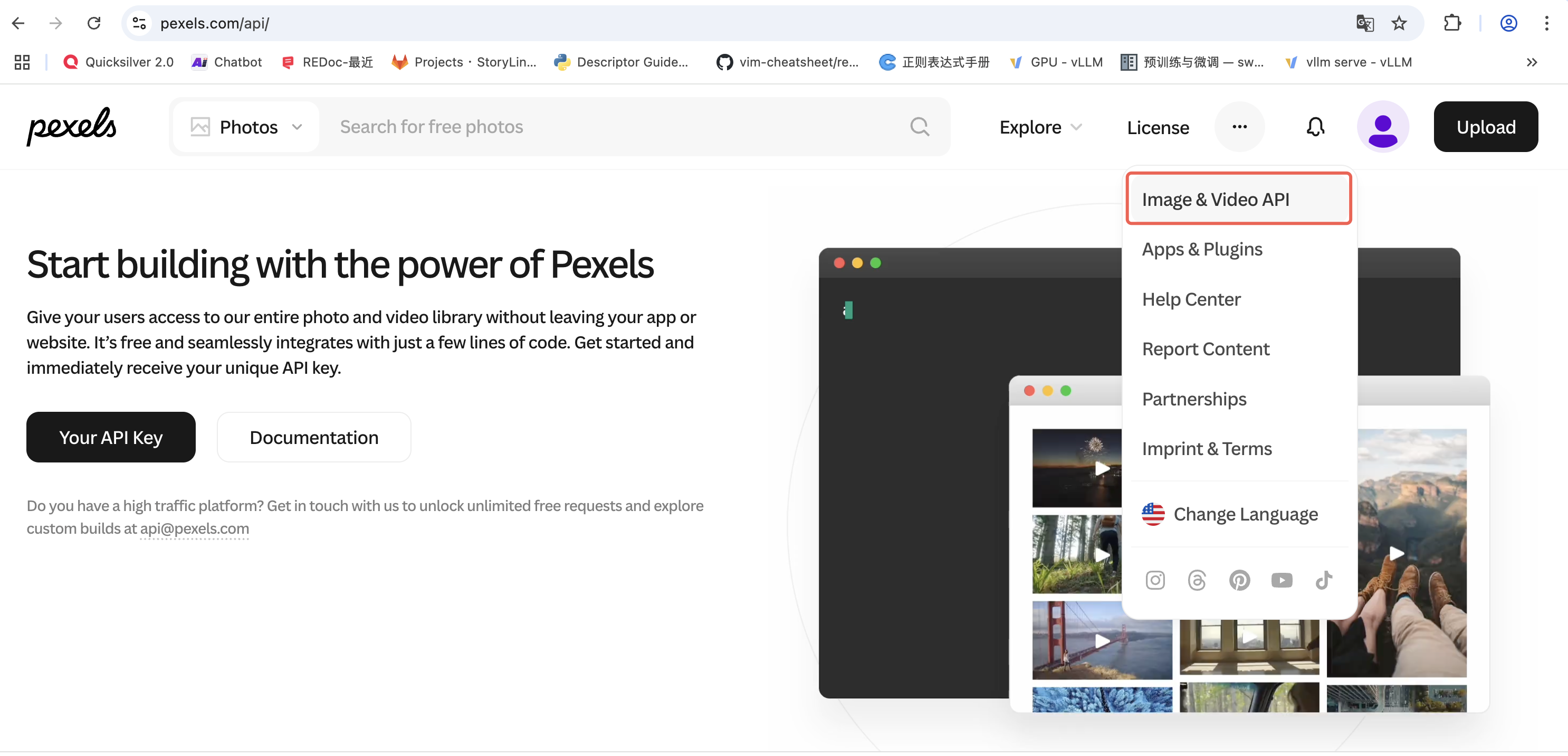
Figure 1: Pexels API Application Page
- Web Usage: Locate the Pexels configuration, select "Use custom key", and enter your API key in the form.
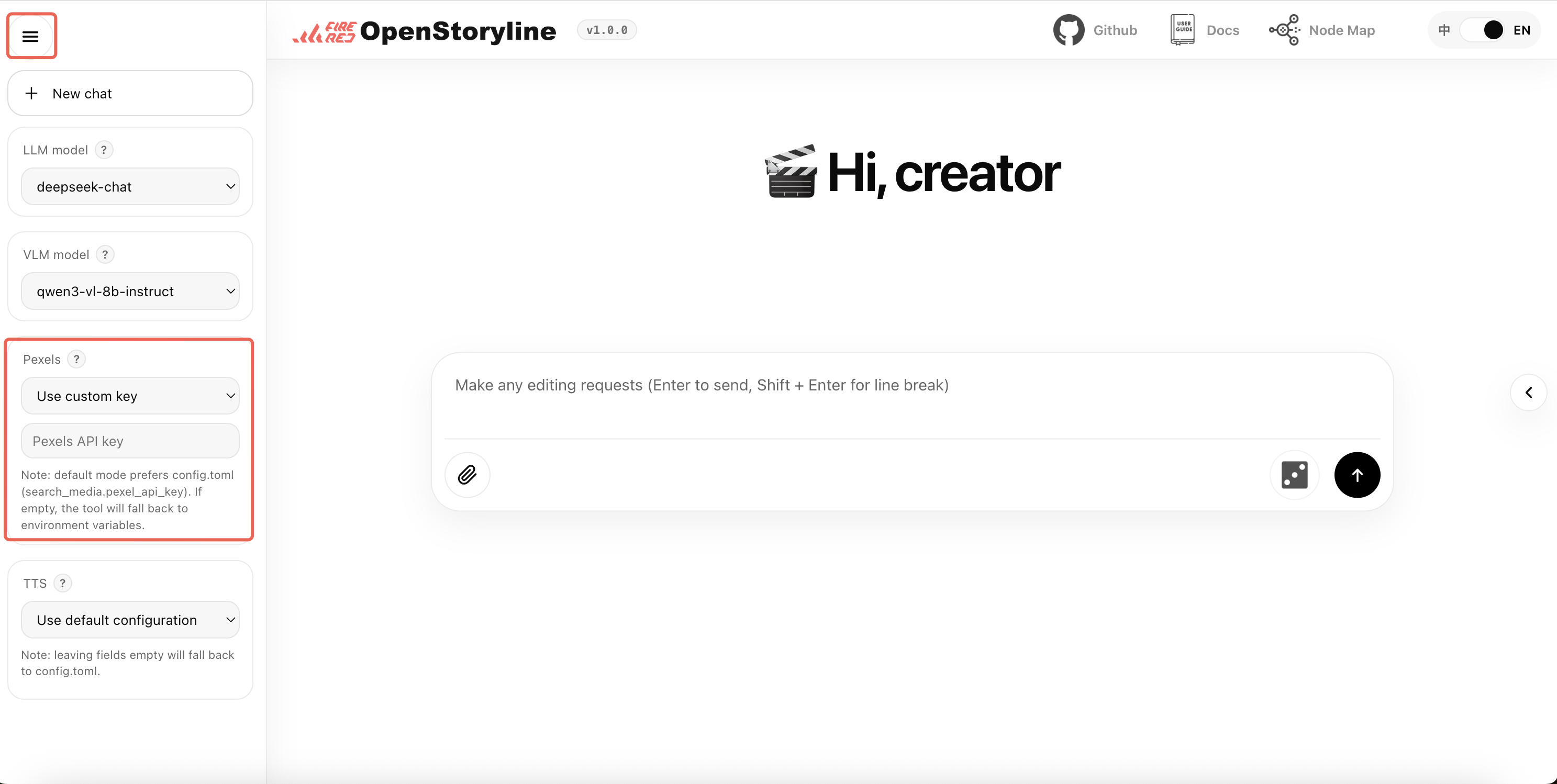
Figure 2: Pexels API Usage
- Local Deployment: Fill in the API key in the
pexels_api_keyfield in theconfig.tomlfile as the default configuration for the project.
4. TTS (Text-to-Speech) Configuration
Option 1: 302.ai (Not recommended)
- Service URL: https://302.ai/product/detail/302ai-mmaudio-text-to-speech
- API Key Base url:https://api.302.ai
Option 2: MiniMax (Recommended)
-
Service URL: https://platform.minimaxi.com/docs/api-reference/speech-t2a-http
-
API Key Base Url: https://api.minimax.chat/v1/t2a_v2
-
Configuration Steps:
- Create API Key
- Visit: https://platform.minimax.io/user-center/basic-information/interface-key
- Obtain and save API Key
Option 3: Bytedance (Recommended)
-
Step 1: Enable Audio/Video Subtitle Generation Service Use the legacy page to find the audio/video subtitle generation service:
-
Step 2: Obtain Authentication Information View the account basic information page:
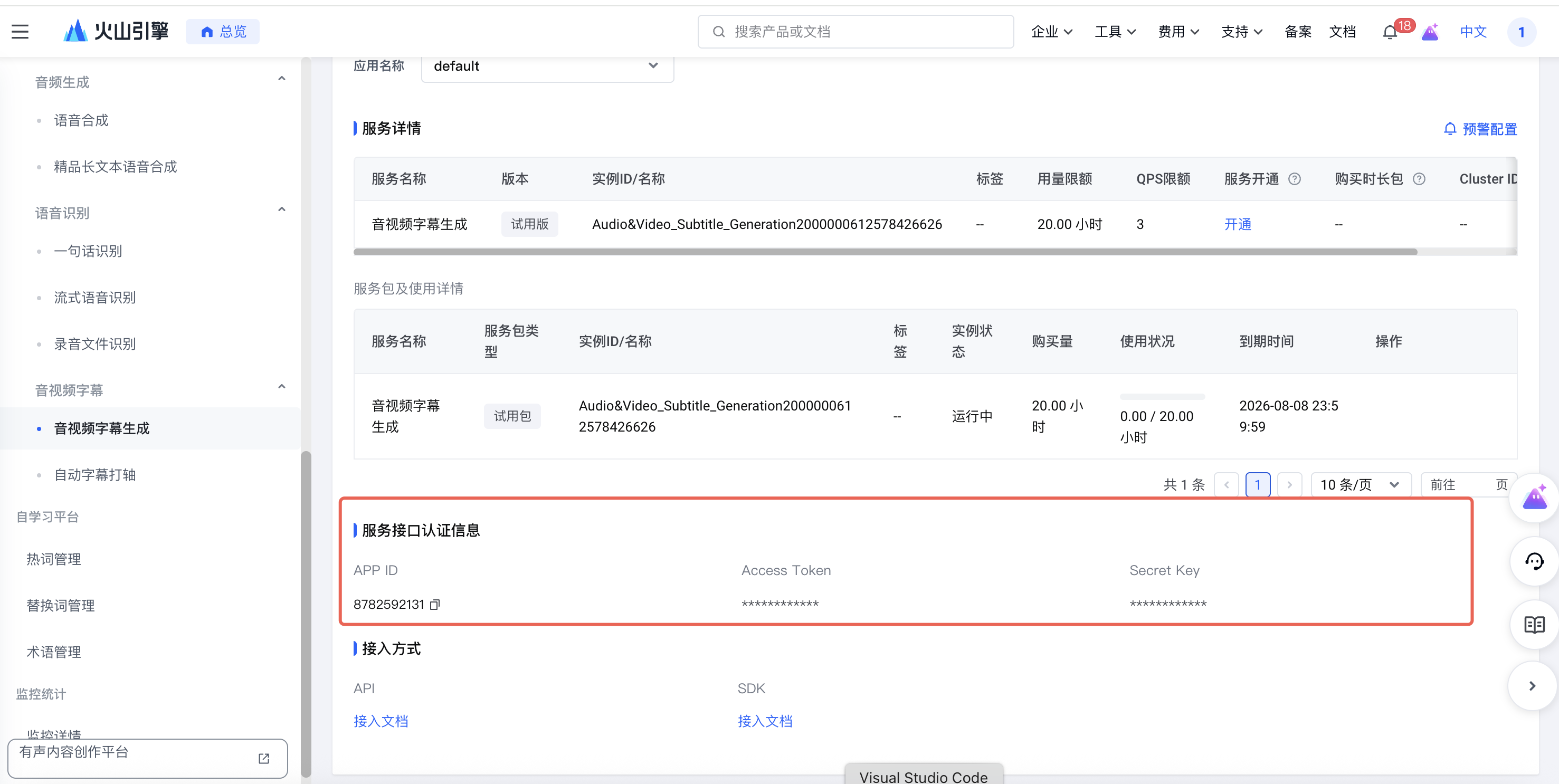
Figure 3: Bytedance TTS API Usage
You need to obtain the following information:
- UID: The ID from the main account information
- APP ID: The APP ID from the service interface authentication information
- Access Token: The Access Token from the service interface authentication information
For local deployment, modify the config.toml file:
[generate_voiceover.providers.bytedance]
uid = ""
appid = ""
access_token = ""
For detailed documentation, please refer to: https://www.volcengine.com/docs/6561/80909
Important Notes
- All API Keys must be kept secure to avoid leakage
- Ensure sufficient account balance before use
- Regularly monitor API usage and costs